Make an Excel PivotTable with multiple or nested rows
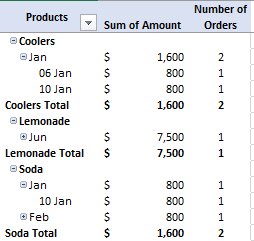
A list with groupings (like Product Type, Country, Region or Staff pay level) can become a nested PivotTable. The sub-totals are created with + – signs to show/hide the groupings. We’re using the same source list as in our Basic PivotTable and Two-dimensional PivotTable examples. Doing that is simple, just drag a second item down […]
Make your first Two-dimensional PivotTable in Excel
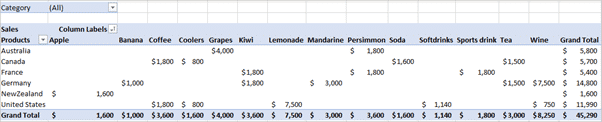
We started with a simple Excel PivotTable, now let’s move on to a multi-column or two dimensional PivotTables. They aren’t a lot more complicated than a basic PivotTable, just add a few more fields. We’ll start with the same sales list that we used for our PivotTables 101 article. This time we’ll make a more […]

Why bother with Excel PivotTables?
PivotTables really are great and we’re not just saying that because it was one of Bill Gate’s favorite features. The original PivotTable feature was clumsy and difficult so you’re forgiven for trying them and giving up in disgust. Mayurakshi wants to show you some of the nifty parts of PivotTables but before that she’ll of […]
Power Excel lists for comparison shopping
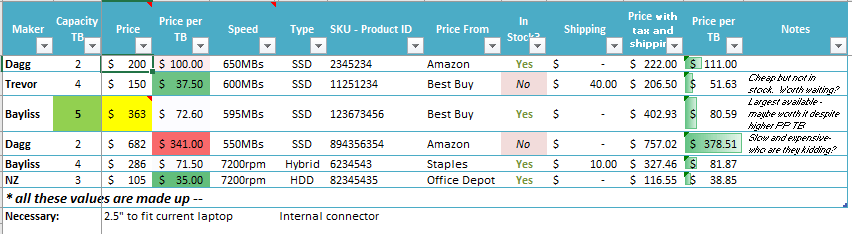
Make smarter decisions with Excel’s tables and lists. Excel is a great place for comparison shopping or deciding which product to buy. Unlike Word or OneNote, Excel has tools to sort, filter and do calculations to help you narrow down many choices to just a few or one. In this article we’ll show you a […]

Excel performance improvements
Excel 2016 for Windows is getting some welcome ‘under the hood’ performance improvements. It’s great to see some work on the fundamentals of Office instead of the apparent focus on flashy new features that look great in demonstrations. Word and Outlook teams: please follow suit. The Problems The aim is to fix some of out […]
Our great Office 2016 book is ready now
We’re delighted to announce that our champion Office 2016 ebook has been updated, yet again, to include new and added features for the main Windows version of Microsoft Office. A bit like Office itself, Office 2016: the real startup guide is updated to keep pace with the improvements in Office 2016 itself. As an ebook, […]

Office 2016 for Windows Store – a closer look
Microsoft has released another version of Office 2016 for Windows to be tested by insiders. This one is bought and installed from the Windows 10 Store. Naturally Office-Watch.com dived in to check it out. At the moment, only some Windows Insiders and users of Windows 10S can get Office in the Windows Store. Later this […]
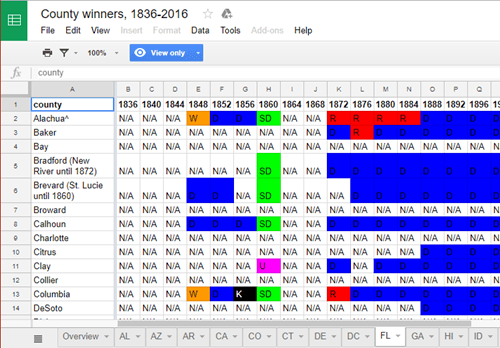
US Presidential Elections, by County and Party from 1836 to 2016
If you love digging into US election details you’ll love these spreadsheets with US Presidential Election results, by County and Party from 1836 to 2016 Unleash your inner Nate Silver, see how your county or state voted over the years, starting at Google Docs There are tabs for each state plus a table of the […]

Logitech’s new keyboard with special Word , Excel and Powerpoint controls
Logitech has a new Craft keyboard with a control wheel that works with Word, Excel and PowerPoint. It’s a high end keyboard that seems to have a lot of interesting points. Source for all images: Logitech It has more than one wireless connection, instead of the usual one. Either Bluetooth or Logitech’s own Unifying connector […]

Office Championship winners 2017 – the full list
The Microsoft Office Championships are done for 2017 with talented young people from all over the planet among the winners. We have the full list of winners. The competition is for students 13-22 years with categories for Word, Excel and PowerPoint in 2013 or 2016 versions. Outlook, Access, Visio and Publisher don’t get a spot. […]

LibreOffice 5.4 has improved MS Office document compatibility
The free office suite, LibreOffice, has released with better Microsoft Office compatibility and a sly dig at their bigger rival. LibreOffice 5.4 has its own Open Document Format (.odt etc.) which is similar to Microsoft’s .docx format. LibreOffice can work with both formats. v5.4 has improvements in the Microsoft Office document compatibility. They’ve also streamlined […]
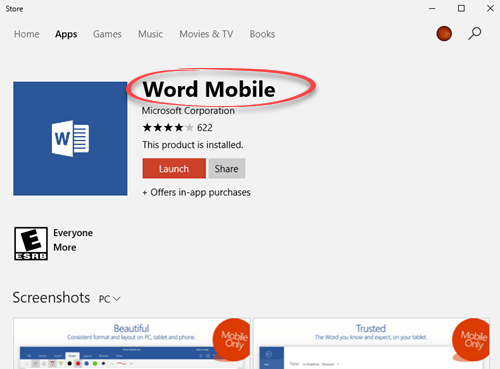
Get the hidden Office Mobile apps for Windows 10
The Word, Excel and PowerPoint apps for Windows 10 computers are hiding from the Microsoft Store. Here’s how to get them. Word, Excel and PowerPoint have ‘mobile’ versions that run on Windows 10 devices for full PC’s, tablets and Windows phones. Here are the links you need, since Microsoft has hidden them. Word Excel PowerPoint […]

Get your free Office ebooks from Microsoft
Microsoft’s annual giveaway of ebooks is on again. Thousands of free downloads, including Office related ebooks. The full list is on the Microsoft blog. We’ve copied the Microsoft Office related titles into a easily searchable list below. Most are in PDF format with a few in MOBI (Kindle), EPUB or XPS format. Modesty (almost) […]

Excel security patches for July 2017
Excel is main focus of this month’s security patches from Microsoft. It’s a familiar story, so Microsoft recycles their stock phrases from similar security lapses in the past. A ‘specially crafted’ document can cause a ‘memory corruption’ in Office. The July 2017 patches fix not one, but two separate design errors in Office. All supported […]

Office ‘Alt Text’ accessibility problems
Microsoft proudly added accessibility features to Office 2016 for Windows, in particular ‘Alt Text’. Pity it’s not been refined and fixed once the hype died down. Earlier this year, Microsoft added an ‘Alt Text’ feature to Office which tries to automatically suggest alternative text for visually impaired readers. Right click on an image and choose […]

New Privacy leakage in Office 2016 for Windows
Images inserted into your Word documents are being automatically uploaded to Microsoft for the accessibility ‘Alt Text’ feature. Even if the image and document are saved on your computer, not cloud storage. It’s a hidden ‘feature’ in Office 2016 for Windows desktop (Office 365 subscribers). Earlier this year, Microsoft added an ‘Alt Text’ feature to […]









