All about Microsoft Office for Apple Mac. Word, Excel, PowerPoint, Outlook on macOS, Microsoft 365 for Mac, Office 2021 for Mac and earlier versions.

Microsoft will continue forcing customers to Office 365: report
A private April 2018 Gartner report confirms what Office-Watch.com has been saying for years. Microsoft is forcing customers away from perpetual licence/one-off software purchases and into software rental like Office 365. As reported by Gregg Keizer at Computerworld, Microsoft will continue ‘encouraging’ customer to annual fees by limiting access to key cloud features for perpetual […]

Why Javascript support in Excel is both a big deal and little concerning
The news that Microsoft is adding Javascript support to Excel is important for developers and regular Excel user, but also a security concern. Javascript is a programming language that’s used on many web pages to provide the fast interaction we’re used to. Javascript is able to get data from external sources and display in Excel […]

Office 2019 for Mac feature list revealed
Microsoft has announced that a perpetual licence version of Office for Mac will be released later this year. Office 2019 for Mac will come out alongside Office 2019 for Windows. Both are for non-subscriber / perpetual licence customers only. Anyone with Office 365 ‘subscription’ doesn’t need to bother with these ‘2019’ releases. Source: Microsoft The […]

Why Office 365 coming to the Mac App Store is a bad move
Later this year, you’ll be able to buy an Office 365 annual ‘subscription direct from the App Store on a Mac. Buying through the App Store will be a bad move for any Mac users. That was one of the lesser noticed announcements at Apple’s WWDC 2018 conference. The whole App Store is being redesigned and […]

Why Windows Variable fonts are important
Office Watch reader, John Hoffmann has some more detail on variable fonts, supported in Windows 10 and Windows 11 Variable fonts are a single package that includes many variations (Light, Heavy etc), instead of having separate font files for each variant. That takes up less disk space (important on tablet devices) and, as John explains, […]
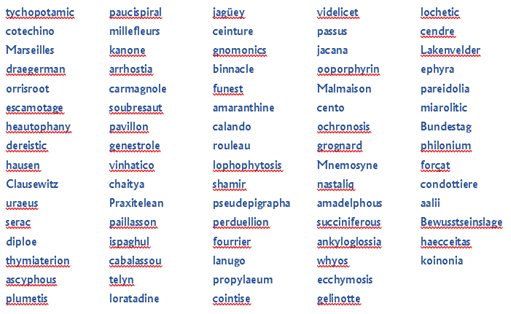
Word vs Spelling Bee Champions – 2018 results
It’s time again to put the mighty brains and resources of Microsoft against the best and brightest of American youth. Yet again, the kids put Microsoft Word to shame. Each year, Office-Watch.com get the word lists from the finals of the US Scripps National Spelling Bee and runs them through the Microsoft Word dictionary. There’s […]

Files Restore for all Office 365 customers with OneDrive protects from ransomware
Microsoft has extended their OneDrive Files Restore feature to all Office 365 customers, not just their business users. It’s a simple way to recover files that have been lost, in particular if you’ve been caught in a ransomware attack. Ransomware will encrypt all the files on your computer and network so you can’t access them. […]

Worrying new data sharing options in Microsoft Office
Office 2016 for Windows or Mac has an inconsistent set of privacy and diagnostic data options depending on exactly which Office variant you have, your ‘Insider’ choice and even the toss of a coin! Microsoft’s intention is clear … they want more information about how you use Word, Excel and Powerpoint to the extent that […]

Another Parallax Slide Transition Trick for PowerPoint
Here’s how to make a parallax slide transition from one slide to another. Strictly speaking, to fake it! The parallax effect is created by making a text box ‘below’ the visible slide then animating that text box into view. See Cool Parallax Slide Transition in PowerPoint Ideally, you’d be able to transition to the next […]

Put World Cup fixtures in your Outlook calendar
Looking for 2022 FIFA World Cup, Qatar calendar info? … click here The upcoming Football World Cup (soccer) is a little more complicated than usual. There are 64 matches playing across three time zones in Russia which makes it hard to figure out what time the live broadcast will be for you. Outlook for Windows […]

Cool Parallax Slide Transition in PowerPoint, part two
Continuing our tutorial on making a parallax slide transition in PowerPoint. In Parallax Effect in PowerPoint, part one we setup the extended slide with the image and text boxes needed. We showed how to add text boxes outside the visible slide area, the vital selection pane, renaming objects so they are easier to identify and […]

Royal Wedding Special
It seems every other business is using the royal wedding of Prince Harry and Meghan Markle as an excuse to sell something, so Office Watch has joined the bandwagon … with tongue firmly planted in cheek. Our book Keep Calm with Microsoft Office has sample Word documents and PowerPoint slides which have the original ‘Keep […]

What the ‘Efail’ email breach is all about and what you need to do
The so-called ‘Efail’ security bug affects Microsoft Outlook for Windows (among others) but only if you’re using a PGP encryption plug in like Gpg4Win and S/MIME. The bug means that messages that should be encrypted can, instead, be viewed in plain text. The current advice is to uninstall Gpg4Win. The EFF has instructions for disabling […]

Outlook for Mac gets Quick Reply and Time Zones
Microsoft Outlook 2016 for Mac (Office 365) is getting some ‘new’ features or, at least, features that other Office users already have. Quick Reply The Reply/Reply all options in the reading/preview pane are promised ‘later this summer’. Time Zone support Outlook for Mac finally gets time zone support but, unfortunately it’s the same lame and […]
European Office 365 outage stops customers cold
Last Friday, Office 365 customers in Europe and especially the UK had to stop working as the Microsoft hosting servers stopped working. When trying to use email online, users only saw an ‘AADSTS90033’ error, and the message: “Service is temporarily unavailable. Please retry later.” As usual, Microsoft’s communications were mixed. The company doesn’t want to […]

Get a cheap(er) Ipad or Macbook Air
Apple’s announcement of special ‘education’ prices for iPad and Macbook Air opens an opportunity for almost anyone to get the cheaper prices. Not that we’d suggest lying to Apple. No, never. Telling fibs to a gigantic company is wrong. It’s not as if big companies like Apple have ever lied to their customers <sigh>. The […]









