All about Microsoft Office for Apple Mac. Word, Excel, PowerPoint, Outlook on macOS, Microsoft 365 for Mac, Office 2021 for Mac and earlier versions.

What is the cloud and what does it have to do with Microsoft Office
You’ve all heard about “The Cloud” as if everyone knows what it is. It’s clear from recent reader messages that not everyone knows about The Cloud. Or they think they know. Or they don’t realize how much the cloud can and will do. Office-Watch.com explains the cloud and how it applies to Microsoft Office. What […]

Sync your Office Recent Documents between devices
Timeline was a new feature in Windows 10. It was a way to see which documents and files you’ve opened across all your devices. What you won’t hear is that Office already has a similar feature. The Office team has already synchronized the Open / Recent Documents lists across Word, Excel and PowerPoint for PC, […]

Make your own White House notepaper with Microsoft Word
Last week we got a peek at the current White House notepaper and could not resist trying to make our own in Microsoft Word. White House notepaper in the President’s hands – 21 Feb 2018 It’s a simple, classic look that anyone can use and adapt to their needs. We’re not trying to make any […]

Replace text with filler – a manual approach
Here’s a manual method of replacing text with filler or anonymous words in Microsoft Word Use this when you need help with a Word document formatting problem but can’t share the troublesome .docx because it contains confidential information. Our head honcho, Peter Deegan, had this problem himself. A friend asked for help with a Word […]
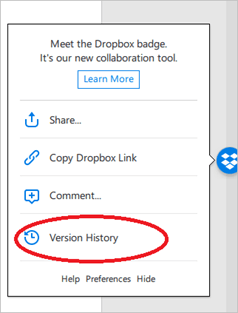
Dropbox Badge, a collaborative tool in Microsoft Office Windows and Mac
Dropbox Badge is their document collaboration option that provides Dropbox specific features inside Microsoft Office programs, It works with a refreshingly wide range of Office version. Microsoft Word, Excel and PowerPoint for Windows and Macintosh. Office 2007 to 2016 for Windows. Office 2011 and 2016 for Mac. It only works with ‘modern’ Office document formats […]

Oxford Comma dispute settled
There’s joy and celebrations in the streets of Maine as their Oxford Comma dispute is settled. Even Microsoft Word approves the new law! The missing comma only cost $5 million plus legal fees. A quick follow up to our 2017 story about a legal dispute around the lack of an Oxford Comma. Oxford Comma in […]
Is Microsoft Office worse than Candy Crush?
“Why Microsoft Office is a bigger productivity drain than Candy Crush Saga” says one of our favorite podcasters, Tim Hartford. Is he right? Hartford isn’t any random blogger. He’s a respected writer with a regular column in The Economist, a series of wonderfully readable books and a great radio program/podcast, More or Less on BBC […]

Improved Office translation for Hindi, Bengali/Bangla and Tamil
Microsoft has announced better Hindi, Bengali (Bangla) and Tamil online translation using AI enhancements in Microsoft Office, Bing and other online services. The company has dropped their latest buzzwords like “artificial intelligence” and “deep neural networks” but what does it really mean for Microsoft’s customers? Our headline translated into Hindi, Bangla and Tamil, according to […]

A different Office for Mac option now in beta
SoftMaker Office is moving into the Macintosh world with the public beta/preview of Office 2018 for Mac. Softmaker is a German based company that already makes Office suite software for Windows, Linux and Android. Source: Softmaker The Office for Mac suite contains a word processor, TextMaker 2018. The spreadsheet PlanMaker 2018 and presentation application Presentations […]
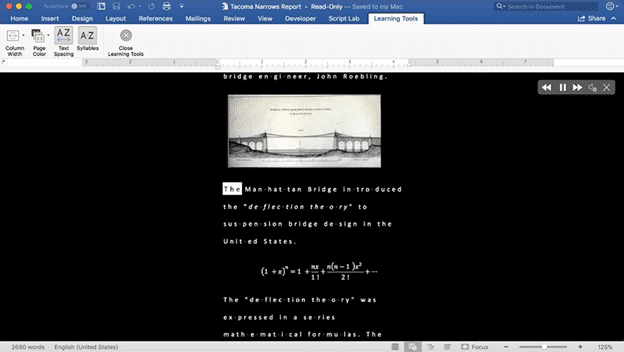
Office ‘Learning’ features are good for everyone
Microsoft has previewed new Office features targeted at students and teaches, however many are good for the wider public too. For example, Dictation is coming to Word for Windows, Word Online, PowerPoint for Windows, Outlook Desktop, OneNote Windows 10, and OneNote Online with support for at least nine languages. Source: Microsoft It’s being hyped as […]

Major Office for Mac update out now!
Back in October we told you interesting things were coming to Office 2016 for Mac, well now they’re here. Microsoft has pushed out a major update to Office 2016 for Mac with not just new features but significant changes ‘under the hood’. Version 16.9.0, build 18011602 has ‘new’ features which will be familiar to Office […]
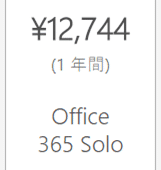
Japan is a special place for buying Microsoft Office
Japan is a special country in many ways, even when it comes to buying Microsoft Office. The Japanese can buy Office in ways that Microsoft have dropped for the rest of the world. Office 365 Home and Personal plans are sold, by Microsoft’s count, in 246 countries and territories but not Japan. Microsoft Japan has […]

Office 365 Personal – the cheapest and most expensive across the world
Microsoft charges quite different prices for Office 365 Home and Office 365 Personal, depending on the country. We decided to see how cheap or expensive Office 365 Personal plan can be, depending on where you live. Maya surfed through many different Microsoft sites to compile this list of countries and regions. Cheapest Office 365 Personal […]
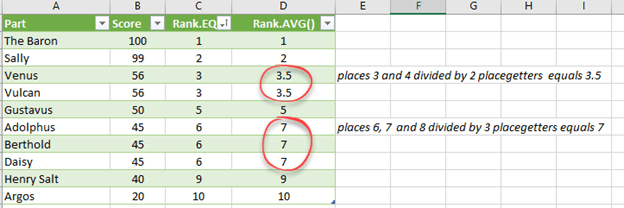
Rank.AVG() and how it’s different from Rank() and Rank.EQ() in Excel
We’ve talked, at length about Excel’s Rank()/Rank.EQ functions and coping with joint or equal rankings. What about Rank.AVG()? Rank.AVG() works differently for equal rankings because it returns an average of the combined rankings. For example, joint 3rd place getters will return the value ‘3.5’ by Rank.AVG() which is the average of ranks 3 and 4 […]
January 2018 Office updates roundup
So many patches for Microsoft Office and Windows in this month’s package of bug fixes. Few parts of Windows or Office aren’t patched this month, either directly or indirectly. According to Microsoft there’s ‘only’ 56 patched security holes in their products, this month alone. In reality there’s a lot more patching going on, just how […]
What are Excel Tables and why you should use them
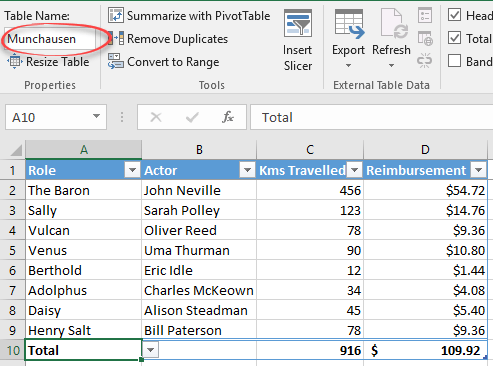
Back in Excel 2007, Tables were added. That simple name hides a quite different and powerful Excel option that, in our view, Microsoft hasn’t explained very well. Excel is often used for lists and Excel Tables make managing and extending those lists a lot easier. In fact, ‘Excel Lists’ was the name of the Tables […]









