All about Microsoft Office for Apple Mac. Word, Excel, PowerPoint, Outlook on macOS, Microsoft 365 for Mac, Office 2021 for Mac and earlier versions.

Spectre/Meltdown and what you need to do – Windows, Mac and more
There’s so much information and mis-information about the Spectre and Meltdown chip problems, we’ve decided to have a look at what Windows and Mac users need to do about Spectre/Meltdown, what not to worry about, plus some trivia and nerdy details. A quick What to Do that quickly tells you how to update your computer, […]

Really stretch your Office 365 Home or Personal plan
It doesn’t take a lot of effort to stretch up to three extra months out of your Office 365 Home or Personal plan. In other words, 15 months for the price of 12. This is based on the experience of reliable Office-Watch.com users who can stretch the proverbial penny better than most. It’s how the […]

Did Covfefe make it into Microsoft Word?
All the ‘End of 2017 news reviews’ reminded us of the great ‘Covfefe’ debate. President Trump made a tweet typing error, adding the previously unknown ‘covfefe’ to the language. It’s believed to be a mistype of ‘coverage’ though neither the President nor his staff would admit that. Word 2016 for Windows As incurable Office nerds, […]

How to run Office 2016 for Windows on a Mac
Crossover, the Windows emulation for Mac computers, has released v17 which adds support for Office 2016 for Windows. With Crossover v17, the default compatibility has changed from Windows XP to Windows 7. That’s a big improvement and opens the way for a lot more recent programs to run like Quicken 2017. There are also some […]
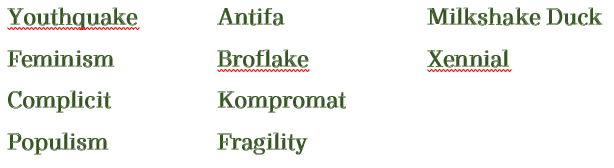
See what happens when Microsoft Word meets the words of 2017
It’s time again to see how Microsoft Word’s spell checker goes against the newest words in the English-speaking world. We’ve taken the “Word of the Year” from various dictionaries plus some other 2017 contenders and typed them in Word to see if the red squiggle appears. We used Word 2016 for Windows and Mac with […]

Paul Manafort was trapped by Microsoft Word and how he could have prevented it
The FBI is using evidence from Microsoft Word to oppose a change of release conditions for former Trump campaign chairman, Paul Manafort. We’ll show you the mistakes that were made and how to avoid them. We’re not interested in the prosecution itself nor the politics, here’s a summary. Our focus is on the little known […]

Click here to see Aussie accounting magic in Excel
The Australian tax authorities have released some interesting data about the biggest corporate (non) taxpayers in an Excel format. It’s raw data ready for extra calculations, charts and PivotTables. Another example of how publicly available data can be used by anyone to dig into previously obscure areas using Excel tools. The “Corporate Tax Transparency” report […]

PivotTable Manual Sorting in Excel
You’re not locked into the PivotTable sorting options provided by Microsoft. Excel lets you arrange a PivotTable into any order you like. Right-click on a PivotTable column and choose Sort | More Sort Options | Manual. How to Drag and Sort It’s not obvious how to select an item (row or column) to move it. […]

PivotTable Custom Sort Orders in Excel
Sometimes you want to sort a list or PivotTable in a special way that doesn’t fit the usual ‘A to Z’ or number order. The most common need for this are days of the week or months in a year. Neither of those orders make sense to a literal computer. Excel has a Custom sort […]
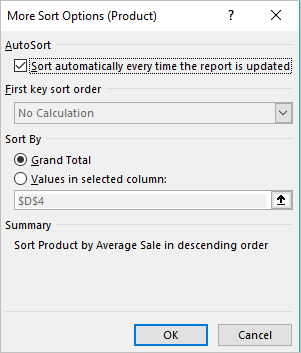
Automatic sorting of PivotTables in Excel
You still want to explore more Excel PivotTable sorting, there are some additional options like Click More options button on the Sort dialog box. The More Sort Options dialog box appears for your Sorting list of the Pivot Table. Let’s see what these additional features can do for you: As the name suggests ‘AutoSort’ automatically […]
Sorting PivotTable Fields
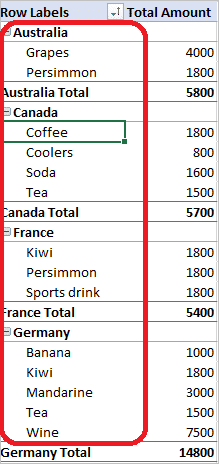
Excel allows you to sort a PivotTable in alphabetical order or from largest to smallest values. They are similar to the standard Excel sorting options but worth looking at separately because there are automatic sorts, custom sortings and a manual sorting option. Quick PivotTable Sort Sort the PivotTable by right-click on any cell in a […]

A peek at the next Outlook for Windows or Mac
There are interface changes coming to Outlook for Windows and Mac which Microsoft quietly previewed recently. As usual, interface changes are accompanied by the same vague promises and jargon. Long standing Office users will find a lot of what follows to be tiresomely familiar. We’re told this change will ‘increase new and existing user satisfaction’ […]

Apple’s new image format HEIC and Microsoft Office
Apple has introduced a new image and video format for iPhone and iPad, here’s how to handle it in Microsoft Office documents. .HEIC image files are made by default in some Apple devices with iOS 11. Microsoft Office and Windows don’t support the new format yet but there’s workarounds available in the meantime. Automatic HEIC […]
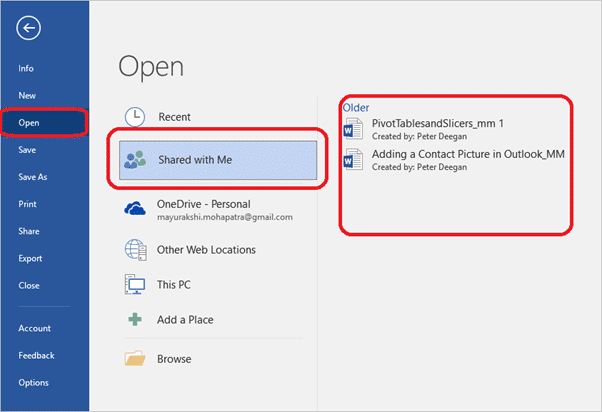
Shared with Me, new feature in Office 2016 Windows / Mac and more
A recent Office addition is ‘Shared with Me’, a list of the documents you’ve been invited to collaborate on with others. It’s available in Office 2016 Windows/Mac and the iPad, iPhone and Android Mobile apps. According to Microsoft ‘Shared with Me’ ” lets you see the files others have shared with you” Our checks show […]

Sharing documents in Office 2016 for Mac
Office 2016 for Mac (Office 365) has the same document sharing options as Office for Windows but they look a little different. In fact, Office for Mac has an additional sharing option not available in Windows. Just like Office 2016 for Windows, Office 2016 for Mac has a Share button on the top right of […]

Send a document sharing link from Microsoft Office
The Share pane in modern Office is fine within an organization or with people who are familiar with document collaboration. But what if you want to share a document link with more detail in the email or using a non-email method like Instant Messaging? Well, you want to get just a link to your document […]