All about Microsoft Office Word, Excel, PowerPoint and Outlook, Microsoft 365, Office 2021 and earlier versions.

How to open Office files with Microsoft Teams
Teams makes it simple to share files and collaborate. If you are working with Word, Excel, PowerPoint, or Visio files, your coworkers may read, edit, and collaborate on them directly from Teams. The different ways to open a document in Teams. Files Access Within Microsoft Teams, each Channel has a Files folder where you can […]

Microsoft 365 get 20% saving with an * asterix
Office Depot in the USA has a good deal available now for both Microsoft 365 Family and Personal, but with an important limitation buried in the fine print. Both offers are for 15 months of Microsoft 365 for the price of 12 but you must buy a ‘qualifying product’ to get that price. “*Qualifying products […]
Understanding all the parts of OneNote
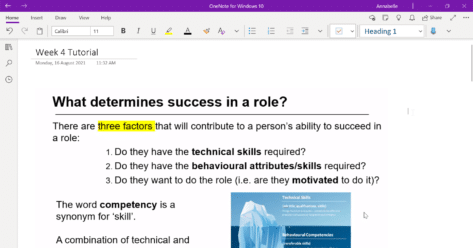
While OneNote is very flexible, especially with pages, there’s an overall structure from Notebooks to Sections, Pages, sub-pages and containers. NOTEBOOKS OneNote is based on a series of notebooks. You can make notebooks for any topic you like. One for personal or diverse notes. Others for work, a hobby, subjects you’re studying, special projects like […]

A start-up guide to OneNote
Since 2003, OneNote has been available to many Office users as part of their Office suites or subscriptions. It features free-form note-taking and multiuser collaboration, plus it’s fairly straightforward and user-friendly, so why not give it a try? What is OneNote? OneNote is a place to keep notes of all kinds and serves as a […]

All the goodies inside OneNote Pages
Pages can contain all manner of things, it’s as simple as ‘click on the page and type’. A container is automatically created for you. Of course, you can copy things from elsewhere (web pages, documents etc) and paste into OneNote. The real power of OneNote is to include lots of different content types. Here’s a […]

Share and collaborate on Office files with Teams
Teams makes it simple to share files and collaborate. If you are working with Word, Excel, PowerPoint, or Visio files, your coworkers may read, edit, and collaborate on them directly from Teams. Co-edit files Each team member has access to files that have been uploaded and shared on Teams. You and your team members can […]

Get Microsoft 365 free in 4.5 different ways
If you’re not willing or able to spend the money, there are several ways you can access Microsoft Office for free. These tips are just good for saving money. Some are useful standby’s to keep in mind if you can’t use the full Microsoft 365 desktop programs. Maybe your computer is playing up or you’re […]
Make Outlook’s spam filter allow Office Watch newsletters
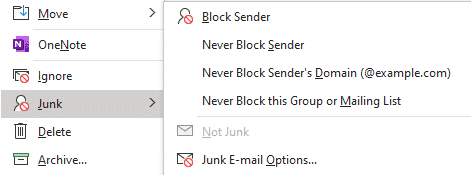
How to stop your Office Watch newsletters going to the Junk E-mail folder. To make sure your Office Watch newsletters don’t end up in your Junk Email folder you need to set us up as a ‘Safe Sender’. Here’s how to do that in Outlook. Keep in mind that Outlook software is NOT the primary […]

Can your computer run Windows 11 properly or at all?
The hardware requirements for Windows 11 are surprisingly high especially the increased security requirements. Some brand-new computers, even Microsoft’s own high-priced Surface computers bought today might not be compatible with Windows 11. See all the Office-Watch.com coverage of Windows 11 Unlike previous major Windows releases, you can’t assume that a recently bought computer will be […]

New Outlook and Microsoft 365 Widgets in Windows 11
The new Widgets pane in Windows 11 has three widgets for Outlook and Microsoft 365 users. Calendar, To Do and one only for Enterprise users. Widgets are a pop-up window of configurable small panes. The selection of widgets is quite limited, at least for now; Weather, Traffic, Stocks, Sports, Entertainment etc. A web search option, […]
Clever ways to use Checkboxes in Excel
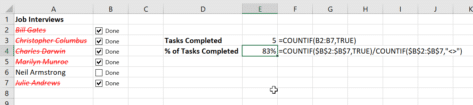
Now you know how to insert checkboxes in Excel, here are some ways to use check box cells in Excel. Counting the checked/unchecked boxes, calculate percentage checked and even showing a separate list of items based on their checked status. A cell with a check box has two values: TRUE – checked FALSE – UNchecked You can use the values […]

Office now supports ODF version 1.3 documents
Microsoft has updated the Office programs to support the OpenDocument format (ODF) to version 1.3. Most people use Office Open XML format (OOXML) which is the official name for what is usually called the ‘new’ Microsoft Office formats, .docx .xlsx .pptx etc. OpenDocument files .odt .ods .odp etc are also supported in Office 365 and […]

OneDrive sync ending soon for older MacOS
OneDrive on Mac computers won’t be supported on older macOS from mid-September 2021. The latest macOS and last two releases will continue work and be supported. Microsoft’s general policy for supporting Office on Mac computers is to support the most recent version of macOS and the two versions before that. So, from time to time, […]

Document collaboration with Office in a browser
Here’s how to collaborate on a ‘live’ file (Word document, Excel workbook, PowerPoint deck or OneNote notebook) saved on OneDrive or other cloud service. It’s part of our series on accept a sharing request and collaborating on a ‘live’ document saved online. Microsoft spends a lot of energy getting people to share documents, but little […]

How to accept an Office document share or collaboration
Microsoft spends a lot of time explaining how to share a file (Word document, Excel workbook, PowerPoint deck or OneNote notebook) but very little on how to accept a sharing request and collaborate on a ‘live’ document saved online. Live or real-time collaboration lets two or more people work on a document (Word, Excel, PowerPoint […]

Two ways to use Microsoft Office on a Chromebook
Chromebooks are low cost alternatives to regular laptops with great battery life. They can run Microsoft Office in different ways – two and a half by our count. There were two more, but Microsoft dropped support for them in September 2021. Quick Chromebook buying tips Web apps Chromebooks come with the Chrome browser, naturally. Word […]