All about Microsoft Office Word, Excel, PowerPoint and Outlook, Microsoft 365, Office 2021 and earlier versions.
Open multiple docs in Word or PowerPoint for iPad
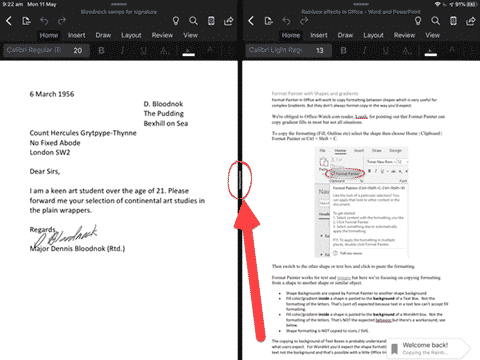
It’s now possible to open two Word docs or PowerPoint decks side-by-side on an iPad. iOS has multiple window or side-by-side support already, but Word and PowerPoint didn’t allow more than one document open at a time. That meant you could have a Word document open alongside another app but not another Word doc. Now […]
X Æ A-12 in Microsoft Word and Office
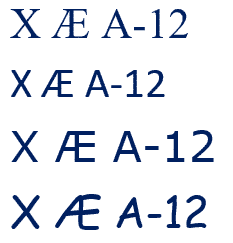
Elon Musk and partner have named their child X Æ A-12 (no kidding) how do you type Æ in Microsoft Word and Office generally. The child’s name doesn’t trigger any spelling or grammar errors in Word. No squiggly lines. What is Æ ? Æ or æ is a a-e ligature that was used in English […]

Looking back on Love – the Love Bug in Windows
Just like the Melissa virus, looking back to the Love Bug virus of May 2000 shows how much has changed and how much has remained the same. Much the same story as the Melissa virus that came out a few months before. Love Bug or I Love You was a VBScript virus sent mostly by […]
Microsoft Word – the song and video
It was only a matter of time before someone became so bored in the lockdown that they made a song about Microsoft Word. Ghetts, a British ‘rapper‘ (translation: singer/songwriter in the modern styling) has ‘dropped‘ (released) a song and video entitled ‘Microsoft Word’. As a boring white man in his sixties, the song is beyond […]
Section Breaks in Microsoft Word
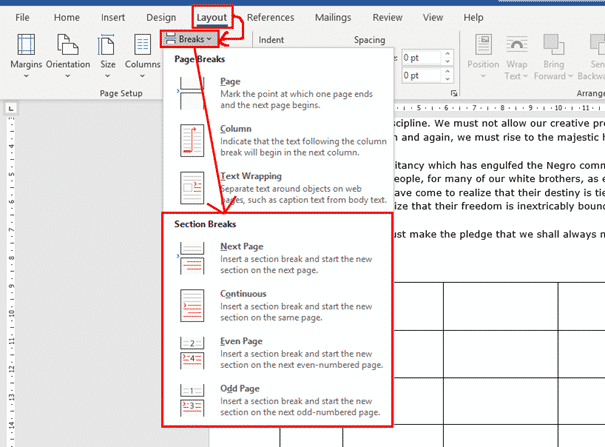
Section breaks are probably one of the most useful features in Word when you are formatting complicated documents. They allow you to change formatting aspects that would otherwise be the same throughout a document, such as page orientation, margins, columns, headers and footers. Column changes (2, 3 or more columns) need Section Breaks before and […]
Two ways to make Word remember your preferred font
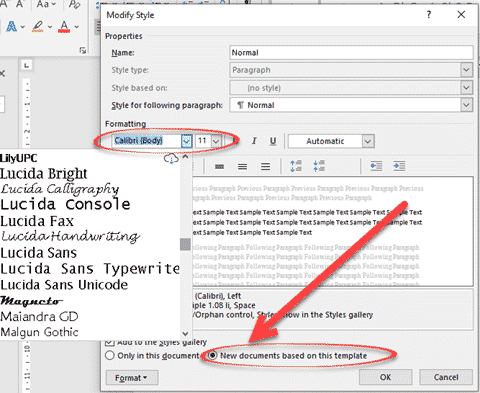
There are two ways to make Microsoft Word open with your preferred font ready to go. Just like with Two Ways to Change Word’s Opening Paper Size there are two ways to change the default or preferred font. Change the base Normal style or open the main Word template and make the change directly. Either […]

Search My Files is the better way to find files, PDF and Office documents
Nirsoft’s SearchMyFiles has received a major boost. It can now search inside Office documents and PDF’s. SearchMyFiles is the Windows search tool that should be included with Windows. It’s interface might be old-fashioned but all the options are visible, including some not available in Windows. Some of the highlights in Search My Files ‘Use Windows […]

Windows and Office are handling COVID-19 very differently
There’s big gap between the response of the Windows and Office parts of Microsoft to the coronavirus troubles. One team has understood the changed needs of customers and adapted; the other part of the same company is carrying on as normal and even taking advantage. Most people think that Windows and Office come from the […]

Format Painter with Shapes and gradients
Format Painter in Office will work to copy formatting between shapes which is very useful for complex Gradients. But they don’t always format copy in the way you’d expect. We’re obliged to Office-Watch.com reader, Lorelei, for pointing out that Format Painter can copy gradient fills in most but not all situations. To copy the formatting […]

Six shortcuts for horizontal lines in Word and stopping them!
Word has six shortcuts to make horizontal lines, here’s how they work, change them, color the lines and how to stop lines when they get out of control. All six line shortcuts There are six horizontal line shortcuts. For each one type the same character three times at the start of a new line then […]
Why PowerPoint Video Backgrounds Should Be Banned
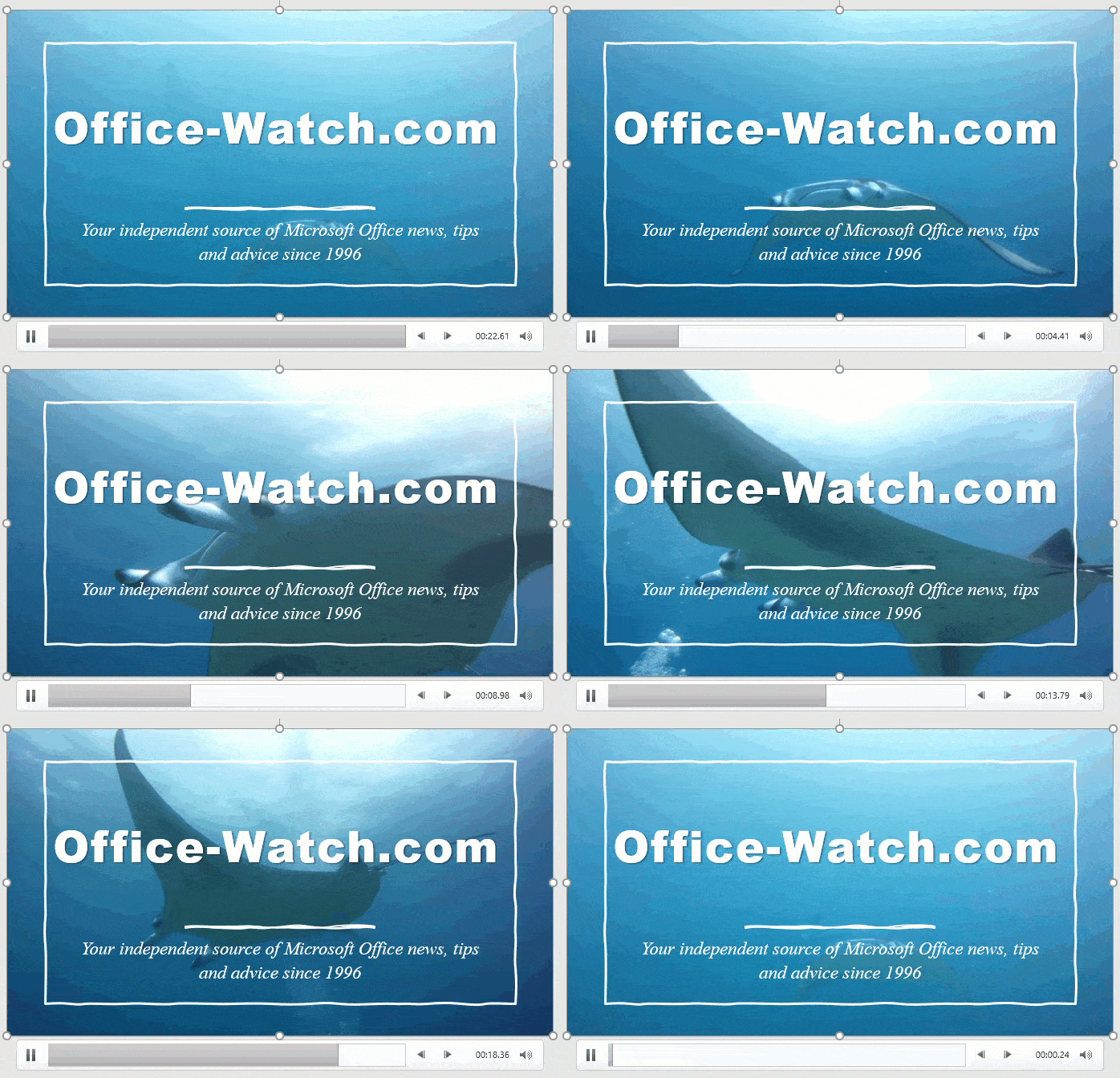
Microsoft is pushing video backgrounds to PowerPoint slides, but they really are a bad idea and should be banned from slide decks. Designer’s Design Ideas will start with a background video. Microsoft loves showing off these moving backgrounds because they impress people at demonstrations. Moving backgrounds are not a good idea because they distract the audience from the presenter and […]

It’s Microsoft 365 day – what changes today?
Today (21 April 2020) is that day Office 365 becomes Microsoft 365. What does that mean to you and using Word 365, Excel 365, PowerPoint 365, Outlook 365 etc. A few weeks ago, Microsoft announced that ‘Office 365’ was becoming ‘Microsoft 365’ from today. There’s NO change in the software people use and buy. Office […]

Converting Google Slides to PowerPoint
Google Slides can be handy for sharing and working on presentations with other people, but sometimes you just really need that file in PowerPoint. No problem – it’s actually really easy to convert them. All you have to do is download the file and save it as a PowerPoint file. If the Google Slides File is Open If you have your Google Slides file open, just go to […]

Microsoft revises Clippy history
Microsoft tries to rewrite history on Clippy. It wasn’t their fault, it was us customers! According to this fiction, there was nothing wrong with Clippy but it was ‘ahead of it’s time’ and customers didn’t understand. That’s complete nonsense. Anyone who used Office 97 knows that. Business Insider reports on comments by Microsoft on Clippy […]

April 2020 Office security bug fixes
Microsoft has released about 113 security bug fixes for Windows and Office in their April 2020 dump of patches on ‘Patch Tuesday’. The main change is a block on external references in VBA code, a change that hasn’t been fully documented. These security fixes will be pushed out via Windows Update in the usual way. […]

No change to Office end-of-support dates
Microsoft is being stubborn about the ‘end of life’ deadlines for Office 2010 and Office 2016 for Mac, insisting that both will stop support in six months as planned. That’s in contrast to Windows which has delayed the end of support dates for some versions of Windows 10 to help everyone coping with the unique […]