All about Microsoft Office Word, Excel, PowerPoint and Outlook, Microsoft 365, Office 2021 and earlier versions.
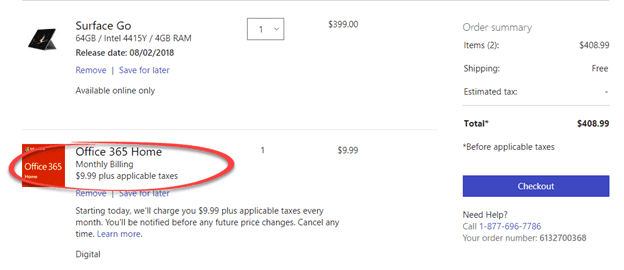
How Microsoft tricks you buying Office 365 with Surface devices
We’ve said for a long time that buying direct from Microsoft is the most expensive way to buy their hardware or software. Redmond has found another way to trick more money from customers buying a Surface product. When you choose a Surface Go from the Microsoft Store, Microsoft adds TWO products to your online shopping […]

New Surface Go and Microsoft Office
Let’s have a hype-free look at Microsoft’s new Surface Go tablet, Microsoft’s pricing tricks, how to buy and which model. Also your Microsoft Office options with the Surface Go. What is it? Surface Go is clearly targeting the Apple iPad with the advantage of being able to run ‘real’ Microsoft Office. Photo from Microsoft. Retail […]
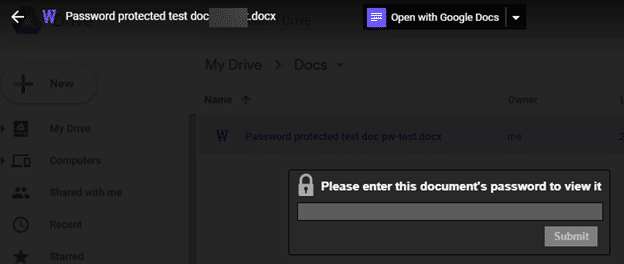
Google Drive supports Microsoft Office encrypted files – sort of
Google has updated their Drive app to support preview of Microsoft Office documents with password encryption. Here’s how it works online and in the Google Drive app. In early 2017 the browser-based part of Google Drive let you preview password protected Word, Excel and PowerPoint documents. Only preview of Office documents is available, not open […]

July Security updates for Office and PDF
Patch Tuesday included the usual bug fixes for more security holes in Microsoft Office plus an important Adobe PDF reader update. The Microsoft Office updates should be applied automatically but the Adobe Reader might need a manual update, instructions below. Windows bug fixes are available for Windows 10, 8.1 and 7. Overall, it’s Microsoft continuing […]
Office 2016 for Windows updates for July 2018
Here’s a list of the non-security aka bug fix updates to Office 2016 for Windows, released for July 2018. These updates should come to you automatically via Microsoft Update or you can patch individually from the links provided. Here’s Microsoft’s list with their explanation of each update. Office 2016 Excel 2016 KB4022229 “Assume that you […]
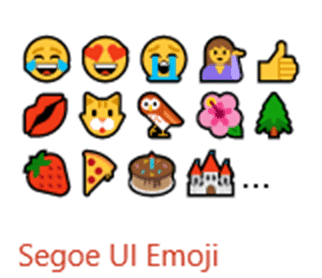
Microsoft update mystery: Segoe UI emoji font
Part of the July 2018 updates to Office is a change to the Segoe UI emoji font but Microsoft is keeping the details a mystery. Segoe UI emoji is a Microsoft Office font which includes many standard Emoji characters though the emoji don’t look the same across different devices or software. Any changes to Segoe […]
Office 2013 and Office 2010 updates for July 2018
Just a few non-security or bug fix updates for Office 2013 for Windows and Office 2010 for Windows. These updates should come to you automatically via Microsoft Update or you can patch individually from the links provided. Here’s Microsoft’s list with their explanation of each update. Office 2013 Excel 2013 KB4022244 “Assume that you copy […]

Tracking attendance with QR codes and Excel
A clever use of Excel is at the end of a paperless class attendance system used by a Filipino teacher. Michael Angelo posted on Facebook how he’s switched to a paperless system for his classes. The same system can be used for classes, one-off events or even to track physical items on loan. All the […]

Degree symbol in Word, Excel and PowerPoint
How to type the degree symbol (Fahrenheit, Celsius, Kelvin, latitude, longitude) into Microsoft Word, Excel or PowerPoint. Degree Symbol codes Decimal: 176 Hex: 00B0 Web: ° ° ° Word The degree symbol ° has an inbuilt shortcut in Word. Ctrl + @ or Ctrl + Shift + 2 followed by a space will enter a […]

Single line ribbon in Microsoft Office for students only
A new Office ‘Garage’ option is ‘Student Tools’ an extra ribbon featuring the tools Microsoft thinks are most appropriate for students. It’s only available to students in USA, Australia or New Zealand for Office 365 for Windows or Office 2016 ProPlus. Word Student Tool Garage is where Microsoft tries out plug-ins and features. Dictation started […]

Mac’s Spacebar preview now available in Windows 10
A source of envy for Windows users has been the quick preview feature on Mac computers. That envy has gone now that there’s two apps that add the same feature to Windows 10. Seer and QuickLook both do the same thing and while they are useful, both lack an important feature; Office document preview. Seer […]
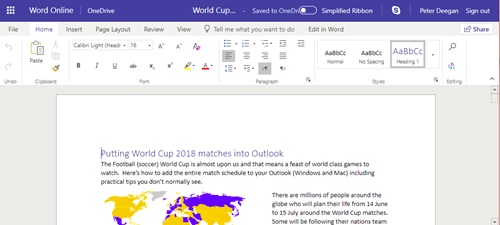
Office Online: The main ribbon and other tricks
Office Online is a slimmed down version of Word for Windows or Mac. What’s possible in a browser interface is impressive from a technical point of view but it will never compete with Word for Windows or even Word for Mac. Anyone familiar with Office for Mac or Windows should be able to use the […]
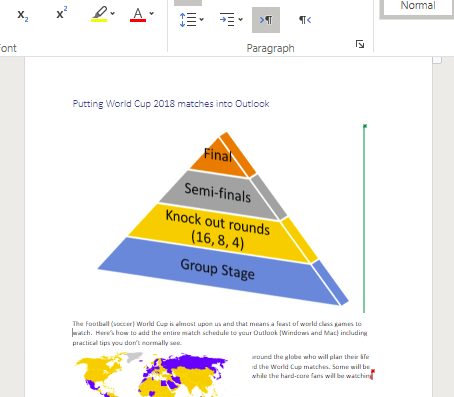
Your free and standby Microsoft Office alternative: Office Online
Word, Excel, PowerPoint and OneNote are always available for you, even if the main Office for Window/Mac are broken or missing. Office Online is the alternative that you have as a standby when regular Office fails or isn’t available. As long as you have a browser and decent Internet connection, you can use Word Online, […]
Microsoft will continue forcing customers to Office 365: report
A private April 2018 Gartner report confirms what Office-Watch.com has been saying for years. Microsoft is forcing customers away from perpetual licence/one-off software purchases and into software rental like Office 365. As reported by Gregg Keizer at Computerworld, Microsoft will continue ‘encouraging’ customer to annual fees by limiting access to key cloud features for perpetual […]

North Korea attacks via Microsoft Office … again
While North Korea’s leader, Kim Jong Un, was busy in Singapore, his government hackers were busy with new malware called TypeFrame and delivered by, you guessed it, a Microsoft Word document. Typeframe has eleven different elements bundled with a Word document. As usual, the hackers send the document and try to trick people into running […]
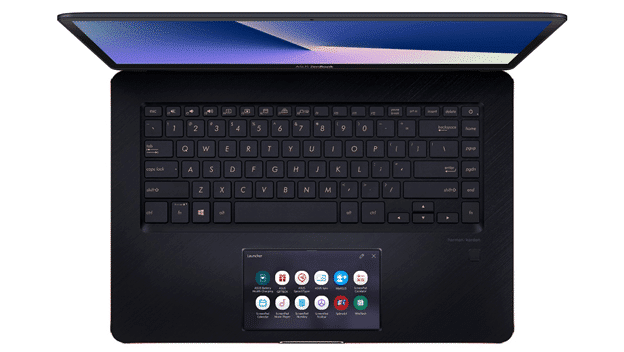
Zenbook Pro laptops have an Office extension screen
The ASUS Zenbook Pro series comes with a snazzy touchpad which doubles as an extension toolbar for Microsoft Office. Source: ASUS Instead of a blank touchpad, it’s a small high-res touchscreen that can display icons or even full videos (play Lawrence of Arabia on a tiny, tiny screen!). For Microsoft Office it means that mini-toolbars […]