All about Microsoft Office Word, Excel, PowerPoint and Outlook, Microsoft 365, Office 2021 and earlier versions.

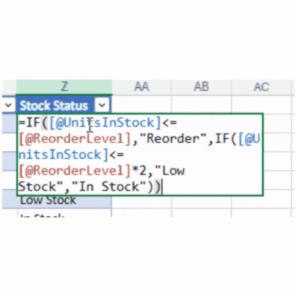
Monospace font makes a difference to Excel formulas
Excel 365 for Windows and web have a different font for the formula bar. The monospace font should be easier to read and understand. For as long as there’s been Excel, formulas have been shown in a proportional font. Probably to fit as much text into the available screen space. Now screens are larger and […]
Value Preview is coming to Excel formulas
Excel 365 for Windows and Web is getting a great new feature called Value Preview. You’ll be able to see the current value of any formula part just by hovering over it. It’s simple and most people won’t even notice it except by accident. Just hover the mouse over part of a formula to see […]
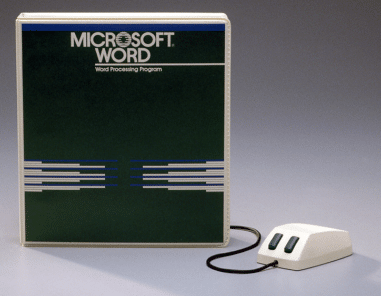
Happy Birthday, Microsoft Word
Microsoft Word is 40 years old today! Back on 25 October 1983, the first Word was released into the wild. Here’s a look at what was tech innovation back when “Every Breath You Take” was the latest pop sensation. Originally called “Multi-Tool Word”, it later renamed “Microsoft Word” or as we’d call it now “Microsoft […]

Witches Graphics To Make The Perfect Halloween Design
Here’s 11 witch graphics you’re welcome to use for Halloween. We made them with Dall-E while testing it’s ability to insert text into a graphic. Dall-E 3 adds text fairly well though sometimes it gets the spelling wrong. Microsoft Designer’s current ‘Generate Image’ feature can’t handle text at all. Instead of deleting our Halloween themed […]

The best Windows color picker
Selecting the exact color from a sample on the screen is best done with one of the PowerToys for Windows 11 and Windows 10 – Color Picker. Unlike the color selector in Office, the PowerToy Color Picker can choose from any visible part of the screen with a keyboard shortcut. Color Picker is just one […]
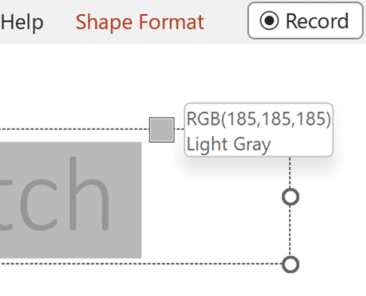
All the Color Picking tools in Microsoft Office
Here’s all the match colors, color picking or color grab tools in Microsoft Office for Windows or Windows itself. While Office for Mac users have it a lot easier with one central ‘eyedropper’ to choose a color from the screen. Naming the color picking tool isn’t consistent in Microsoft Office, it’s called an Eyedropper in […]

Microsoft 365’s secret plan for the US government
The US Department of Defense (DoD) is now fully deploying an extra-special secret version of Microsoft 365 to high-ranking areas including the Secretary of Defense. Called ‘DOD365-Secret’ or ‘DOD365-Sec’, this Microsoft 365 plan is one of the DoD’s first moves into cloud computing and 21st Century collaboration. The new system has been trialed since January. […]
Get Python in Google Sheets
Google Sheets can now support Python code in a similar but cheaper way than Python in Excel 365 Neptyne has released a Python Add-on for Google Sheets which works in much the same way at the newly released Python extension to Excel 365. The add on includes ‘spilling’ results to nearby cells and a Package […]

Halloween emoji, fast find and copy
Need a Halloween emoji or symbol? Here’s a quick and searchable list of more than 30 spooky, scary emoji for documents, sheets, slides, emails or messages that you can use or copy. In Microsoft 365, Office 2021 and Office 2019 there are also Halloween icons and symbols for Word, Powerpoint and more or see all […]

Seven free Halloween fonts for Word, PowerPoint and Office
There are plenty of creepy Halloween themed fonts available for free to work on Windows or Mac with Word, PowerPoint or other Office apps. Here’s seven that caught our eye plus one that you probably already have. All of these work in both Windows and Mac, mostly TrueType fonts. They are licensed for personal use, […]
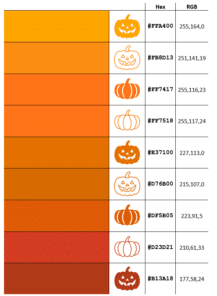
14 perfect pumpkin colors and more in Microsoft Office
Our exclusive Pumpkin Color Charts have the perfect ‘pumpkin’ colors you can use in Halloween documents, slides and graphics with their Microsoft Office compatible color codes including the five Pantone colors called ‘Pumpkin’. There are many Halloween ‘pumpkin’ colors to choose from depending on the variety and ripeness of virtual vegetable you want. See more […]

Add Skeleton and Skull to Word, PowerPoint and Office
Office has various options for graphics or images of skeletons or skulls – perfect for Halloween or other gory, scary uses in Word docs, PowerPoint slides or Outlook emails. We can’t offer a 12-foot skeleton, complete with creepy glowing eyes. For this 3.56 meter monster you have to hunt through Home Depot stores in the […]
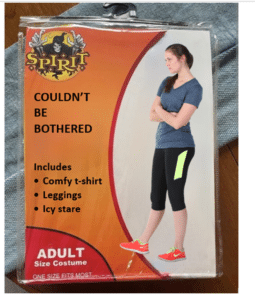
Make your own Halloween costume pack image
Create your own fun, satirical ‘Halloween costume’ pack in the style of a popular meme using just Microsoft Word or PowerPoint. Use this article as a year-round example of how to overlay one image over another plus adding text to a picture. Take a blank Halloween costume image, add an image and some text. Something […]

PowerQuery mystery solved – how to Remove Duplicates, keeping most recent record
Excel 365’s PowerQuery has many wonderful features but occasionally there are common needs that it can’t easily handle. One of those surprising complexities is removing older duplicates but retaining most recent row for each. We’ll explain the simplest solution then why it works. Here’s some sample data on the left and the most recent purchase […]
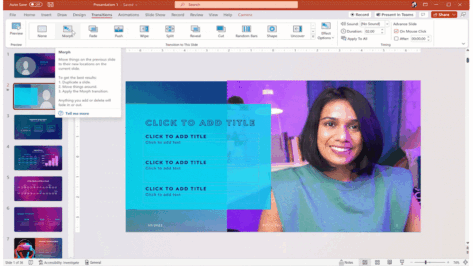
PowerPoint Cameo puts your video selfie into a slide
Microsoft PowerPoint’s Cameo lets you put a live camera feed into your slides. The camera feed can be moved, resized, cropped, and styled just like any other image. Designer in PowerPoint can also be used to add flair to slides that use cameo. Cameo is already in Windows and Mac and now also in Powerpoint […]
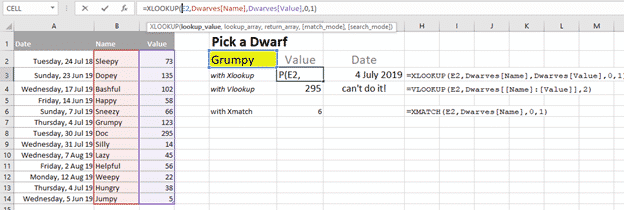
Xlookup is truly a great Excel function
One of the most commonly used and confusing Excel functions is much better in Excel 365 and Excel 2021. Vlookup() has a new, better and easier replacement Xlookup(). It’s a truly good and useful addition to Excel, some might call it a godsend. Xlookup is available in Excel 365 for Windows/Mac/Apple/Android plus Excel 2021 for […]









