All about Microsoft Office Word, Excel, PowerPoint and Outlook, Microsoft 365, Office 2021 and earlier versions.

Typography 101 – font terms explained
Font vs typeface, ascender, desender, X-height, finial … there’s a nice one-page guide to all the Typography terminology. Become a typography nerd in under 10 minutes by Andrew Coyle Has a good visual summary of all the major words used talking about type – the broad categories of fonts (Serif, San-serif etc), how letters combine […]

Goldman Sachs font for a new look in Excel, Word and Office
The (in)famous Goldman Sachs bank has released their own font which anyone can use in their Word, Excel or Powerpoint documents. It’s called Goldman Sans and is available for anyone to download and use. The font is especially useful in Excel workbooks. The company describes the sans-serif typeface as “approachable without being whimsical”. Goldman Sans, […]

Speaking Head in Silhouette 🗣 emoji in Word, Excel, PowerPoint and Outlook
How to insert the Speaking Head in Silhouette 🗣 emoji into Microsoft Word, Excel, PowerPoint or Outlook. Both in Office for Windows and Office for Mac. Speaking Head in Silhouette 🗣 emoji can be used as a different way to draw attention to a special point or note. Or as an alternative icon for a speaker […]

Don’t wait – start using the new Microsoft Designer now
Get the new Microsoft Designer tool now. You can preview Microsoft’s new way to quickly make graphic designs with text and pictures including fancy, original AI generated (aka Dall-E) images. Now NO wait list, just login and start creating. Give Designer a try to add something interesting to a Word document, PowerPoint slide or social […]
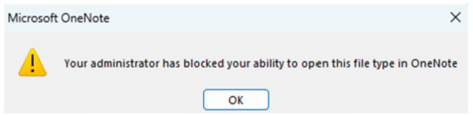
OneNote is (finally!) blocking dangerous files
The latest versions of OneNote will prevent over 120 file types from being added to notebooks in a move that’s WAY overdue. The blocked types of file might contain dangerous, hacked content that could infect a computer. Many of the newly blocked types are obscure or obsolete, mostly used by hackers to trick the unwary. […]

Files blocked from Outlook and OneNote – a complete searchable list
Here’s a complete and searchable list of the 120 file types that are blocked by Outlook (sending or receiving) or OneNote (embedding in a notebook). These, mostly old and obsolete, types of file can be used by hackers to infect Windows computers. As a precaution, Outlook and Exchange Server block messages containing these files, unless […]
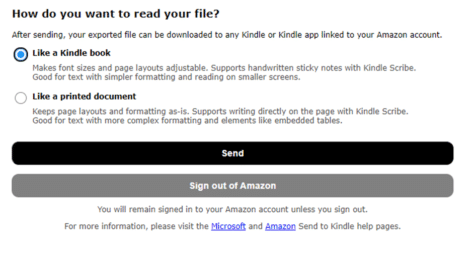
From Word doc to Kindle in one easy step
Now you can copy a document from Microsoft Word to the Kindle ebook reader in one step with the arrival of “Send to Kindle” inside Word 365 for Windows and Mac. We’ll also explain how to convert and transfer a Word document to Kindle without the latest Office innovation. It’s always been possible to send […]

Siren 🚨 emoji in Word, Excel, PowerPoint and Outlook
Insert the Siren or Police Car Light 🚨 symbol / emoji into Microsoft Word, Excel, PowerPoint or Outlook. Both in Office for Windows and Office for Mac. Police Car Light🚨 (aka Siren or Emergency Vehicle Light) symbol can be used any time you want to add warning or alert to a document, slide or sheet. […]
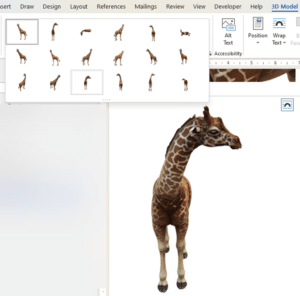
Starting out with 3D models in Microsoft Office
How to insert and use 3D models in Microsoft Office. 3D models let you rotate, pan and zoom all around an object to show it exactly the way you want. Microsoft Office’s 3D models feature has more uses than you might expect. From the Microsoft promotion, it looks like 3D models are only good for […]
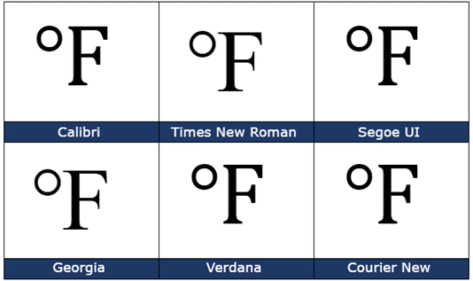
Degree Fahrenheit ℉ symbol in Word, Excel, PowerPoint and Outlook
How to insert the Degree Fahrenheit ℉ into Microsoft Word, Excel, PowerPoint or Outlook. Both in Office for Windows and Office for Mac. Degree Fahrenheit ℉ symbol is used as the unit for the Fahrenheit temperature scale. It’s a single character that’s a combination of the degree symbol and capital F. There’s a matching Degree Celsius […]
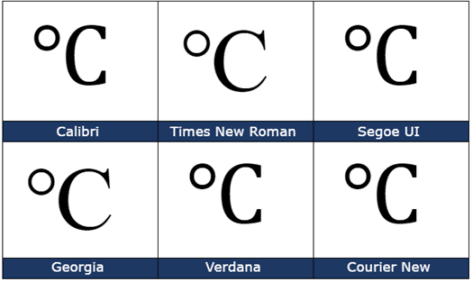
Degree Celsius ℃ symbol in Word, Excel, PowerPoint and Outlook
Insert the Degree Celsius / Centigrade ℃ into Microsoft Word, Excel, PowerPoint or Outlook. Both in Office for Windows and Office for Mac. Degree Celsius ℃ is a single character symbol is used to refer to a specific temperature on the Celsius or Centigrade scale. Centigrade was the original name for the temperature scale before 1948 […]
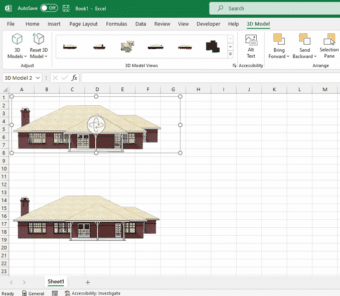
SketchUp 3D graphics in Office 365
Microsoft has added SketchUp 3D graphics (.skp files) to the models inserted into Word, Excel, PowerPoint, and Outlook. SketchUp is a 3D graphics program where you can create shareable designs such as architectural models and graphics used in industrial design, product design, and civil and mechanical engineering. SketchUp Free is available for everyone. Adding Sketchup’s […]

Use the Smithsonian for great photos and 3D models in PowerPoint and Word
The Smithsonian has millions of images and 3D models available online to add something great and different to Microsoft Office including PowerPoint slides and Word documents. The Smithsonian Institution has been a US cultural, scientific and historical resource for the last 170 years. No visit to Washington DC is complete without going to several of their […]

Microsoft fixes their Quick Access Toolbar changes
Microsoft has reversed course on their proposed changes to the Quick Access Toolbar (QAT) in Microsoft Office 365 apps. The current defaults remain for new installs with ‘below the ribbon’ available as an option. In other words, common sense has prevailed. Microsoft wanted to move the Quick Access Toolbar from its familiar location ‘top left’ […]

Illegal colors in Word, PowerPoint and Office
Amazingly, a simple color can be trademarked and using one in a Word, PowerPoint or Office document can be illegal. We’ll explain why and a list of some colors you might need to avoid. Companies can trademark a color that’s associated with their product or logo. If you’re designing a document or presentation, especially for […]
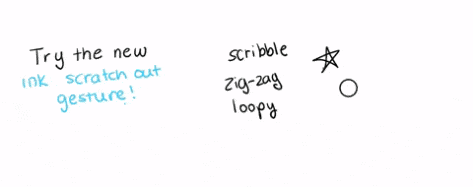
A faster way to delete ink in OneNote
OneNote is getting a new and faster way to delete digital ink using the ‘scratch out’ or scribble gesture. As usual, there’s devil in the details to keep in mind. The basics are simple, so simple that it’s a little surprising that the erase gesture isn’t already available. To delete an ink object on a […]









