All about Microsoft Office Word, Excel, PowerPoint and Outlook, Microsoft 365, Office 2021 and earlier versions.
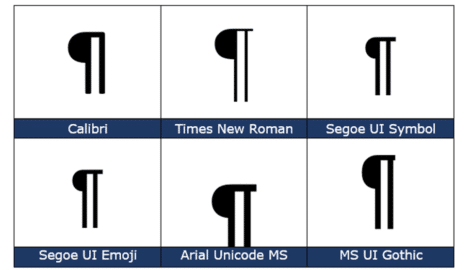
Pilcrow Sign ¶ emoji in Word, Excel, PowerPoint and Outlook
Type the Pilcrow Sign ¶ into Microsoft Word, Excel, PowerPoint or Outlook. Both in Office for Windows and Office for Mac. Pilcrow Sign ¶ is a typographical symbol sometimes called a paraph, or blind P In typography ¶ marks the start of a paragraph but in Microsoft Word the Pilcrow Sign ¶ marks the END of a paragraph. […]

Better Excel formula converts days into Years, Months, Days
Here’s a better Excel formula for converting a number of days into text for year, months and days. This formula leaves out zero values and proper singular/plural (e.g. not “1 Year 0 Months 27 Days” but “1 Year 27 Days”). And we’ll show an even better way to write the formula in Excel 365, 2021/LTSC […]

Handwriting fonts for literacy skills
Suggested fonts including “handwriting fonts” to help teach writing recognition and improve literacy. Office Watch reader Wim V saw our article on Avoiding Comic Sans and wrote to us about a use for Comic Sans and other fonts used in teaching literacy. Some fonts can be used to teach people how to recognize and write different […]
How a deleted Word document caught a serial killer
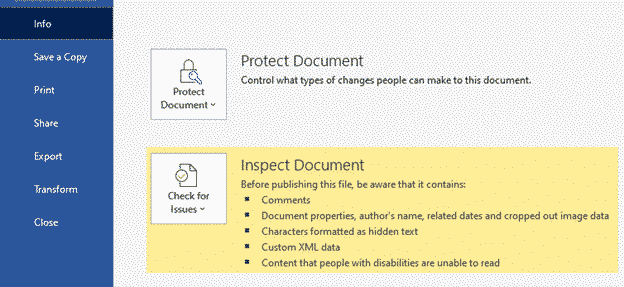
A Word document and a floppy disk caught a serial killer back in 2010. There are still lessons for anyone wanting to keep their personal or business data confidential. Known as the ‘BTK killer’, he murdered 10 people in Kansas between 1974 and 1991. The murderer was finally caught in 2004. He liked sending notes […]

Protect yourself buying Microsoft Office from Amazon or Ebay
After the report of pirated / illegal Microsoft Office from an Amazon retailer (and Amazon’s initial refusal to act) how can you protect yourself from a similar problem on Amazon or other sites? Your entitlement to a refund or redress for a illegal product is different depending on whether you buy from Amazon itself or […]

Warning: now there’s a Clippy dress
As a public service, we’d like to warn all our readers of a new outbreak of Office “Clippy” – as a dress. At least this isn’t Clippy Porn 😄 Add Office Clippy to your web pageHow to avoid the Clippy Paperclip emoji in WindowsBeware! Clippy is hiding in Windows and OfficeWhy has Microsoft (finally) trademarked […]
What are .tmp files in MS Office document folders?
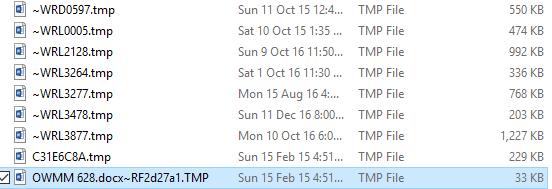
If you look in folders that contain Office documents (Word, Excel, PowerPoint) you might see the occasional .tmp file. What are they? Could they be useful? How to look inside. Can they be safely deleted? The quick answers are: probably Word or Office document remnants, could be handy to recover a lost document but otherwise […]

Beware .doc files in emails
Many of the dangerous emails arriving in your Inbox have one thing in common — they use the old (and risky) Word .DOC format. .DOC .XLS or .PPT are exactly the sort of email attachments you should avoid. The main ‘red flag’ is the email attachment of a .DOC file (or .XLS or PPT). These […]

How the 22H2 Windows 11 update is different and why
The Windows 11 late 2022 update (called 22H2) is quite different from earlier Windows updates. We’ll explain how it’s different and some thoughts about why Microsoft is trickling out the changes over time.. In the past, major updates to Windows were installed and activated in one load. New and changed features appeared on a computer […]
Add Office Clippy to your web page
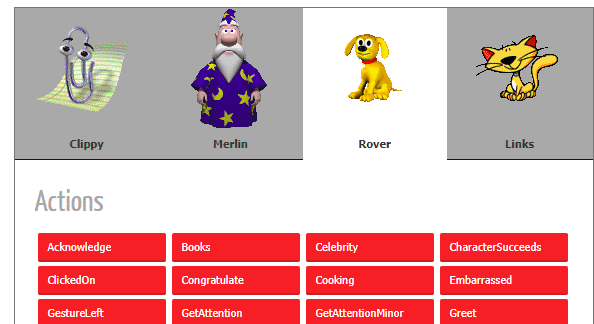
The much unloved Office Clippy will never leave us, thanks to a Javascript library that makes the annoying little critter possible on any web page. We wondered how the WordArt online site got the animated Clippy effect on the web page. Turned out that it wasn’t hard. There’s a free Javascript library available that recreates […]
Do you know all five style types in Microsoft Word?
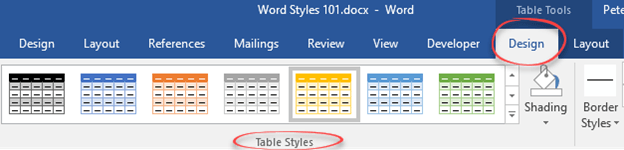
There are five different types of style (collection of formatting settings) in Microsoft Word. There’s three styles for text plus Tables and List styles. Paragraph styles Originally, Word only had paragraph styles. Styles could only be applied to an entire paragraph. Any changes to an individual word or phrase had to be done individually. Get […]
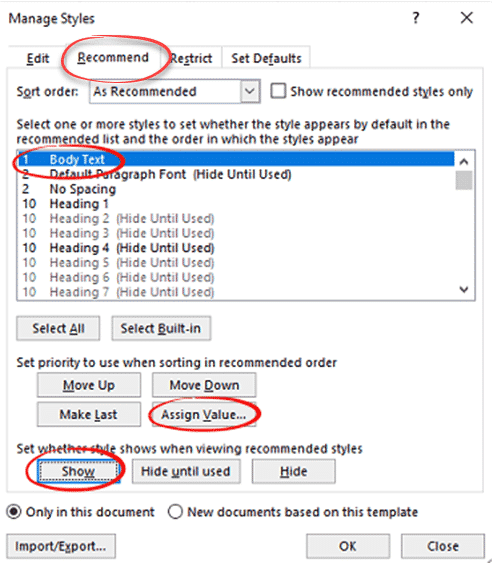
Two ways to make Body Text style appear in Microsoft Word
There are two ways to reveal or un-hide a hidden style, most commonly “Body Text” style. There’s the long-winded Microsoft approved method and the faster way. By default, Body Text style in Microsoft Word is ‘hidden until used’. That seems like a Catch-22, its not visible until it’s used but you can’t use the style […]
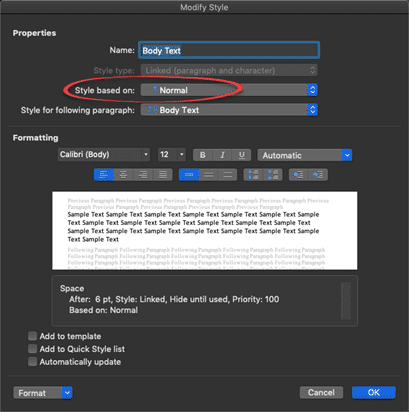
Modifying Body Text style in Microsoft Word
The default ‘Body Text’ style in Word needs some changes to suit your needs. Here’s some suggestions for things to alter or check to make sure they suit your, er, style. Can’t see a Body Text style? See Make Body Text style appear in Microsoft Word Body Text style can be different The default Body Text […]
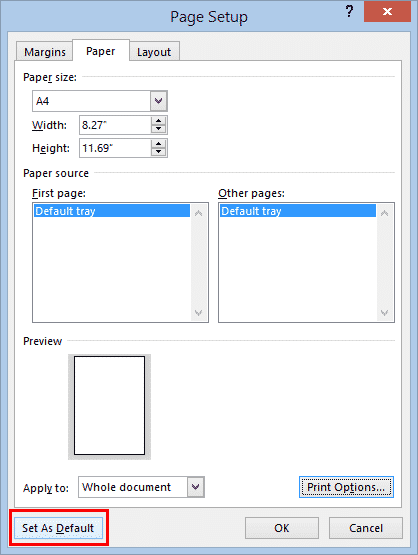
Two Ways to Change Word’s Opening Paper Size
Two ways to change the default or opening paper size for Microsoft Word documents. Change to Letter , Legal, A4 or any other paper size. These two options haven’t changed for many years. The fundamentals haven’t changed since the very first Word for Windows. This will change the paper size when you choose New | Blank document […]

File menu change for the better in Office 365
A small but very welcome change to the File menu in Office 365 for Windows to handle the overflow at the bottom of the window. It’s one of those changes that Microsoft doesn’t promote or even mention. Maybe because it’s quite small or perhaps because it fixes an embarrassing design flaw. The File menu scrolled […]
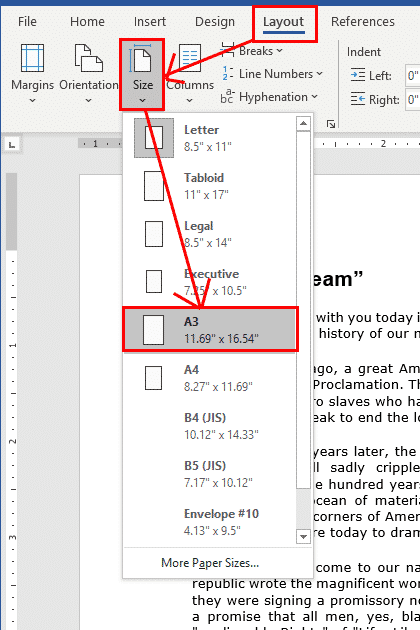
Change the Paper Size in Microsoft Word
It’s very easy to change the paper size in Microsoft Word, whether just for a single document, or change the default paper size for all your documents. You don’t always want to use the same paper size for all your Word documents – different types of projects require different paper, and different parts of the […]