All about Microsoft Office Word, Excel, PowerPoint and Outlook, Microsoft 365, Office 2021 and earlier versions.
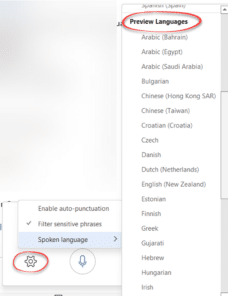
25 new languages added to Microsoft Office Dictation
Not only has Microsoft just added 25 more languages to the Dictation feature of Microsoft Office 365, they’ve also promoted six languages from ‘Preview’ to full dictation status. Microsoft has been unusually quiet about all the improvements in Dictation, focusing on the new languages while not even mentioning that six languages which were labelled ‘Preview’ […]
Starting Word Page numbers from a specific page number
Here’s how to start page numbering at any point in a Word document. There’s no rule which says that visible page numbering has to start with Page 1, there are many situations where the first page in Word isn’t ‘Page 1’ as labelled in the header or footer. Some opening pages like a cover page, […]

Five ways to divide numbers in Excel
If you thought dividing one number by another was simple, think again. Excel has five different ways to divide numbers and we’ll explain them all. Basic Division Obviously, there is the basic concept of division in Excel using / in a formula. Like in Excel we can use the formula =[@[Total Sales]/@[Number of Tickets Sold]]. […]

OK Hand sign 👌 emoji in Word, Excel, PowerPoint, and Outlook
Type the OK Hand sign 👌 into Microsoft Word, Excel, PowerPoint, or Outlook. Both in Office for Windows and Office for Mac. OK Hand sign 👌 emoji is mostly used to symbolize approval, agreement, all that is well but there are other meanings. Scuba Divers use 👌 hand sign to confirm they are ‘OK’ and […]

Excel Sheet View solves a collaboration problem
Excel Sheet View is Microsoft’s fix for a problem when sharing an Excel list or table among many people. We’ll explain how it works and what’s happening behind the scenes. A shared Excel list can be sorted or filtered in many different ways. It’s quite possible that two people can look at the same worksheet […]

Office 2013 countdown has begun … but don’t panic
There’s only a year of Office 2013 support left but don’t panic. Despite what you might have read in some clickbait headlines, Office 2013 is not ‘ending’. Support for Office 2013 ends on 11 April 2023 That does NOT mean Office 2013 will stop working on that date. Talk about Office software ‘end of life’ is […]

Beware! Clippy is hiding in Windows and Office
The dread Clippy, the paperclip with eyes, is still hiding in Windows and Office. The Windows 11 emoji panel and Segoe UI Emoji font have Clippy instead of a plain old paperclip that other apps use. Use the Emoji Panel in Windows 11 (Win + . ) and search for ‘paper’ you’ll see various options […]

LucidChart in Microsoft Office
LucidChart is a very nice diagramming and flowchart tool which is integrated with Microsoft Office for Windows or Mac. Office has diagram tools via Insert | Shapes but they aren’t very elegant. They serve for simple uses but not a lot more. LucidChart is better than the inbuilt Office diagram tools and not as expensive […]

See the very latest Mac laptop in action …
Apple has just released a new and quite different Mac laptop. It has unique hardware and a minimalist operating system. The macOS has always had a Trash Can (Recycling Bin for Windows users) but this new model puts the Trash at the heart of the machine rather than a detail tucked away in the corner. […]
Why can’t Word connect shapes?
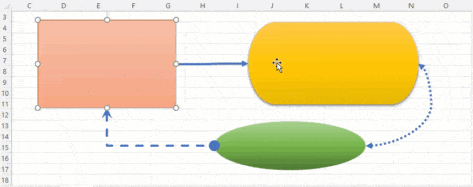
The Shapes feature in Microsoft Office looks the same in all the major Office apps but it’s not. The important connectors feature, essential for flowcharts, is obvious Word or Outlook but works automatically in Excel, Publisher and PowerPoint. Update: We’ve updated this article after some clever readers reminded us of the Windows only Word trickery […]
Microsoft raises prices for non-profit organizations
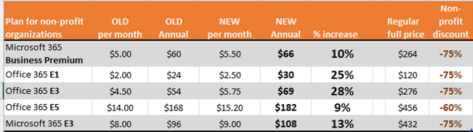
Microsoft has generous price discounts for non-profit organizations but that hasn’t stopped them raising the cost of Microsoft 365 plans up to 28% The new prices start in September 2022, Microsoft announced them as monthly price changes to make them appear lower than they really are. Redmond does that knowing most media will just copy […]

More price rises ahead for Microsoft Office?
Some Microsoft 365 plans have already increased in price and there’s likely more to come after an analyst’s report led to a drop in the Microsoft stock price. A UBS research note, as reported by Barrons, expressed concerns about the growth in sales of Microsoft 365/Office 365. That led to a drop in the MSFT […]
Passover images and more in Microsoft Office
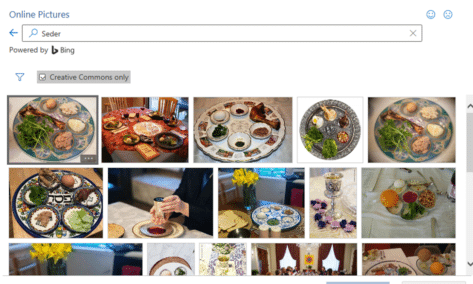
Add some Passover images and icons to your documents, slides or emails from right inside Word, PowerPoint, Outlook and Excel. If you know where to look there are images from the Jewish tradition related to Seder, Matzah and Menorah among many, Icons The SVG Icons collection (Insert | Illustrations | Icons) has only one option, […]

Cat Face 🐱 emoji in Word, Excel, PowerPoint and Outlook
How to insert the Cat Face 🐱 into Microsoft Word, Excel, PowerPoint or Outlook. Both in Office for Windows and Office for Mac. Cat Face 🐱 emoji is a variant of the grinning face emoji, usually depicted as yellow on all platforms. How Cat Face 🐱 looks in different fonts. Here’s some examples of how […]

Fast screen shot or clipping in Office
There’s a simple way to copy a screen image into Word, PowerPoint, Excel, Outlook or OneNote. Word, PowerPoint and other Office apps for Windows (Office 2010 and later) has a Screenshot option to paste an image from any open program window into a document or email. Go to the Insert tab of the programs, there’s a Screenshot […]
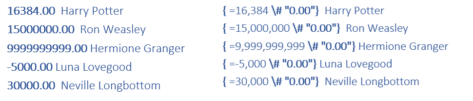
Word number \# field code formatting explained
All about the \# formatting switch in Word field codes lets you change the look of numbers in many different ways. Many examples plus a guide to the formatting codes. Use these options with Word fields that return a number like SEQ, REF, PAGE, SECTION, SECTIONPAGES, AUTONUM, EDITTIME, FILESIZE and MERGEFIELD . The \# codes […]