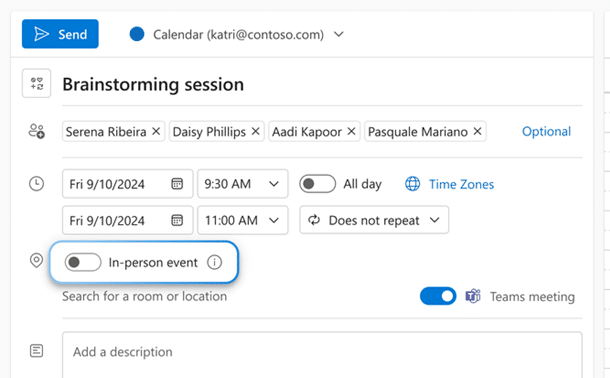
In person vs virtual event option in Outlook
It’s possible to RSVP to an event or meeting and say whether they’ll be attending in the old fashioned way (aka “face to face”) or virtually. Look for an ‘in-person’ event option to appear just above the location line. An event can also be a Teams meeting, making it what Microsoft calls a ‘hybrid’ meeting. […]

Tag your In-person events in Outlook
Outlook can now mark the difference between a virtual and ‘in-person’ event in your calendar. It’s part of Microsoft’s “Hybrid” features intended for the modern world where people mix remote and in-office working. For any calendar event/appointment you might see a switch ‘In-Person Event’. Turn that on for any occasion where you’ll have a physical […]

Eye 👁 emoji in Word, Excel, PowerPoint and Outlook
How to insert the Eye 👁 emoji into Microsoft Word, Excel, PowerPoint or Outlook. Both in Office for Windows and Office for Mac. Eye 👁 symbol is used for decoration “Look Here” or “See this”. Even as a fancy bullet point in Word or PowerPoint. How Eye 👁 looks in different fonts. Two Windows fonts […]
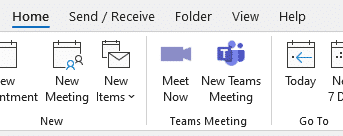
Get rid of Teams buttons from your Office ribbon
Teams button creep into Office and Outlook ribbons because Microsoft tries to promote itself. Here’s how to get rid of it or any other Office buttons you don’t want. Teams icons prominently appear on Office ribbons, like this one on the Outlook Calendar ribbon. or this with Meet Now video conferencing included as well. Or […]

Coin 🪙 emoji in Word, Excel, PowerPoint and Outlook
How to insert the Coin 🪙 symbol or emoji into Microsoft Word, Excel, PowerPoint or Outlook. Both in Office for Windows and Office for Mac. How Coin 🪙 looks in different fonts Only Segoe UI Emoji font has the coin symbol in standard Windows. Coin 🪙 codes These are the important code numbers or values […]

Translate automatic or manual in Outlook
Outlook for Windows has both automatic and manual options to translate incoming messages into a language you understand. We’ll explain the choices available and the Outlook settings that are in a strange order. Microsoft Translator supports over 100 languages, enabling users to translate text across a diverse array of linguistic contexts. You can easily translate […]

All about editing an incoming Outlook message
For many readers being able to edit incoming Outlook messages is just a handy feature, but for anyone in the legal or corporate world it could have ‘interesting’ consequences. In Outlook for Windows, open the email in a full window (not the Reading Pane) then go to Message | Move | Other Move Actions | […]

Don’t trust any text message
The safest thing to do is NOT trust any text/SMS message from a bank, delivery company etc. The message might be real but could be a scam and you can lose thousands. Fake bank text messages, usually designed to make you panic and call immediately, are still catching thousands of people every year. This report […]
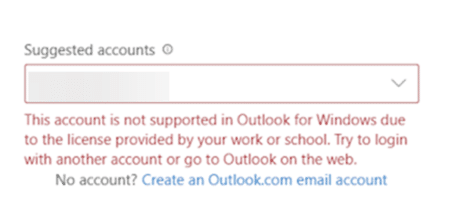
New Outlook does NOT block Exchange Server mailboxes
The new Outlook (in preview) did seem to be enforcing a Microsoft 365 software license in a way that other Outlook software has never done before. Happily that’s been fixed. Here’s what happened, to explain and debunk stories still going around. Outlook (new) is the preview web app that Microsoft is developing. It will eventually […]
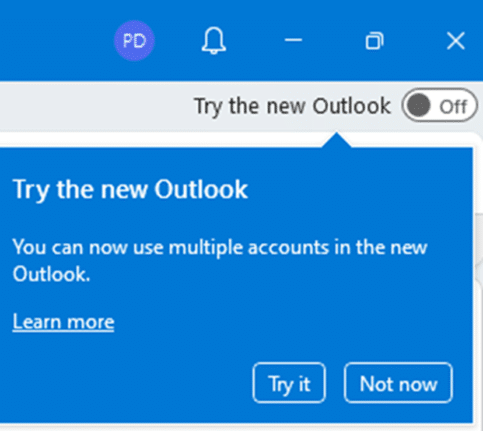
How the change to new Outlook for Windows will work
Microsoft has announced some of their plan for the changeover to the newer, totally rebuilt, Outlook for Windows. The changeover plan will be in four stages; Opt-in, General Availability, Opt-out and finally Cutoff. There are no specific dates given, just a broad structure but the whole switch from ‘classic Outlook’ to ‘Outlook (new)’ will take […]
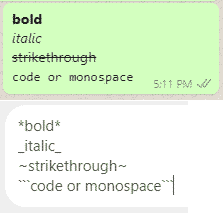
Eight WhatsApp formatting shortcuts including four new ones
There are shortcuts that automatically format bold and italic text in Word. The same shortcuts and more work in WhatsApp texting as well. There are now four more formatting options; bullet lists, numbered lists, quotes and inline code. AutoFormatting Bold and Italics as you type In Microsoft Word and Outlook it’s possible to make words […]

How to check if your emails are sent with DKIM
Here’s a way to ensure your outgoing emails include DKIM and SPF details all setup correctly. DKIM email verification is becoming more important for deliverability of emails. This is mostly for anyone using Microsoft 365 email hosting, especially individual or small business users who have change their email verification setup. Once you’ve enabled DKIM for […]
Critical new flaw in Microsoft Outlook allows (too) easy access
All Outlook for Windows have a critical bug which makes it too easy for any hacker to gain access to a computer. It just needs a simple link clicked from an email to bypass Office Protected View protections, even from the Preview pane. So all Outlook’s should be updated asap. Microsoft rates the security bug […]

A vital setting that Microsoft 365 admins should check now
All Microsoft 365 administrators should make sure this setting is completely ON to ensure emails are delivered and not marked as spam. It’s a setting many administrators might assume is already on but it’s not. Some email hosts have started stronger enforcement of two email verification systems called SPF and DKIM. While the changed rules […]

Last minute Heart icons for Valentine’s Day
Need a heart symbol or image for your Valentine’s Day message, email, slide or card? Microsoft Office Icons have many choices available including Icons. Many of the stock or supplied resources in Office have passionate ‘heart’ symbols. As you’ll see, there are some anatomically correct icons among the romantic ones, just ignore them <g>. Icons […]

Essential ways to strengthen your Microsoft account
Most readers of Office Watch will have a Microsoft account but is it as secure as it should be? Two-step authentication is becoming essential for the key Microsoft account. If you have Microsoft 365, OneDrive, Outlook.com, Windows 11/10/8.1/8, Windows Phone or (likely) Skype then you’ll have a Microsoft account. It’s the single login for all […]









