Installing older Office on Windows 10
Can Office 2007 and other older versions of Office (Office 2010, Office 2013) be installed on Windows 10. What are the licensing, activation problems? How about moving documents? Eileen G asks a common question to Office Watch: “I got a new HP desktop computer, but can I install the old MS orig office, “Home and […]
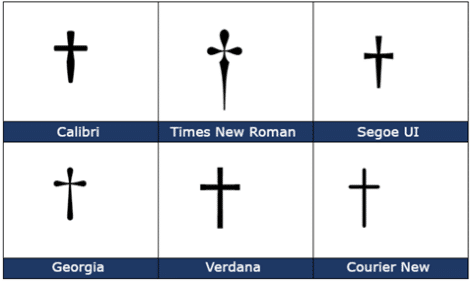
Dagger † symbol in Word, Excel, PowerPoint and Outlook
Insert a Dagger † into Microsoft Word, Excel, PowerPoint or Outlook. Both in Office for Windows and Office for Mac. Dagger † symbol is used to indicate a footnote if an asterisk has been already used. Footnotes and Endnotes in Word Formatting Footnotes and Endnotes Dagger is a different look (depending on the font) but […]

Removing email attachments from mailboxes like Outlook.com
How to remove or move email attachments using Outlook for Windows or Mac and the workarounds for Outlook.com in a browser. Doing this reduces the size of your online mailbox and, from 1 Feb 2023, your OneDrive storage. Removing email attachments is the fastest way to shrink a mailbox that’s getting near it’s maximum size […]
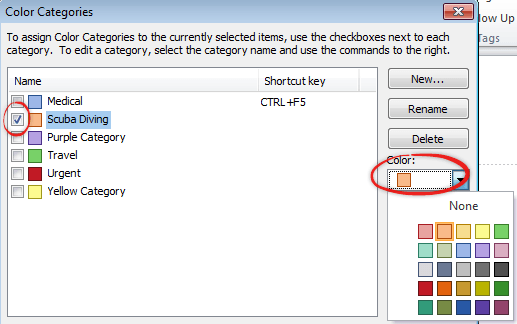
Outlook Categories: why and how
Outlook has had a Categories feature for a long time … here’s how you can use it and why. Categories let you group Outlook items (emails, contacts, calendar and tasks) into broad topic areas or subjects … all without moving from their original folders. They can be subjects that a normal Outlook search could not […]

Lambda upper Λ or lower case λ in Word and Office
Type the Lambda upper case Λ, and Lambda lower case λ symbols (aka Lamda) in Microsoft Word, Excel, PowerPoint, or Outlook. Both in Office for Windows and Office for Mac. Lambda/Lamda (uppercase Λ / lowercase λ) is the 11th letter of the Greek alphabet. The uppercase symbol has various uses, it is used for the likelihood ratio […]
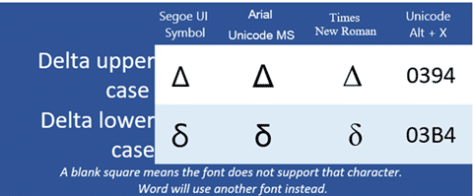
Delta upper Δ or lower δ symbols in Word, PowerPoint and more
The Delta upper case Δ or Delta lower case δ symbols in Microsoft Word, Excel, PowerPoint, or Outlook. Both in Office for Windows and Office for Mac. Delta (uppercase Δ / lowercase δ) is the fourth letter of the Greek alphabet. It’s the “d” sound in Modern and Ancient Greek. Delta uppercase Δ symbol is used […]
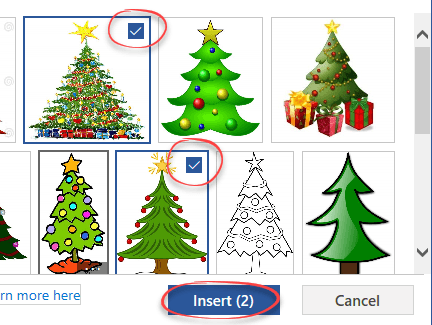
Great Christmas images and clipart in Microsoft Office
Looking for some Christmas images, pictures or graphics? Microsoft Office has some in-built Xmas options for the festive tide of Yule. Add these images into Word documents, Outlook emails, PowerPoint slides or even Excel worksheets. Unsubtle Hint: Christmas Cheer with Office has a collection of festive cards, letters, gift tags, emails ready to open, edit […]
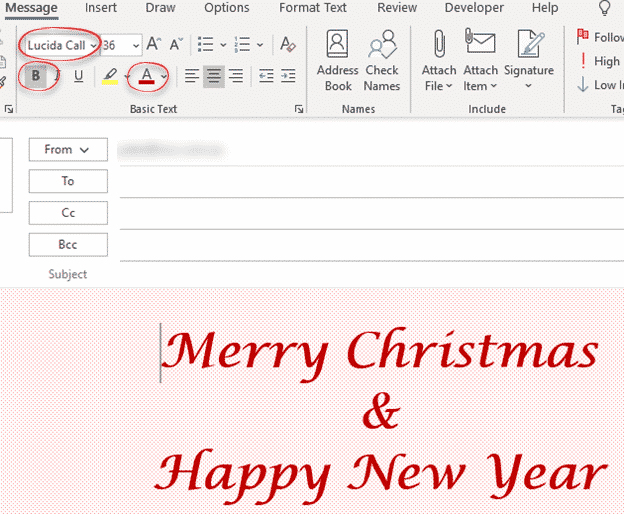
How to make personal Christmas emails
Send a colorful and personal Merry Christmas, Happy Holidays or Happy New Year email. Here’s a quick design you can do in Outlook from the resources and settings you already have. As usual with Office-Watch.com, we’ll explain our choices so you can adapt them to your preferences. Keep in mind that emails can look different […]

Add Santa Hats to your Xmas photos and emails
There are many red and white Santa hats that you can quickly add to any photo using Word, Outlook, PowerPoint or any Microsoft Office app. I’ll explain where to get some Santa hats and how to add them to a picture. A Santa Hat can add a little festive fun to a photo, like this […]

Airplane ✈ symbol in Word, Excel, PowerPoint and Outlook
Type the Airplane ✈ symbol, icon, emoji into Microsoft Word, Excel, PowerPoint or Outlook. Both in Office for Windows and Office for Mac. Airplane ✈ symbol is often used for signs, directions or an itinerary, possibly in combination with symbols for other transport like train, car, walking. For more ‘airplane’ related graphics see Even more […]
What is RGBA color and how to use in Microsoft Office
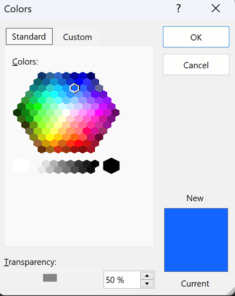
RGBA color codes are an extension of the RGB (Red, Green, Blue) color system which you can use in modern Microsoft Office with a little trickery. There’s an annoying difference (reversal) in settings on Office for Windows vs other Microsoft services and Office for Mac. RGB colors have been around for a long time to […]

Set your own Shape default settings in Microsoft Office
You’re not stuck with the Microsoft automatic settings when inserting a new shape. Change the defaults to whatever you like for faster shape formatting in Office; Word, Excel, PowerPoint or Outlook. When you Insert | Shape, something like this probably appears. Blue fill, 1pt black single line outline, no effects and Text Wrapping in front […]

Bypass Office Backstage and get to ‘real’ Open or Save dialogs
If you don’t like the large Office Backstage pane, the older and more powerful Open and Save dialog boxes are still available via shortcuts or changing a Microsoft Office setting. Microsoft has spent a lot of time and effort changing the Word, Excel and PowerPoint File panes to add more features and unsubtle hints to […]

Viva Magenta! Pantone’s 2023 color in Word, Excel and PowerPoint
Pantone has announced their “Color of the Year” for 2023 is “Viva Magenta” and, as usual, we’ll explain how to use that exact color in Word, Excel, PowerPoint and Outlook. And we’ll look at the purple prose that’s become a hallmark of Pantone’s annual promotion. The color of 2023 is … Viva Magenta As usual […]

Does an Office licence work for two users on a computer?
Microsoft Office rules might let two users or more use the same copy of Office on a computer. It depends on which type of Office you have on a Windows or Mac computer. Office can work for multiple separate users on the one computer. Most commonly, there are separate Windows or Mac logins for the […]

Outlook Profiles, important, useful but little known
Outlook profiles is one of the most important but least known parts of the program. Profiles can be very useful, sometimes essential to getting Microsoft Outlook working. An Outlook profile is a group of settings for connecting to the email server, and where to store the emails and other data. A profile is created when […]