
Almost Equal ≈ symbol in Word, Excel, PowerPoint and Outlook
Almost Equal sign ≈ can be typed into Microsoft Word, Excel, PowerPoint or Outlook. Both in Office for Windows and Office for Mac. The Almost Equal symbol ≈ is commonly used within Mathematics to indicate two values are roughly equal, but not exactly equal. Or use it whenever you need horizontal wavy lines! How Almost […]

NSFW or ‘naughty’ words aren’t in Microsoft Word – why?
There’s a strange, almost prudish, feature in the Microsoft Word spell checker aka Microsoft Editor that’s used in many of the company’s products. We’ll explain Microsoft seeming avoidance of ‘Naughty Bits’ and why it’s happening. Warning! This article is unusually explicit (NSFW) for Office Watch. If sexually explicit but standard words (not slang) might offend, […]

Up Down Arrow with Base ↨ symbol in Word, Excel, PowerPoint and Outlook
Type Up Down Arrow with Base or underline ↨ into Microsoft Word, Excel, PowerPoint or Outlook. Both in Office for Windows and Office for Mac. How Up Down Arrow with Base ↨ looks in different fonts. Here’s some examples of how Up Down Arrow with Base / Underline ↨ looks in common Office fonts. Up […]
Replying to emails with colored backgrounds
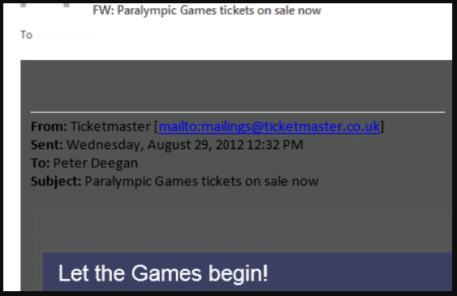
Outlook replies can be a problem of invisible or hard to read text when the incoming email has a color background. We’ll explain the problem and how to fix your reply email. Messages with colored backgrounds might look OK to the sender but are a pain when you try to reply or forward. Most of […]

Outlook Email: why Format Background is called Page Color
If you want to change the background color on an email, Outlook’s option to do that has changed name and location. At least Windows users can change background color, Outlook for Mac users lost this option at few years ago! A color background can be nice in an email but care is necessary when replying […]

Typing both Tilde ~ ∼ symbols in Word, Excel, PowerPoint and Outlook
How to insert either of the Tilde ~ ∼ symbols into Microsoft Word, Excel, PowerPoint or Outlook. Both in Office for Windows and Office for Mac. Tilde ∼ symbol is easy on some keyboards but for other keyboards, there’s no specific key for Tilde. The two Tilde symbols There are TWO tilde symbols in the […]
Turn on or off the new look Office 365 for Windows
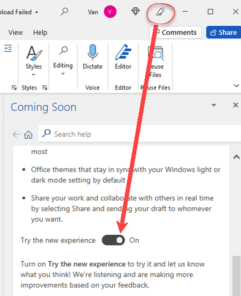
The new look Office 365 (and Office 2021) is coming. For the moment you might have the option to try it or not. Here’s how. Look for the megaphone If a megaphone appears on an Office app title bar, you can try the new look Office for Windows. Click on the icon to open the […]

Up Down Arrow ↕ symbol in Word, Excel, PowerPoint and Outlook
Type the Up Down Arrow ↕ into Microsoft Word, Excel, PowerPoint or Outlook. Both in Office for Windows and Office for Mac. Up Down Arrow ↕ symbol is a vertical line with arrowheads on both ends, pointing up and down. How Up Down Arrow ↕ looks in different fonts. Here’s some examples of how Up Down Arrow ↕ looks in common Office fonts. Up Down Arrow ↕ codes These are the […]
Pantone 2022 color in your Word, Excel and PowerPoint
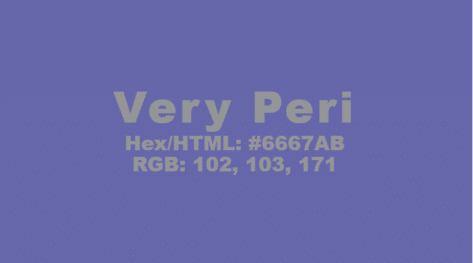
Pantone has announced their “Color of the Year” for 2022 and, as usual, we’ll explain how to use those exact colors in Word, Excel, PowerPoint and Outlook. For 2022, the new color will also be appearing in Microsoft products with a nice PowerPoint template with extra color palettes. The color of 2022 is … Very […]

Black Chess Queen ♛ symbol in Word, PowerPoint and Office
Insert the Black Chess Queen ♛ into Microsoft Word, Excel, PowerPoint or Outlook. Both in Office for Windows and Office for Mac. Black Chess King ♛ symbol is useful for users that want to represent the chess piece as a symbol, rather than an image. Or just a generic crown icon. How Black Chess Queen ♛ looks in different fonts. Examples of how Black Chess Queen ♛ looks in common […]

Action Pen is editing by drawing in Microsoft Word
The Ink Editor button in Word 365 has gone, replaced with the ‘Action Pen’ on the Draw tab in Word 365. Some of the ink gestures have quietly changed since the original release of the Action Pen. The ‘Action Pen’ is now on right-side of the Draw tab | Drawing Tools. The Word 365 for […]
Who and how to get the new look Office for Windows
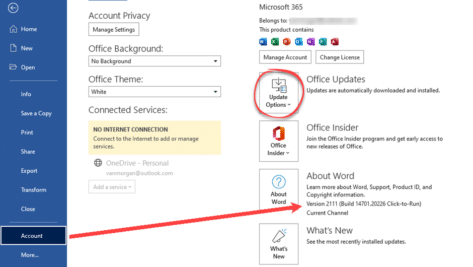
The gradual rollout of the new look Office for Windows (Microsoft 365 and Office 2021) continues. More users, but not all, can now try the revamped Office interface. We’ve had a lot of feedback from Office Watchers about the new look. Some approve, others definitely don’t. Some users are eager to try the new look […]

Approximately Equal To ≅ symbol in Word, Excel, PowerPoint and Outlook
Type the Approximately Equal To ≅ into Microsoft Word, Excel, PowerPoint or Outlook. Both in Office for Windows and Office for Mac. Approximately Equal To ≅ symbol with a curvy line above the usual = symbol is commonly used within Mathematics to refer to approximate equality between two values, congruence or isomorphism. Not to […]
AutoComplete in Outlook – all you need to know
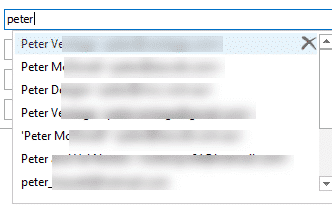
Outlook’s AutoComplete seems simple and useful. It’s certainly useful but it’s hardly simple and occasionally it’s been downright dangerous or embarrassing. AutoComplete makes it too easy to send an email to the wrong address. We’ll look at AutoComplete, how it works, the pitfalls and the few settings available. First we’ll cover the basics (that you […]
How to make a smaller email or document
Here’s some suggestions for making a Word, Excel or Powerpoint document smaller. Also useful for Outlook emails. We’ve had readers occasionally asking how they can ‘shrink’ a document until it’s under some arbitrary size limit. Why even worry about the file size of documents? Much of the time, the file size isn’t a concern. Modern […]

Outlook calendar tricks & traps adding from links and .ics
There are web links or .ics files that let you add an appointment direct to your Outlook calendar without retyping. Airlines and some theater and concert events offer them at the end of online booking. They are simple to use but there’s also tricks to make them even better. We’ll look at some of the […]









