
Turn Copilot Off in Microsoft 365: How to Guide for Word, Excel, PowerPoint & Outlook
If you’re finding Microsoft 365 Copilot intrusive or just prefer a cleaner Office view, you can turn AI off across your desktop app, including Word, Excel, PowerPoint and Outlook. Users who don’t want Copilot help can disable it on both Windows and Mac. In this guide, we walk through how to switch off Copilot completely […]

How to Insert the Exclamation Question Mark (⁉) in Word, Excel, PowerPoint & Outlook
Learn how to quickly insert the unique Exclamation Question Mark (⁉) symbol across Microsoft Word, Excel, PowerPoint, and Outlook on both Windows and Mac. Whether you’re adding emphasis and excitement to documents, spreadsheets, slides or emails, this step-by-step guide shows you the fastest methods — including keyboard shortcuts, the Symbol menu, and Character Viewer tips […]

Create Your Own AI Writing Style Prompts, a Step-by-Step Guide
Want to make your AI writing tools truly reflect your voice? Instead of relying on generic presets like “formal” or “casual,” you can create your own writing style prompts tailored to the exact tone, vocabulary, and structure you prefer. This step-by-step guide shows how to feed an AI system several examples of your writing and […]

AI Writing & Rewriting Made Easy: How Anyone Can Get Better Text with Modern AI
Struggling with writer’s block, phrasing, or finding the right tone for your text? Modern AI tools can help anyone rewrite, rephrase, and polish text quickly and effectively. From simple prompts like “Rewrite this in a friendly tone” to advanced style adjustments, here are practical and ways to draft writing before adding the vital human touch. […]

PDF Save As or Print: Best Methods Explained
Learn how to create high-quality PDF files from Microsoft Office documents using the two main methods: Save As/Export and Print to PDF. This guide compares both approaches so you can choose the best one for your needs. Whether you want clickable hyperlinks, bookmarks, backgrounds, or a simple fixed layout PDF from Word, Excel, PowerPoint, Outlook, […]

How to get Pantone’s 2026 color in Word, Excel and PowerPoint
Pantone’s color of the year for 2026 is “Cloud Dancer”. You can use that exact color in Word, Excel, PowerPoint, Outlook and Designer using the right Hex/RGB color code. And we’ll look at the flowery prose that’s become a hallmark of this annual promotion. The color of 2026 is … Cloud Dancer “Cloud Dancer” is […]
US State Department switches fonts, Times New Roman vs Calibri
In a move reversing a 2023 policy, the U.S. State Department has officially returned to using Times New Roman font for its communications, ending the brief tenure of Calibri. Why choose one font over another? Times New Roman vs Calibri – the pros and cons of each font. The US State Department is switching fonts […]

Left arrow ← in Word, Excel, PowerPoint and Outlook
Type the Left arrow ← into Microsoft Word, Excel, PowerPoint or Outlook. Both in Office for Windows and Office for Mac. The official Unicode name is ‘Leftward Arrow” ← but it can be called ‘Left pointing’ ‘Left facing’ or just ‘Left Arrow’ See also Right arrow → symbol in Word, Excel, PowerPoint and OutlookLeft Right arrow […]

Why It’s Suddenly Harder to Use Classic Outlook — What’s just changed
More than ever, users of Outlook (classic) are running into friction — even when they select it. The newest updates from Microsoft cause the email-client designated “Classic Outlook” to start New Outlook for Windows instead. What once was a stable, always-available legacy interface is increasingly disrupted, making the once-familiar Classic Outlook experience harder to maintain. […]
Excel Attachments Failing in New Outlook — What You Need to Know
Users of the new Outlook for Windows are running into a frustrating bug: certain Microsoft Excel attachments simply won’t open — instead, they trigger the vague error message: “Try opening the file again later.”. Here’s how to bypass the bug. Some users are finding themselves locked out of Excel attachments in the shiny new Outlook […]
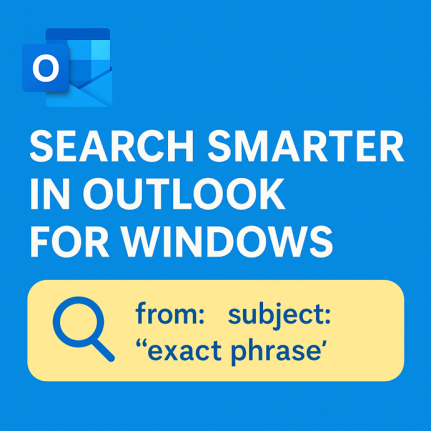
Mastering Search in Outlook for Windows
Searching in Outlook for Windows (“new” Outlook) might look as simple as typing a keyword into a search bar, but there’s a surprising amount of power under the hood. The search function can comb through email subjects, message bodies, attachments, contacts, and files. To effectively search Outlook for Windows, understanding its unique functionalities is crucial. […]
Keep Vintage Microsoft Office Alive: Zero‑Day Patches to the Rescue
Your trusty Office 2016 or 2019 has lost official Microsoft support. There’s a smart, affordable way to keep your ‘vintage’ Office software secure and running smoothly after October 2025. Zero-day micropatching can protect you from new security threats, extend the life of your software and help you avoid costly upgrades. The sun has finally set […]
Microsoft 365 Copilot Expands for Personal & Family Plans — But Limits Remain
Microsoft is extending more Copilot features to Microsoft 365 Personal and Family subscribers, offering expanded AI tools across Word, Excel, Outlook, and more. While users now gain access to enhanced drafting, summarizing, image generation, and voice features, the long-standing cap of 60 AI credits per month still applies. Compared to the unlimited use in the […]

Microsoft 365 Premium: Copilot AI, new Features & Pricing Explained
Microsoft 365 Premium is the newest consumer plan that bundles the popular Family subscription with Copilot Pro at a much lower cost. For $199 a year, subscribers get six accounts with full Microsoft Office apps, 1TB OneDrive storage each, and premium Copilot AI tools for the plan owner—including research, data analysis, and workflow automation. Our […]

Microsoft 365 Companion Apps: People, Calendar & File Search Explained
Microsoft is rolling out three new “Companion apps” for Microsoft 365 users on Windows 11, People, Calendar, and File Search. Designed as lightweight taskbar tools, these apps bring quick access to contacts, schedules, and cloud-stored files without switching between Outlook, Teams, or SharePoint. There are three new Microsoft 365 apps which will soon be pushed […]
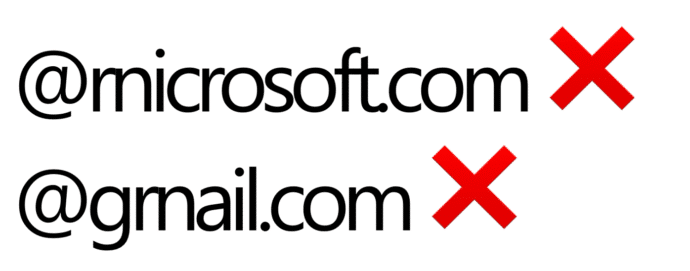
Beware “Evil Kerning”: How Hackers Trick You with Fake Email Addresses
Cybercriminals are exploiting a subtle typography trick called evil kerning to disguise fake domains as trusted ones like Microsoft.com or Gmail.com. By tightening letter spacing, “rn” can appear as “m,” making scam addresses like rnicrosoft.com or grnail.com nearly indistinguishable from the real thing. Here’s how the scam works, why it’s so dangerous, and what you […]









