
New Outlook Dark Mode feature and other Insiders news
The 21 June 2019 Office 365 for Windows Insiders release 11815.20002 has a new Dark Mode feature in Outlook plus some fixes. Here’s the details including Microsoft’s report on ‘Notable Fixes’. Outlook New features Outlook 365 for Windows now has a Sun/Moon button when using Dark mode and the black theme, Sun/Moon switches the reading […]

Office 365 for Windows: Straight Talk
We’re delighted to announce a new ebook from Office Watch — all about Office 365 for Windows: Straight Talk. In-depth with Word, Excel, PowerPoint and Outlook 365 plus buying and configuration. For anyone with Office for Windows on an Office 365 subscription. It’s a truly independent guide to Office 365 for Windows. We take the […]
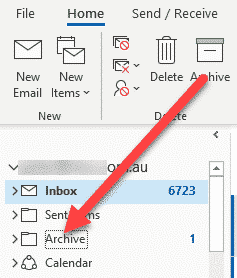
Archive in Outlook 365 and Outlook 2016/2019 for Windows
The Archive button in Outlook 2016/2019 and Outlook 365 is a very different thing than previous versions. Archive is just another folder among many in the same Outlook mailbox and data store. It’s a default folder (which can’t be changed) for Office 365 hosted, Outlook.com, and Exchange accounts. For other accounts (POP3, IMAP) you can […]
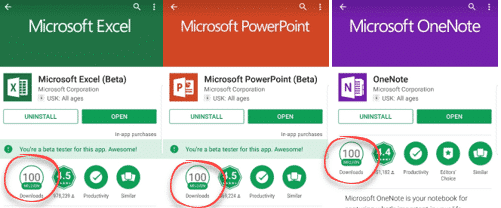
Office for Android stops support for older devices
Microsoft has announced that the Office apps for Android won’t update for older versions of Android. These are the Word, Excel, PowerPoint and Outlook apps for Android. Quietly, the system requirements were changed to cover only the last four major versions of Android. Misleading news alert Despite what you may have read, the Office apps […]

WhatsApp is getting ads, time to switch to Signal
WhatsApp will starting showing ads in 2020 which is another reason to give up on the messaging app and move to a more private and secure but very similar app, Signal. WhatsApp has over 1.5Billion users which makes it a too tempting target for the owners Facebook and advertisers. Facebook will be able to target […]

Send and Receive appointments via Outlook
How to easily make and receive appointments with other people using Outlook. This is a feature that’s been in Outlook for many, many years and so is often overlooked amid the hype for the latest ‘exciting’ thing from Microsoft. We’ll look at how to send an create an appointment to send out and what to […]
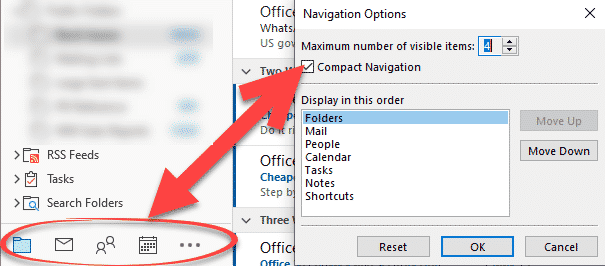
Outlook folders; changing names to icons
Here’s how to change the Outlook folder labels from large text labels to smaller icons. Also tricks hiding under those folder labels. Microsoft’s default in modern Outlook is large text labels across the bottom. Click on any label to switch to that folder view. The text is large and might be suitable on a big […]
Office bug patch highlights for May 2016
A few of the May 2016 patches Microsoft Office caught our eye with embarrassing bug fixes, previously not disclosed to customers. They all apply to older Office releases: Office 2016 and before. It’s a long-standing Microsoft trick to hide embarrassing bugs from customers until they have a fix. In the meantime, customers waste time and […]
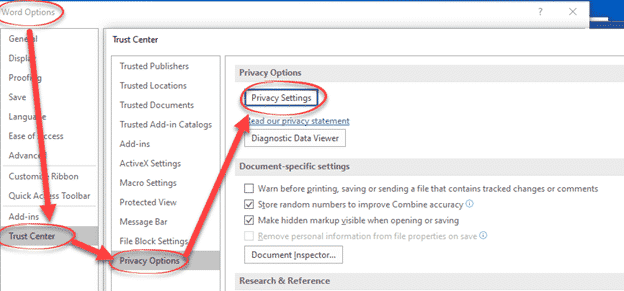
New Office 365 software privacy settings
Office 365 for Windows has new look privacy settings, hidden deep in the menus where, presumably, Microsoft hopes customers won’t find them. These changes are in conjunction with the renamed Office cloud features now called ‘Connected Experiences’. They apply to Office 365 for Windows build 1904 and later. A series of opening screens may appear […]
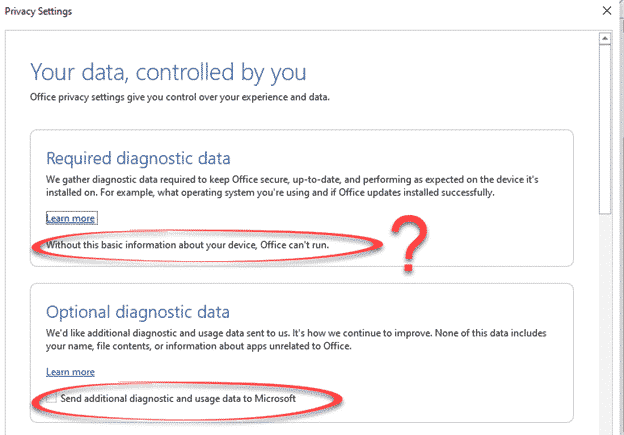
Office 365 Privacy Reminder aka Microsoft covering it’s legal behind
Office 365 customers will be seeing a set of opening screens about how Microsoft gathers and uses customer data. Those screens are carefully worded to avoid some hard truths about modern cloud connections and cover Microsoft from legal liability. Cloud features can be great and very useful. Companies do their best to hide the problems, […]
Connected Experiences now in Office 365
Microsoft has something ‘new’ in Office 365 they call ‘Connected Experiences’. It’s really a new, fancy name for things we already have. Connected Experiences is the new catchphrase for the cloud services already in Office 365 software or apps. It’s the various features which require customer data sent to Microsoft’s servers. According to Microsoft: “Office […]

Microsoft accounts hacked. Who to believe and why it matters.
Microsoft has admitted a security breach which allowed hackers to access the accounts and data of customers. The admission from Microsoft isn’t complete and the hackers say it’s worse than the company is saying. Who is affected? Some people with a free Microsoft accounts like Outlook.com, Msn.com Hotmail.com etc. Microsoft says that a ‘limited’ number […]
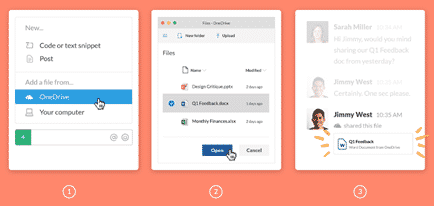
Slack gets better Office 365 and OneDrive support
Slack, the popular collaboration service, has added better integration with Office 365 hosting and OneDrive. Office 365 tools were inevitable because Microsoft now has Teams, its own rival to Slack. There are two new tools, Outlook email and calendar plus nice previews of Microsoft Office documents. Office document preview Now included in Slack is better […]

Excel scams for tax time
It’s income tax time in the USA and that means a new round of email scams and infected Excel documents to watch out for. IBM Security Intelligence reports on a series of scam emails courtesy of the Trickbot hackers. All the emails look like legitimate messages from big companies like Paychex, a payroll provider and […]

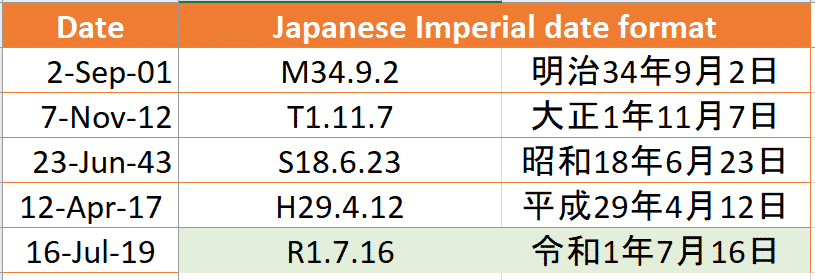
Updates for Japanese Era support in Excel
Microsoft continues to struggle with their support for Japanese Era date format in Excel. The new Imperial Era, ‘Reiwa’ is known but the necessary changes for Excel aren’t released yet. New Japanese Imperial Era changes in Excel and Office explains how to add the new Reiwa era without waiting for Microsoft’s patch. Meantime, yet more […]
Microsoft gives out less information about Office bug fixes and patches
Microsoft has never been great about documenting patches and bug fixes but this month they have sunk to a new low. Maybe it’s a delayed April Fool’s prank with Microsoft ‘taking the Mickey‘ or treating Office customers with contempt? Sustained Engineering isn’t sustained Maintaining Office software is the thankless job of the Office Sustained Engineering […]









