Office 365 outage and the discount that applies
Office 365 hosted customers in Europe are recovering from an outage of about two days. Affected customers should make sure Microsoft gives them the downtime discount they’re entitled to. The outage affected Office 365 email and other hosting in the UK and parts of Europe, like The Netherlands and Belgium for about two days late […]

Farewell Clutter … hello Focused Inbox in Outlook
Outlook’s Clutter feature is going away in favor of the Focused Inbox. Both have the same limitation that Microsoft doesn’t talk about much. Clutter was a hyped Outlook/Exchange feature which shunted lower priority messages to a separate folder. Marketing emails, group messages etc could go to Clutter leaving, in theory, important emails only in the […]
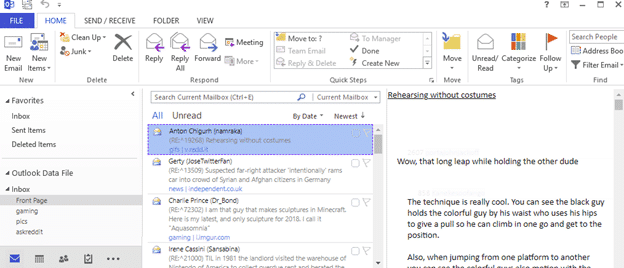
Make Reddit look like Outlook
If you like Reddit but want to hide it from your boss, co-workers, partner etc then we’ve got a web site for you. It makes Reddit look like Outlook Web Access (aka OWA). Go to https://attaxia.github.io/MSOutlookit/ or http://pcottle.github.io/MSOutlookit/ There’s a web page with the latest Reddit posts in the familiar form of Microsoft Outlook. The […]
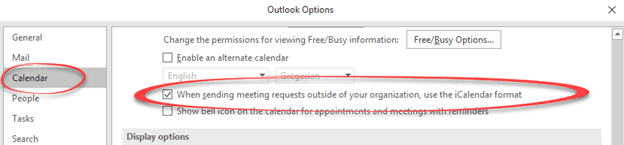
Important Outlook setting for sending meeting requests or invitations
If you’re sending meeting requests or invitations there’s an important Outlook option to check. Normally, Outlook within a company, uses Microsoft’s own method for including meeting details. That’s OK ‘in-house’ where you can be sure everyone has Outlook. But you don’t know what people outside the organization use to manage email and calendar. Buried at […]
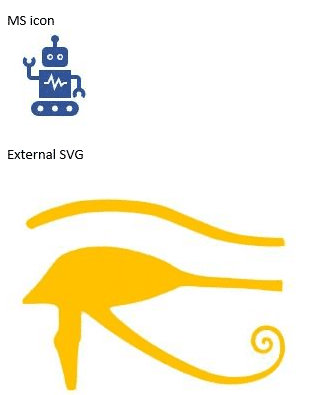
Is it safe to use Icons / SVG in Outlook emails?
Icons are a relatively new part of Office 365 for Windows/Mac but can they be used in emails that go to people not using Office 365? SVG graphics are widely supported in web browsers but not all email programs know what to do with these new images. What do they see if you’ve used an […]
Why can’t you buy individual Office programs?
Office Watch reader, Meredith M. asks a question we’ve heard many times before. Why can’t you buy individual Office programs instead of paying for an Office bundle with programs you don’t need? “My issue: I need ONLY Word, Excel and Access–but I NEED them. I know that I cannot buy them separately but does anyone […]

New Icons for Microsoft Office 365
It’s been five years since the Word, Excel, PowerPoint and other Office icons were given a new look. Now they’ve been announced and, frankly, we could not care less. New look icons don’t make any difference to anyone’s daily use of Office. It’s like supermarket groceries that boast ‘New Packaging’ as if any customers care? […]

Office 365’s Cyber Monday failure
Cyber Monday at Microsoft wasn’t a sales event so much as an embarrassment. Their Office 365 Exchange Server hosting went down, disconnecting Outlook software from the server. On this occasion, The Register reports that users could continue working via the web browser interface. Only the ActiveSync connection used by Outlook software was affected. Back in […]

Patch Outlook today, four new security lapses get fixed.
Microsoft has released four security patches that all Outlook for Windows need to protect from newly discovered bugs. The patches apply to Outlook 365, 2019, 2016, 2013 and 2010 for Windows and are available today. The four Outlook security bugs are related. They involved a hacked .RWZ file that could be sent to you via […]

End appointments early, new feature in development for Outlook
The latest ‘Insiders Fast Track’ Outlook for Windows has an interesting but somewhat incomplete new feature for managing appointments called ‘End appointments early’. It’s an overall setting at File | Options | Calendar | End appointments and meetings early. There are ‘end early’ choices for meetings: Less than one hour One hour or longer We […]

Fake email overlimit messages in Outlook
A new email trick to fool people into clicking a link from Outlook. It’s a ‘warning’ that your mailbox is near it’s size limit. The message was a little sophisticated by pretending to come from the real company that handles the domain. It was sent to an address with a domain managed by GoDaddy (the […]
Beware Office 365 email scams
It was inevitable that scammers would start using Office 365 as the basis for email scams, here’s what to look out for and how to avoid any dangerous web links. The scams are similar to the fake emails that pretend to come from banks and other large companies. They try to trick you into clicking […]
Add Outlook to Windows Live Tiles
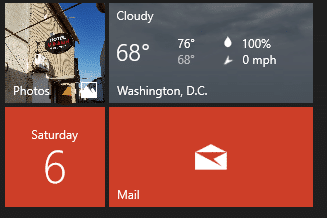
Adding email, calendar and contacts Live Tiles to the Windows Start Menu would seem like an obvious thing to do. Here’s how you can workaround to do it. On the Windows 8 and 10 large Start Menu are ‘Live Tiles’ which are updated to show the latest information. Some of them are setup to show […]

Office 2019 starts public release
Office 2019, the new non-cloud version of Office for Windows and Mac, is now available to volume licence and commercial customers. This is the ‘cloud free’ or, as Microsoft call it the ‘on-premises’ version of Office desktop. It has no cloud related features and is ‘feature fixed’ with no future enhancements. There’ll be security and […]

Exploring the Office clipboard
The Windows clipboard is quite limited but there’s a better one hiding inside Microsoft Office for Windows. It can collect more items, paste in any order and be cleared when you like. We’ll also show how to keep the sometimes annoying pane out of the way. You’re about to hear more about the clipboard because […]

Outlook’s new Simplified ribbon
After a lot of talk and promises, Office Insiders are getting a look at the proposed Outlook for Windows single-line or Simplified Ribbon for Office 365 customers. As usual, there’s good news and bad news in the interface change. Though it’s early days and there’s still time for changes. Don’t Panic There’s no reason to […]









