January 2018 Office updates roundup
So many patches for Microsoft Office and Windows in this month’s package of bug fixes. Few parts of Windows or Office aren’t patched this month, either directly or indirectly. According to Microsoft there’s ‘only’ 56 patched security holes in their products, this month alone. In reality there’s a lot more patching going on, just how […]
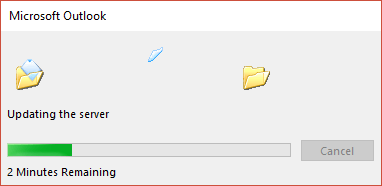
Why does updating Outlook Rules take so long?
When you update your Outlook rules with Exchange Server, why does it take so damn long and you have to wait? Each time you change your email processing rules, Outlook for Windows/Mac has to update the server. But it takes an unreasonably long time, even when there’s only a few rules being updated across a […]

Add Tripit itinerary to your Outlook calendar
Here’s how to merge the travel details in your Tripit itinerary into your Outlook calendar. Just like our previous Tripit article, Tripit tips for Microsoft Outlook Tripit isn’t involved in this piece in any way. There’s no money or consideration in exchange for this article. Outlook software can link to external calendars and display them […]

Did Covfefe make it into Microsoft Word?
All the ‘End of 2017 news reviews’ reminded us of the great ‘Covfefe’ debate. President Trump made a tweet typing error, adding the previously unknown ‘covfefe’ to the language. It’s believed to be a mistype of ‘coverage’ though neither the President nor his staff would admit that. Word 2016 for Windows As incurable Office nerds, […]
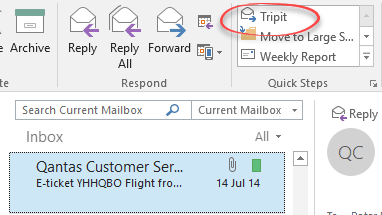
Tripit tips for Microsoft Outlook
Tripit is an online system for managing your travel which includes live updates on flight information, seat assignments and other goodies. Here’s how you can make Outlook work better with Tripit, or similar systems. Peter finally tried Tripit after his friend, Phil, reminded him about the service for the umpteenth time! Now Peter is a […]

How to run Office 2016 for Windows on a Mac
Crossover, the Windows emulation for Mac computers, has released v17 which adds support for Office 2016 for Windows. With Crossover v17, the default compatibility has changed from Windows XP to Windows 7. That’s a big improvement and opens the way for a lot more recent programs to run like Quicken 2017. There are also some […]
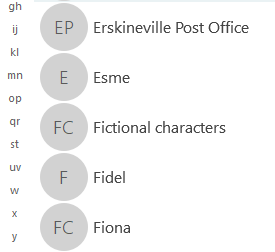
How to find all Contact Groups in Outlook
How can you filter the Outlook contacts list to show just the Contact Groups or not? You can’t … amazingly there’s no direct or easy way to separate out the two types of contacts: individual or groups. Look along the Search tab for Contacts and there’s many options but not all. The ‘More’ pull down […]
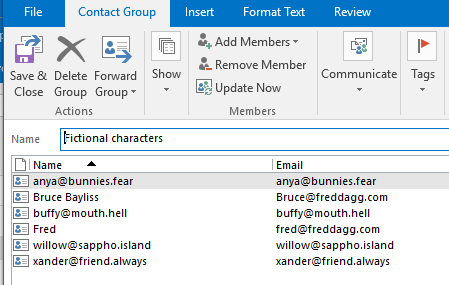
Converting list of contacts into a Contact Group
Here’s how to convert a list of contacts into an Outlook Contact Group. Often, the need for a Contact Group isn’t obvious from the start. We realize that we’re sending emails to the same people over and over again and they really should be in a Contact Group. How to convert an email TO list […]
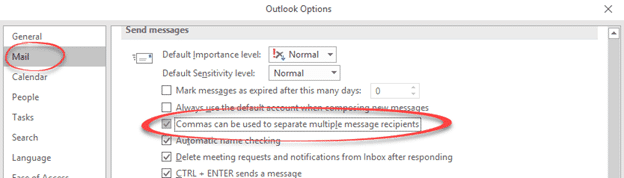
A really useful Outlook option you’ll want to turn ON
There’s a simple little option buried in Outlook for Windows that will make your life a tiny bit easier. An Outlook Life Hack, if you will. We’ve added a bonus Outlook shortcut with a warning. When typing a list of email recipients you have to separate each with a semi-colon. There’s nothing hard about typing […]
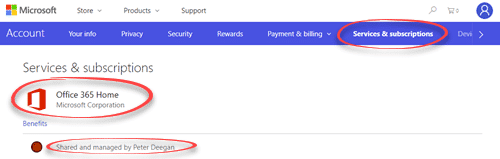
Outlook.com bonuses for Office 365 customers
Microsoft’s mail hosting Outlook.com now comes with extras for Office 365 Home and Personal subscribers, as we foretold a while ago. In short, the ‘Premium’ $50/$20 a year Outlook.com is dead. The Premium benefits are now available to all Office 365 Home and Personal users. If you’re one of the five people linked to an […]

A peek at the next Outlook for Windows or Mac
There are interface changes coming to Outlook for Windows and Mac which Microsoft quietly previewed recently. As usual, interface changes are accompanied by the same vague promises and jargon. Long standing Office users will find a lot of what follows to be tiresomely familiar. We’re told this change will ‘increase new and existing user satisfaction’ […]

Apple’s new image format HEIC and Microsoft Office
Apple has introduced a new image and video format for iPhone and iPad, here’s how to handle it in Microsoft Office documents. .HEIC image files are made by default in some Apple devices with iOS 11. Microsoft Office and Windows don’t support the new format yet but there’s workarounds available in the meantime. Automatic HEIC […]

No attachment needed for new Office security bug
There’s a new Office security bug that can be exploited with just an email or calendar invite as well as the more common infected Office document. The new Office exploit uses the long-standing DDE system which allows Office documents to ‘talk’ to each other. Until told otherwise, best to assume that all versions of Office […]

Outlook bug exposes ‘secure’ messages and Microsoft stays very, very, quiet.
Who knows how long Outlook has been sending supposedly encrypted emails with a plain text readable version included? Microsoft isn’t telling their customers, presumably hoping we won’t notice. SEC Consult discovered a serious breach in Outlook’s email encryption system. Secure messages were being sent with a plain text readable version included! Ouch. Source: SEC Consult […]
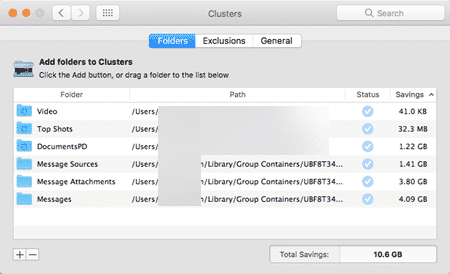
Reduce the disk space used by Outlook for Mac
Outlook for Mac is a disk space hog but the macOS has a way to recover some of that. Mac computers can have relatively small hard drives like 128GB or 265GB which Outlook 2016 for Mac can gobble up. Unfortunately, Outlook for Mac, even the latest Outlook 2016 doesn’t have some of the space saving […]

Read Receipt responses in Outlook Windows / Mac
Here’s how to control what Outlook does when it gets a Read Receipt request with an incoming email. The setting is at File | Options | Mail | Tracking, just below where you set the options for outgoing Read Receipts. That’s Outlook for Windows, see below about Outlook for Mac. The choices are: Always send […]









