
Lawyer fake email – what to look for
A new bit of spam or phishing got past our multiple spam filters and into our Outlook 2016 Inbox. It’s a good example of what check in an unexpected message. The message uses the name and link from a real law firm but they’re not to blame. It appears to be sent from the UK […]
Our great Office 2016 book is ready now
We’re delighted to announce that our champion Office 2016 ebook has been updated, yet again, to include new and added features for the main Windows version of Microsoft Office. A bit like Office itself, Office 2016: the real startup guide is updated to keep pace with the improvements in Office 2016 itself. As an ebook, […]

Office 2016 for Windows Store – a closer look
Microsoft has released another version of Office 2016 for Windows to be tested by insiders. This one is bought and installed from the Windows 10 Store. Naturally Office-Watch.com dived in to check it out. At the moment, only some Windows Insiders and users of Windows 10S can get Office in the Windows Store. Later this […]

Animated GIFs in Outlook messages, but not all Outlooks
Outlook for iOS and Android has a of plugin with support for animated GIF’s which is very strange indeed. Gfycat has released a plugin for Outlook iOS and Android that lets you choose animated GIF’s to insert into your messages. Source: Microsoft/Gfycat You can add animated GIF’s to emails from the Outlook app, but they […]

Contact pictures in Outlook
By Mayurakshi Mohapatra Adding a picture to an Outlook contact is a good way to make the contact more identifiable. If you are bored seeing the initials or boring graphic next to the Outlook contact name, no worries, at all. Outlook lets you add, change or remove an existing picture from any Outlook contact or […]
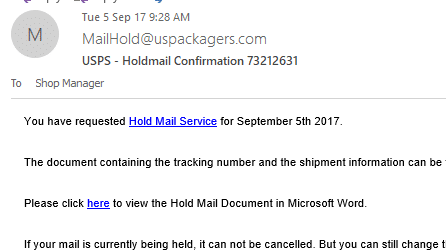
A USPS fake mail alert and example of phishing to guard against
Here’s the latest hacker email we’ve received, a good example of a phishing and infected Word document email. We’ll use it as an example what to watch for and avoid. This message got through various anti-spam filters to arrive in the Office Watch managers Outlook 2016 Inbox. Which brings us to the first important point […]

Festival / Conference planning with Outlook
Organizing your time at a busy conference, arts festival or other composite event is easier with Microsoft Outlook. Either for yourself or coordinating with others. Here’s how. These are ‘real world’ Office suggestions you can use for any busy conference, festival or event. Not just the official Microsoft advice but practical ways to use their […]

Space & Astronomy calendar in Outlook
The New York Times has a nifty new calendar of upcoming space related events including eclipses, meteor showers, launches etc. Here’s how to add the NYT Astronomy and Space Calendar into Outlook software. The service is directly linked to Google and Apple iOS devices (iPhone / iPad ) with Outlook software and Outlook.com relegated to […]
Email spoofing tricks senior British politician
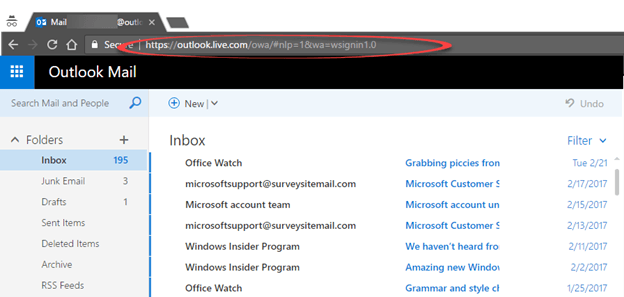
Amber Rudd, the British Home Secretary was tricked into an email exchange with someone posing as her own communications chief. It’s very embarrassing because Ms Rudd is responsible for cyber security as well as MI5 (the UK equivalent of the US FBI). The Minister was using an Outlook.com account which is pretty amazing, even for […]

Where are my Outlook data files?
Where does Outlook hide its main data files? The .PST or .OST files which have your email, calendar, contacts and more. Outlook data files can be anywhere on your computer, but the default location is usually in a hidden folder: \Users\<username>\AppData\Local\Microsoft\Outlook \Users\<username>\Roaming\Local\Microsoft\Outlook The location can vary a lot, depending on the Outlook version, Windows version, […]
Outlook is stopping Windows Indexing and how to fix it
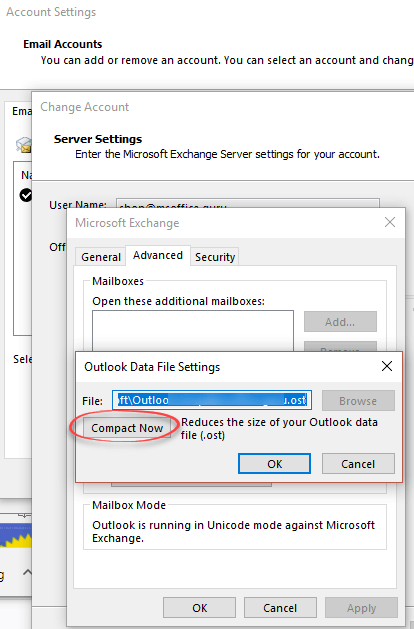
A common Windows Indexing / Search problem is Outlook itself. Windows Search stops while indexing Outlook data and never reaches the end. Here’s some suggestions on how to fix it. An indexing problem means your Outlook data can’t be searched or not everything has been indexed (partial search results). Even if Windows Search says it’s […]
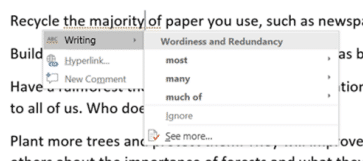
How Word makes you a worse writer
Jacob Brogan launches a deserved broadside on Microsoft Word’s grammar checker in Slate. ” Microsoft’s grammar and style tools aren’t helping writers understand their work, just arbitrarily imposing anemic pedantry on them. “ He gives practical examples of mistakes in the latest ‘Editor’ English grammar checker. Replacing ‘the majority of’ with ‘most’ is OK but […]

Your key to fixing Windows / Outlook Indexing problems
If Windows / Outlook indexing isn’t working properly, there’s a buried tool that should help identify the problem. We’ll show you where this tool is and what to do with the information it has. It’s the Event Viewer, Windows logging of what happens on your computer. Windows Search notes its actions in the Event Viewer […]

Make your WhatsApp portable between numbers and devices
WhatsApp can still work on the same account if you change the mobile number or SIM card. You can even move your WhatsApp account to a different smartphone. You might think that a WhatsApp account is tied to your phone number, but that’s not true at all. WhatsApp (like other messaging services) sends an SMS […]

Put WhatsApp on your PC, Mac or tablet
Typing on a little Smartphone screen is a pain and happily there are PC desktop, Mac and tablet extensions for both WhatsApp and Signal. There are ‘big screen’ options to read and send WhatsApp and Signal messages from a larger screen. A Windows PC, Mac computer or a tablet device (iPad, Android etc). Source: WhatsApp […]
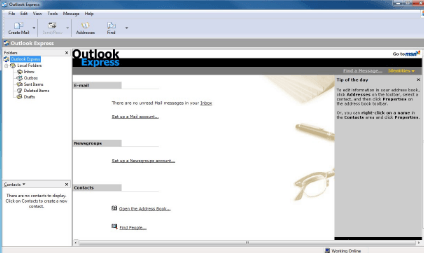
Outlook Express – it’s dead like the proverbial parrot
Lost in the ‘news’ about Paint is the confirmation that Outlook Express is dead. Like the Norwegian Blue Parrot it’s going to join the choir invisible. Microsoft will be dropping Outlook Express from the supplied programs in the upcoming Windows 10 Fall Creators update. Outlook Express is finally getting removed. It’s long since been replaced […]









