
Discover the Content Status flag in Word, Excel and PowerPoint
Tucked away in Microsoft Office is a little used tag ‘Content Status’ or just ‘Status’ that could help manage and find Word, Excel and PowerPoint documents in organizations. Unfortunately, Content Status is only used once in Office features. It’s supported in Windows Explorer if you know where to look. On the Mac it’s all but […]

Epsilon lower ε or upper case Ε symbols in Office and more
Insert the Epsilon upper case Ε, and Epsilon lower case ε symbols in Microsoft Word, Excel, PowerPoint, or Outlook. Both in Office for Windows and Office for Mac. Epsilon (uppercase Ε / lowercase ε) is the fifth letter of the Greek alphabet. The uppercase isn’t commonly used outside of the Greek language, due to the similarity to […]

Upside-down ¿ or Spanish Question mark in Word
The inverted or Spanish question mark ¿ is available in Microsoft Word, regardless of language setting. There’s even an in-built shortcut. ¿ is most commonly used in Spanish for the start of a question sentence. This guide is mostly for people without a Spanish keyboard or who only occasionally need the inverted question mark. See […]
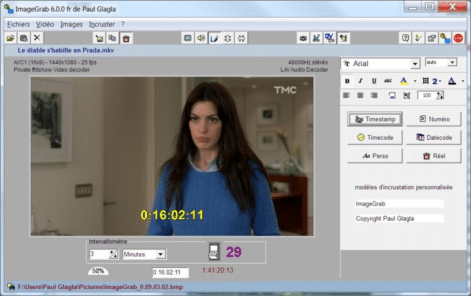
Capture full size still images from video
Grab high-res still pictures from movies and videos to insert into Office documents or emails. We’ll show you how to capture or grab a proper, full size, high-resolution still image from a high quality video file then paste that picture into an Office document or Outlook email. Why do this? Sometimes a video turns out […]

PowerBI reports direct and live in PowerPoint
It’s now possible to insert a PowerBI report directly into a PowerPoint slide, finally resolving a long-standing customer demand and glaring omission. The PowerBI report has filters and pivots to adjust the display directly. The data is live in both Edit and Slide Show modes. Microsoft calls this Interactive Data “Storytelling” which seems a bit […]
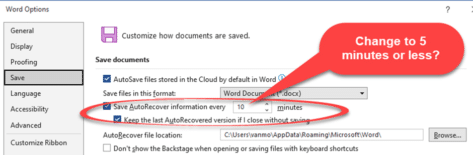
Five changes to make Microsoft Office saves more reliable
Losing recent work on a document is really frustrating so here are a few tips to make Office document saving more reliable, with less risk of loss if the computer or Office programs crash. A few changes to Microsoft’s defaults can mean lower blood pressure for you. Save AutoRecover every … minutes The default setting […]

Make the ultimate PowerPoint Handouts with Word
The ultimate in PowerPoint Handouts aren’t made in PowerPoint at all. Link a presentation to handouts in Microsoft Word, where you have all the powerful Word formatting features available to you. You’re forgiven for not knowing this option existed, because it’s not immediately obvious and you need to go several steps down in menus before […]

Add circled lower case letters in Word, Excel and more
Insert lower case letter with circles ⓐ to ⓩ in Microsoft Office, Word, Excel, Outlook etc. Officially they are called Circled Latin Small Letters. Circled small letters in different fonts Only two common Office fonts have double circled digits Segoe UI Symbol and Calibri. Here’s how the symbols look in both fonts plus the Unicode Hex […]

Rainbow shape and Rainbow text in Office
The rainbow shape with multi-color effect is possible in text, shapes and images for any Microsoft Office documents including Word and PowerPoint. With a few changes you can make a rainbow for documents or slides. Rainbow Text Effect Insert | WordArt choosing whichever preset is closest to what you want. Select the text and go […]
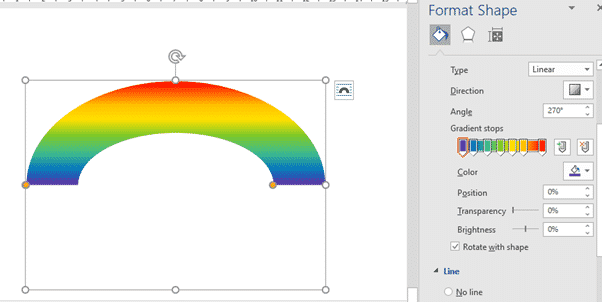
Rainbow gradient or effect in Office, Word or PowerPoint
A rainbow in Office is a custom gradient effect available for Shapes including WordArt borders and many elements in Word, PowerPoint and other Office programs for Windows or Mac. We have the exact colors, positions and options to use for a great rainbow. All the Office preset gradients are single-color effects however it’s possible to […]
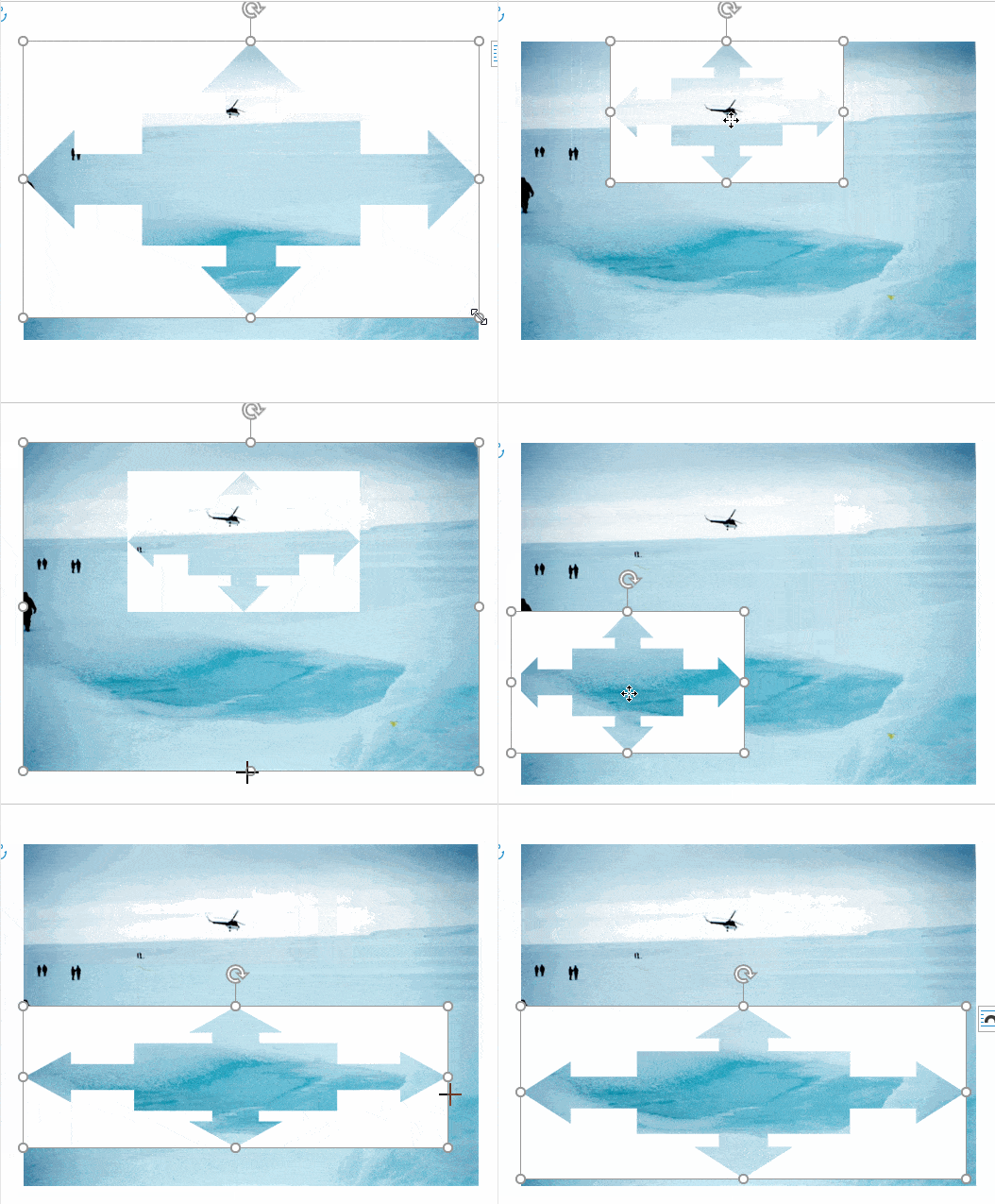
Make a transparent shape to mask a photo in Word, PowerPoint and more
Here’s how to mask a photo with any Microsoft Office shape or icon and do it with full control over what appears from the original image. We’ve already explained two simple ways to crop a photo to a shape or fill a shape with some options to move and resize each element. This method has […]

Transparency Color problem and fix for Microsoft Office
The picture option ‘Set Transparency Color’ doesn’t always work properly in Microsoft Office. We’ll explain the problem and suggest some fixes. When we were making our article “Make a transparent shape to mask a photo in Word, PowerPoint and more” we discovered that the ‘Set Transparent Color’ option didn’t work fully as needed. ‘Set Transparent […]

Check out the new look Microsoft Office on an iPhone
There are new look menus and toolbars coming to the iPhone Microsoft Office apps, Word, Excel, PowerPoint and the all-in-one Microsoft 365 app. We’re not sure when you’ll see these changes because they are three months late! Microsoft started talking about this ‘fast and fluent’ change in November 2022. Three months later and there’s still […]

Make and customize your own tab on Office Ribbon
Have all your favorite Office features and buttons in one place. Commonly used buttons or options that aren’t on the regular ribbon. The Office ribbon lets you make a personal tab filled with your choices. We will show you how easy it is to make in Word below, but this can also be done the […]

Add different symbols for each bullet in Word or PowerPoint list
How to make a bullet list that has different bullet symbol or emoji for each Word or PowerPoint line. With the wide range of symbols and emoji in Word and PowerPoint there’s scope for creative lists that use symbols that relate to each line. It’s not possible to do that as a normal bullet list. […]

Type double circled digits in Word, Excel and more
Insert digits with double circles from ⓵ to ⓽ in Microsoft Office, Word, Excel, Outlook etc. Use them as an alternative way to number a list like this … Double Circled digits in different fonts Only two common Office fonts have double circled digits Segoe UI Symbol and Calibri. Here’s how the symbols look in both […]









