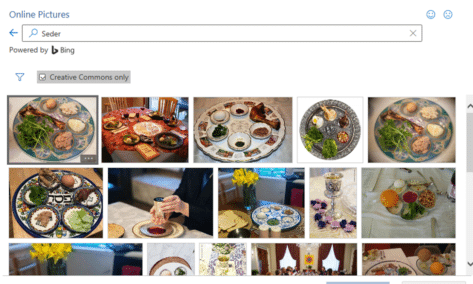
Passover images and more in Microsoft Office
Add some Passover images and icons to your documents, slides or emails from right inside Word, PowerPoint, Outlook and Excel. If you know where to look there are images from the Jewish tradition related to Seder, Matzah and Menorah among many, Icons The SVG Icons collection (Insert | Illustrations | Icons) has only one option, […]

Cat Face 🐱 emoji in Word, Excel, PowerPoint and Outlook
How to insert the Cat Face 🐱 into Microsoft Word, Excel, PowerPoint or Outlook. Both in Office for Windows and Office for Mac. Cat Face 🐱 emoji is a variant of the grinning face emoji, usually depicted as yellow on all platforms. How Cat Face 🐱 looks in different fonts. Here’s some examples of how […]

Fast screen shot or clipping in Office
There’s a simple way to copy a screen image into Word, PowerPoint, Excel, Outlook or OneNote. Word, PowerPoint and other Office apps for Windows (Office 2010 and later) has a Screenshot option to paste an image from any open program window into a document or email. Go to the Insert tab of the programs, there’s a Screenshot […]

Dog Face 🐶 emoji in Word, Excel, PowerPoint and Outlook
How to insert the Dog Face 🐶 emoji into Microsoft Word, Excel, PowerPoint or Outlook. Both in Office for Windows and Office for Mac. Aside from the obvious the Dog Face 🐶 emoji can used as a variant of the Grinning smiley face emoji. How Dog Face 🐶 looks in different fonts. Here’s some examples […]
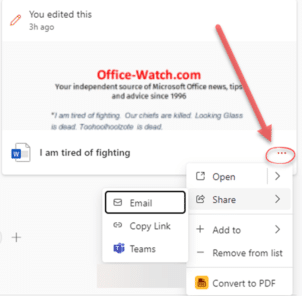
Useful tricks hide in the new look Office.com
The main Office.com page has an updated look for Business and Enterprise customers. There’s a Create pane, My Content section and Quick Access buttons plus some more useful features hiding away under obscure buttons that are easy to overlook. This is the overall Home https://office.com look if you’re logged into a non-consumer Microsoft account. Choose […]
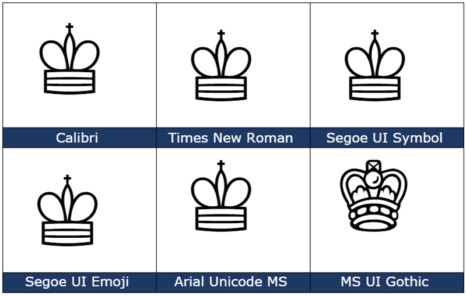
White Chess King ♔ symbol in Word, Excel, PowerPoint and Outlook
Type the White or outline Chess King ♔ into Microsoft Word, Excel, PowerPoint or Outlook. Both in Office for Windows and Office for Mac. White Chess King ♔ symbol is useful for users that want to represent the chess piece as a symbol, rather than an image. There’s also a Black Chess King ♚ symbol […]
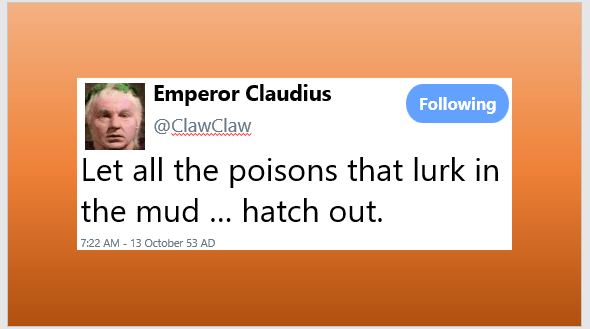
Make your Twitter ‘message’ in Word or Powerpoint
With a little Office formatting trickery, you can make a Twitter ‘message’ that looks like what you see on the Twitter web site or app to put in a Word document or PowerPoint slide. Use this trick to recreate a real Tweet that’s part of a document. Or as a fake or joke tweet as […]

Eye of Horus 𓂀 symbol in Word, Excel, PowerPoint, and Outlook
Insert the Eye of Horus 𓂀 into Microsoft Word, Excel, PowerPoint or Outlook. Both in Office for Windows and Office for Mac. Eye of Horus 𓂀 is an Egyptian Hieroglyph symbolizing protection. According to Egyptian myth, Horus lost his left eye during his struggle with Seth, and it was restored by Hathor, symbolizing the process […]

Jazz up and animate photos in PowerPoint
Using simple animations in PowerPoint presentations is relatively easy, but you can also take them to the next level, to jazz up your photos in PowerPoint. Using this method might take a few more steps than just creating a straightforward animation, but the result is well worth it … In short We’ll explain how to […]

2001 A Space Odyssey – in Word and PowerPoint
As long time space and SF nerds, Office Watch can’t resist putting the look of 2001: A Space Odyssey into Word documents and PowerPoint slides. We’ll show you how to make a ‘close match’ using just the fonts and features in Microsoft Office. We’ll also explain the details behind that choice and some alternatives, both […]

Why Windows Character Map is better than Office
Character Map is a Windows feature that’s very useful for Microsoft Office users. It lets you insert symbols and, importantly, find them which is not possible within apps like Word. Windows Character Map has been around for as long as we’d like to remember and it’s mostly done right. If only the equivalent in Office […]

Free color selector in your browser
Google has a color selector among the many features in their home page. It’s free, works in any browser and it’s easy to copy color codes into Office. Search for ‘Color picker’ or https://www.google.com/?q=color+picker then move the two circles to choose the exact color and shade you want. The HEX and RGB color codes are […]

Law & Order title card in PowerPoint and Word
Here’s how to make a lookalike for the Law & Order TV show title card in either PowerPoint or Word. Last week we showed how to make the Law & Order opening screen image and how to use that look in slides or documents. Many readers asked why Office-Watch.com didn’t do the main title card. […]

Law & Order titles and sound in PowerPoint and Office
One way to open a PowerPoint presentation could be to copy the opening of the Law & Order TV shows. Here’s how to get the same look in your PPT slides or Word documents plus the distinctive sound. The same formatting can be used in Word, maybe as a callout to highlight some text. But […]
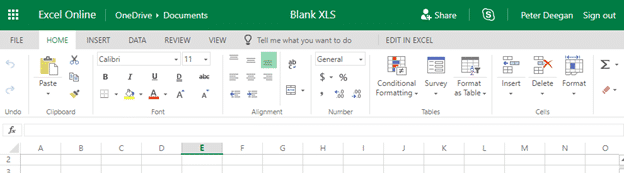
Free and secure conversion of .doc .xls or .ppt to the newer Office formats
Here’s how to convert an older .doc .xls or .ppt into a safer and smaller .docx .xlsx .pptx even if you don’t have Microsoft Office. Any smart computer user is wary of documents received in the old .doc .xls .ppt formats because they are regularly used to transmit viruses. The new document formats are much […]
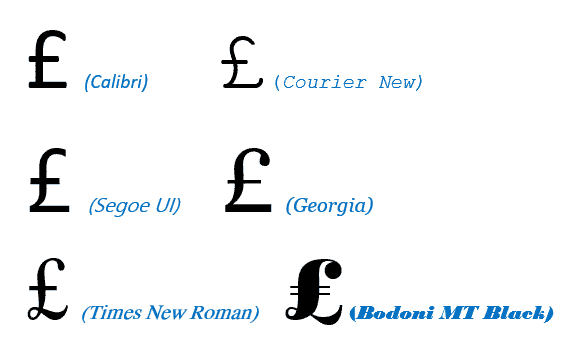
Pound £ symbol in Word, Excel, PowerPoint and Outlook
Type the Pound Sterling £ currency symbol into Microsoft Word, Excel, PowerPoint or Outlook. Both in Office for Windows and Office for Mac. £ symbol is easy on a UK keyboard but for other keyboards there’s no specific key for Pound. Pound is used for British Pounds Sterling and also other ‘pound’ currencies like the […]









