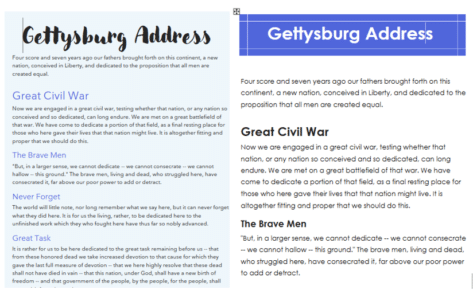
How Word Designer makes plain documents look great
Word Designer is a really fast way to reformat a document into something very interesting and professional. Here’s how to use it properly and add extra tweaks to make your Word doc look really great. All these documents were transformed from a plain document with a few clicks. Word Designer does a lot more than […]

Croissant 🥐 emoji in Word, Excel, PowerPoint and Outlook
Add the Croissant 🥐 emoji into Microsoft Word, Excel, PowerPoint or Outlook. Both in Office for Windows and Office for Mac. I have to declare a personal interest in this article because the Croissant 🥐 is an essential part of my breakfast. No morning is complete without the “Three C’s” – Coffee, Computer and Croissant […]
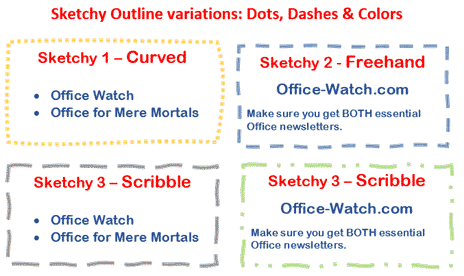
Sketchy line option in Office for Windows and Mac
Office for Windows and Mac has three special outline styles for the borders of shapes and text boxes. Called ‘Sketched’ or ‘Sketchy‘ because they have a hand-drawn line look. It’s a nice little addition to Word, Excel, Powerpoint and Outlook. Let’s see how it works plus some details and limitations that Microsoft hasn’t mentioned. All […]
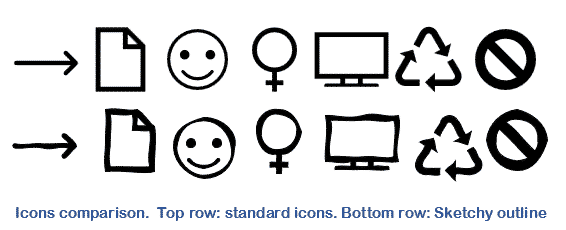
Sketchy or wriggly lines in Icons and SVG graphics
Microsoft Office Icons and other SVG graphics can be improved a lot simply with Sketchy or Sketched lines. They turn an icon or graphic from something formal into a hand-drawn and casual look. Sketchy lines is the ‘hand-drawn’ line option available in Microsoft 365 for Windows or Mac plus Office 2021. It lets you change […]

Better Icon, illustration or SVG editing trick in Office
Get more from Microsoft Office Icons, Illustrations, Cartoon People and other SVG graphics by turning them into Office Shapes which opens up many more options for editing and recoloring the graphic. That includes ‘splitting’ a single graphic into parts that can be changed separately. Microsoft 365, Office 2021, 2019 and 2016 for Windows/Mac have an […]

Quickly make your Word document look better
Word has some quick ways to turn a plain document into something fantastic. All it takes is a few clicks on the Design tab to change the overall look, fonts and colors. And we’ve added tips to fix formatting that doesn’t change. Let’s start with a very plain version of a famous and definitely not […]

How hackers trick you to open infected documents
Here’s how to avoid the tricks hackers use to infect your computer via Office documents. Microsoft has added features to Office that should make it harder to infect your computer via a Word, Excel or PowerPoint document. Hackers have found ways to trick people into bypassing those warnings and enable the viruses in the document. […]

Office Application Guard is on the way out
Microsoft Application Guard for Office is being ‘deprecated’ (phased out) in Windows 11 and Windows 10 after only a few years. No official reason has been given and the excuses don’t make sense. Back in 2019 Microsoft announced Application Guard as a new way to isolate macro enabled documents from unknown sources. Suspect documents are […]

Telephone location ✆ emoji in Word, Excel, PowerPoint and Outlook
Insert the Telephone location ✆ symbol into Microsoft Word, Excel, PowerPoint or Outlook. Both in Office for Windows and Office for Mac. Telephone location ✆ symbol is supposed to be used as a sign for a phone box or booth but can be used for any ‘phone’ purpose. See also: Telephone Receiver 📞 Emoji In Word, Excel, […]

Making a Word linked style for lead in paragraphs
Here’s how to make a linked style with an outline level in Microsoft Word. Use this for many reasons like Table of Contents styles in Word. The ‘outline level‘ is how Word knows what to put in the Table of Contents, Outline View and, mostly, Navigation Pane. Any Paragraph, Linked or Table style can have an […]

Table of Contents basics in Word
Let’s explore the basic options for making a Table of Contents (TOC) in a Word document. Table of Contents is very easy to do in Word and it’s not just for people who are making books. TOC’s can be useful in any long document such as a contract. Beyond the simple Table of Contents there […]

Finding the Style Separator feature for Word TOC’s
Style Separators let you have Table of Contents (TOC) entries that use only part of the heading text or text that doesn’t look like a heading. It gives you a lot more flexibility to choose the document formatting you want and not be forced into Microsoft Word’s standard formatting. Style Separators are a useful trick […]

Choose the words to show in a Word Table of Contents
Choose specific words from a heading to appear in the Table of Contents (TOC) of a Word documents, instead of the whole heading. Welcome to the strange world of Word’s Style Separators. We’ve already explained Lead in emphasis which is easy to use. Simply select the text you want at the start of a paragraph […]

Table of Contents styles in Word
There are many different ways to change the look a Table of Contents from a Microsoft Word document. The standard ways, taught in most classes, force you to format your document in a way that suits Word. We’ll show you how to get a Table of Contents (TOC) from a document formatted the way you […]
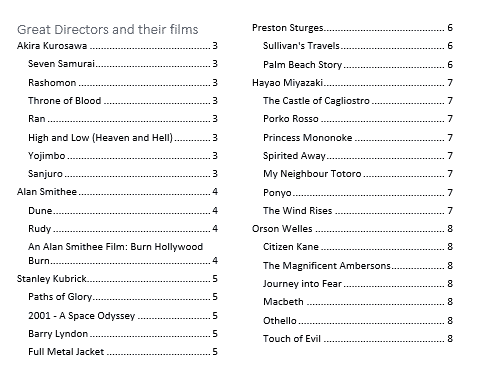
Four Word tricks to shrink a Table of Contents
Four simple Microsoft Word tricks to squeeze a Table of Contents (or Table of Figures etc) into fewer pages. Here’s an example of a Table of Contents (ToC) that’s grown too big using Word’s default settings. It’s creeped over to a second page. We’ve seen ToC’s for big documents that take up many, many pages. […]

All Word’s Table of Contents options
Microsoft Word has many Table of Contents options, a lot of them hidden away. Here’s a complete list of all the switches available with a Word {TOC … } field code. We’ve covered the basics of Table of Contents and some Table of Contents tricks already, here we’ll go in-depth with the TOC field codes […]