
Stock images or premium content in Microsoft 365
Word, Excel, Outlook and PowerPoint in Microsoft 365 have image and icon libraries plus stock images or ‘premium creative content’. Despite the ‘Stock Images’ name there are four types of extra content; Images, Cutout People, Icons and Stickers. We’re told there are ‘over 8,000’ images and icons with ‘more to come’. Insert Pictures The Insert […]
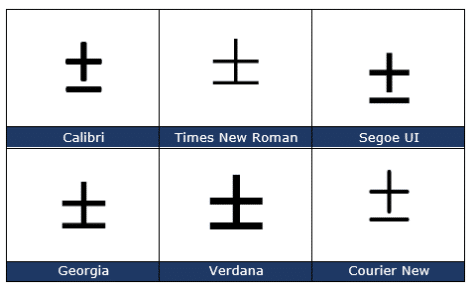
Plus or Minus sign ± in Word, Excel, PowerPoint and Outlook
Type the ‘Plus or Minus sign’ ± into Microsoft Word, Excel, PowerPoint or Outlook. Both in Office for Windows and Office for Mac. Plus-Minus ± symbol isn’t just used for equations, it’s also used as a shortcut for ‘plus or minus’. In statistics you’ll often see results given as being “ ± 3% ”. How […]

Change sentence space after fullstop/period in Word
Microsoft Word can check if you use a single or double space after a sentence (fullstop/period) but how can it be changed throughout a document? Make all sentences end with a single space instead of double spaces, triple or more. The Sentence Spacing settings (single, double or don’t care) is in Word’s Grammar settings see […]

New Outlook attachment Viewing warning hides the way out
The new Viewing menu option in Word has mislead people into thinking they can’t edit documents sent to them. Really, nothing has changed except a poorly worded Microsoft message that hides the important button underneath. Opening a Word attachment from the latest Outlook 365, starts Word 365 with this notice. It’s part of the Edit, […]

Two checkmark or tick ✓ choices in Word, Excel, PowerPoint and Outlook
Check mark or tick has two options, normal ✓ or heavy ✔ to insert into Microsoft Word, Excel, PowerPoint or Outlook. Both in Office for Windows and Office for Mac. Checkmark ✓ symbol is used for bullet or check lists and other indicators. There’s also Heavy Check Mark ✔ which looks different, heavier, than the […]

Four X cross ✗ choices in Word, Excel, PowerPoint and Outlook
Type one of the four diagonal cross Mark ✗, multiplication or ballot symbols into Microsoft Word, Excel, PowerPoint or Outlook. Both in Office for Windows and Office for Mac. The X or Cross Mark ✗ symbol is used for bullet or check lists and other indicators. It’s the opposite of the tick or Checkmark. There […]
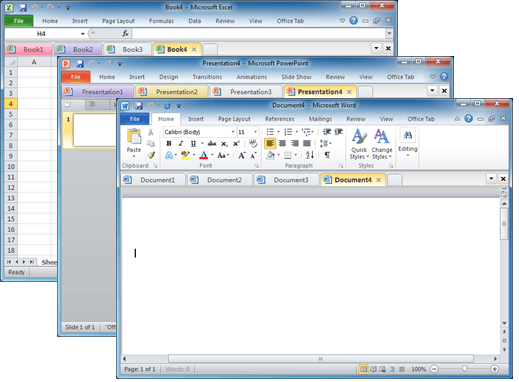
Documents in tabs option for Microsoft Office
There’s a useful and long-standing Office add-on for people who have many documents open at once and prefer them to appear in tabs (like web pages) instead of separate windows. Office Tab switches Microsoft Office for Windows from the usual ‘one document per windows’ view to ‘many documents in a single window’. This can be […]

The full story on Dictate with Office 2013 & Office 2016
Microsoft released an interesting new tool for Office 2013/2016 which promised to be a major improvement on current ‘speech to text’ options. Most media have just reported Microsoft’s hype, we actually tested Dictate and here’s what we’ve found. What made Dictate different is the use of Cortana voice recognition technology. It uses the same cloud […]

Save Office images or slides to SVG format
Microsoft Office 365 and Office 2021 let you save images to SVG format from either images/graphics, charts or whole slides from PowerPoint. Originally ‘Save As SVG’ was only in PowerPoint 365 Windows but it’s quietly spread to Word 365, Excel 365 and Outlook 365 as well as the Office 2021 apps. SVG is a scalable […]

Printing tricks for Microsoft Word and Office
There’s a lot more printing and money saving options available if you know where to look or use a little cunning to get what you want. Microsoft Word documents with rescaling paper size, saving money in ink or toner, double-sided printing, two pages to a sheet, poster sizes and booklets. There are ways to save […]
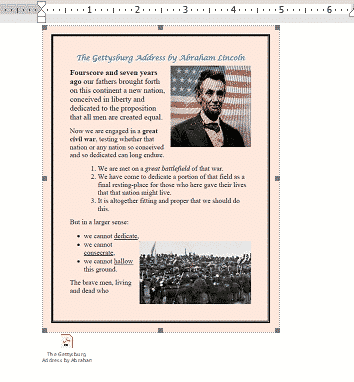
Three ways to add a PDF into a Word document
Here’s three ways to add a PDF into your Word document. Like many things in Microsoft Word, there is more than one way to add a PDF file into a Word document. From a simple link to another file to converting the PDF into a Word document. In most cases you’ll link to a PDF […]
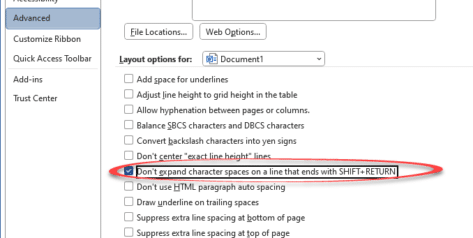
Four Word fixes for stretched out last line
To my horror, I encountered something strange while working on a Word document with “strung out” or ‘stretched’ text on the last two lines with huge gaps of space between them. Here’s the two ways it can happen and the four fixes available. A stretched-out line in a Word document often happens while pasting text […]

Inside Smart Copy and Paste in Word
When Microsoft Word was first released, all those years ago, it had a Paste feature but it was dumb and literal. These days Word’s Paste (Word for Windows and Word for Mac) is a lot smarter and does very useful things that you may not realize or appreciate. Before the ‘Smart Paste’ options came along, […]
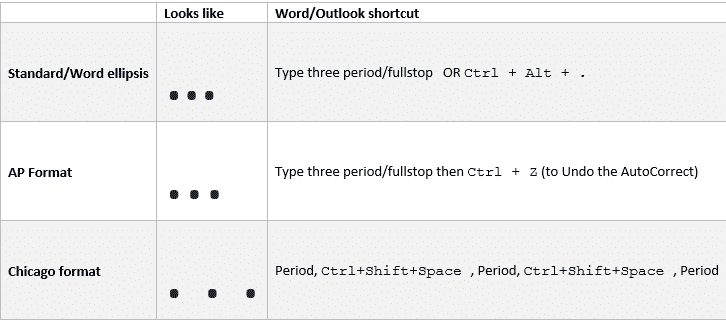
Ellipsis … symbol in Word, Excel, PowerPoint and Outlook
Type the three different types of Ellipsis … marks in Microsoft Word, Excel, PowerPoint or Outlook. Both in Office for Windows and Office for Mac. Ellipsis … symbol is used for a gap or break in some text, usually to drop out some irrelevant text or speech. The same applies in maths e.g. 1,1,2,3 …. […]

Comma Ellipsis ,,, in Word and Office
Like it or loath it but the comma ellipsis has arrived ,,, as an alternative to the more common ellipsis with dots. Here’s how to use it in Word and Office. The comma ellipsis is a modern, more casual version. It’s used as a more dramatic, even annoyed trailing off of a thought, compared to […]

Office simplified ribbon with Voice Access
See the Microsoft 365 / Office simplified ribbon combined with Windows 11’s new accessibility feature, Voice Access. Voice Access is a new way to control Windows by voice that’s in the 22H2 release of Windows 11. Windows 11 for Microsoft Office users is already updated for 22H2 features including Voice Access and its counterpart Live […]









