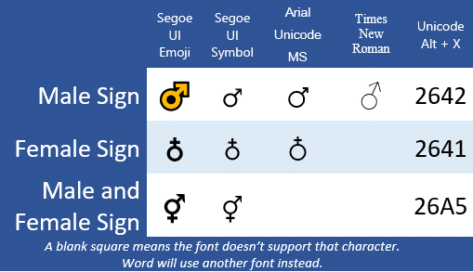
Male ♂, Female ♁ or ⚥ symbols in Word & PowerPoint
Should automatically redirects to Male ♂ Female ♁ both ⚥ symbols in Word and Office, if not, please click the link
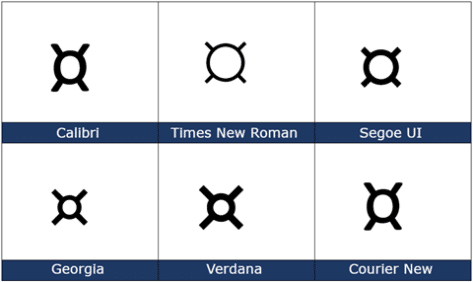
Currency ¤ Symbol in Word, Excel, PowerPoint and Outlook
How to insert the Currency ¤ or scarab symbol into Microsoft Word, Excel, PowerPoint or Outlook. Both in Office for Windows and Office for Mac. Currency ¤ symbol is used to denote an unspecified currency. It’s the generic sign you could use if the correct symbol isn’t available. It doesn’t seem to be used a […]
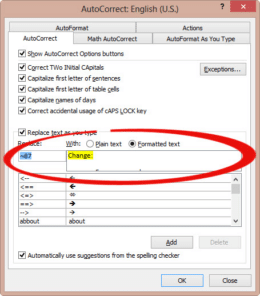
AutoCorrect is great for larger blocks of text & acronyms in Word
How to use AutoCorrect for more than a word or single character. It can speed up typing of large blocks of text or expanding an acronym into the full name. Paul G writes: “Autocorrect is fantastic for the numerous standard letters, or specific instructions for various computer actions (downloads, etc). 1. I prepare the fully […]

New dark mode in Microsoft Word
Word 365 for Windows now has an even darker dark mode option which changes the page area to black with white text. Until now ‘Dark Mode’ only applied to the ribbon and other interface areas, not the document area. The newly extended Dark mode only changes the look on the edit screen – what Microsoft […]

How new is the Microsoft Office interface really?
A fascinating article digs into the ‘new’ Windows 10 look to reveal that it’s not as new as Microsoft hype would have you believe. Some parts of Windows 10 are over 25 years old and it’s a similar story in Microsoft Office, despite the Ribbon. It’s the same in Microsoft Office, scratch the Ribbon and […]

Apple Privacy tags don’t tell the whole story with Office
Apple’s new Privacy tags sound like a great idea but they rely on the honesty of app makers (Ha!) The simple labels can cover an enormous amount of privacy intrusion in Microsoft Office and Outlook mobile apps. The Washington Post is behind a paywall but the ‘general tenor of his spray’ is that each developer […]

Right Pointing Hand ☞ symbol in Word, Excel, PowerPoint and Outlook
How to insert the white right pointing hand ☞ into Microsoft Word, Excel, PowerPoint or Outlook. Both in Office for Windows and Office for Mac. Officially called “WHITE Right POINTING INDEX” ☞ symbol is a different or novelty form of the right arrow as a hand. It can be used in standard text or a […]

Black ‘Not Allowed’ circle/line symbol
Continuing our series on the ‘Not Allowed’ symbol, let’s make a version with a black background and white center graphic. This isn’t part of the official ISO specification for the symbol but it’s widely used. It’s done by adding a black circle under the main circle/line & graphic (which is changed to white, naturally). An […]
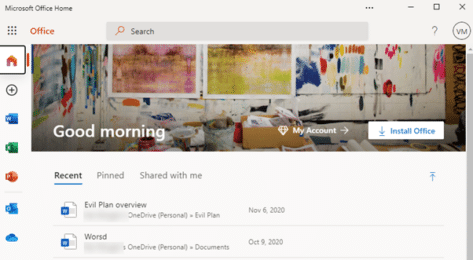
Make Microsoft Office a Progressive Web App or PWA
Microsoft Office (plus Word, Excel and PowerPoint) can be installed as a standalone web apps or PWA. We’ll explain how and the current limitations. This looks like the Office.com web page but it’s not, it’s Office as a standalone Progressive Web App (PWA). It’s available now in Windows 10 with the Edge (Chromium) browser. To […]

What Office users need to know about the new Windows 10X
Windows 10X is coming and you’ll hear a lot about it in the coming months. Let’s see what Windows 10X is, how it will run Office (Word, Excel, PowerPoint, OneNote and Outlook) and why most people won’t need to worry about Windows 10X. What is Windows 10X? Windows 10X is a very scaled-down or lightweight […]

Arrived! The first Office bug fixes for 2021
Microsoft announced 83 security bug fixes for January 2021, the count is really 96 once you add the Edge browser patches from last week. At first look, it seems there’s only five Office related patches including two each for Word and Excel. It’s important to keep both Office and the underlying operating system patched. The […]

Better ‘Not Allowed’ red circle/line symbol with text
Continuing our series on the ‘Not Allowed’ symbol, let’s make a versions with text instead of a graphic or icon. Check out our article on Make a ‘Stop’ circle / diagonal symbol in Word, Excel & PowerPoint about creating, resizing and coloring the basic shape. Text in circle Instead of the usual symbol, let’s add […]

Great text & image ‘Not Allowed’ red circle/line symbols
Continuing our series on the ‘Not Allowed’ symbol, let’s make a version with text and graphic or icon. Check out our article on Make a ‘Stop’ circle / diagonal symbol in Word, Excel & PowerPoint about creating, resizing and coloring the basic shape. Better ‘Not Allowed’ red circle/line symbol with text has the basics of […]

Office Lens leaves Microsoft Store but lives on!
As we mentioned back in October, Office Lens has been dropped from the Microsoft Store but it’s not the end of Lens, far from it. Microsoft announced that the cloud services backing Lens features would be disabled from 1 January 2021. Only Office Lens for Windows 10 and Windows Mobile are affected. Saved documents retained […]

Nice variations for Stop shape in Word, Excel & PowerPoint
There’s plenty of scope for variations on the basic Not Allowed symbol (red circle with diagonal) using the tools in Microsoft Office. See Make a ‘Stop’ circle / diagonal symbol in Word, Excel & PowerPoint for how to insert the basic ‘Not Allowed’ shape and change to suit your needs. Line Direction The line across […]
Office Watch most popular articles of 2020
Well, that’s been an ‘interesting’ year for all of us <sigh> . Here’s some of the articles that have been popular with our worldwide audience over 2020. Getting more from online video calls With the global lockdown, Office Watch switched roles for a while and added lots of advice for online video calls. We’ve been […]









