
Editor look & feel changes coming in Word and Outlook
Microsoft has announced some changes to the Editor feature in Word and Outlook to improve access to spell-check and grammar tools. Look for these changes in upcoming releases of Word and Outlook for Windows and later for Mac. Many reports on these changes say that the Editor is a ‘new grammar checker’ in Word 365, […]

Pantone 2021 colors in your Word, Excel and PowerPoint
Pantone has announced not one but TWO ‘colors of the year’ for 2021 and, as usual, we’ll explain how to use those exact colors in Word, Excel, PowerPoint and Outlook. The colors of 2021 are … Illuminating and Ultimate Grey As usual what’s more amazing than the color is the description that goes with the choice. […]

Synonyms in Word and, maybe, PowerPoint for the web
Word and PowerPoint online, the browser versions, now have the same Synonyms feature that’s in the Windows and Mac releases. Synonyms helps you vary your vocabulary by suggesting alternative (different, substitute, other ) words. If you’ve used Synonyms in Office for Windows or Mac, there’ll be no surprises in the browser version. Right-click on a […]
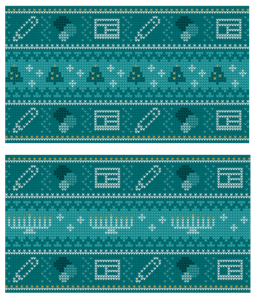
Get your Holiday ‘sweaters’ for Teams, PowerPoint & more
Microsoft has released some ‘sweater’ backgrounds for Christmas, Hannukah or anytime of year. The PNG images are intended as backgrounds for Teams calls but can be used anywhere. A PowerPoint slide, Word background, Zoom call background or whatever. Adding Virtual Background or blurred video to TeamsAdd your own background image to a Teams call They […]
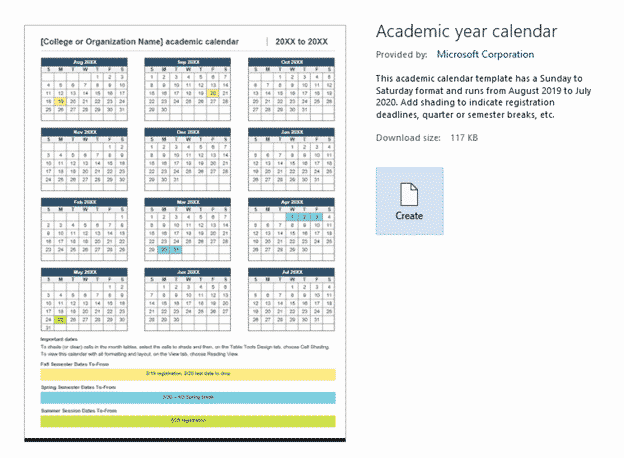
2020/2021 Academic calendar in Microsoft Word
The only specific 2020/2021 calendar template in Microsoft Word is an academic calendar from August 2020 to July 2021, here’s how to use it and make it better. In File | New search for ‘academic calendar’ there are a few options. We’re looking at ‘Academic year calendar’. A few notes before moving on. Ignore what […]
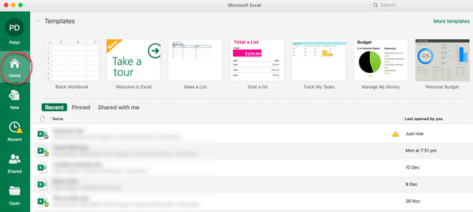
New look in Microsoft 365 for Mac coming in early 2021
Microsoft 365 for Mac is getting a revamped look for the Home or Start menu in early 2021. Here’s all the new and old features in the Home pane or as Microsoft calls it “Office Start experience” (no kidding) The Home panel changes to be more consistent with what’s visible in Microsoft 365 for Windows […]

Here’s how Gmail can now edit Office docs directly
Google’s Gmail can now directly edit Microsoft Office documents arriving in email attachments. It’s available to all Gmail users, free and paid accounts. It removes a lot of the hassles of exchanging Office documents with Gmail and Google Docs/Sheets/Slides users. No more document conversion hassles … at long last! Email Attachments edited directly Any incoming […]

PowerPoint Outline tricks with Word
You don’t have to write directly onto each PowerPoint slide. Instead write an outline of headings and text, then convert into slides. There are two ways to do it, with Word or directly into PowerPoint. Outline View View | Outline View shows each slide title with bullet points within a slide. Slides can be made, […]

Beware MacOS backdoor hack with fake Word document
Mac computers aren’t immune to hacking and viruses. There’s a new backdoor infiltration out there posing as a Word document and directly targeting Macintosh computers. OceanLotus is interesting because it targets MacOS, trying to open a backdoor through which hackers can get data from Mac computers. Another noteworthy part of the hack is that the […]

Special offer for Microsoft 365 Business Premium or an even cheaper option
If you’re thinking about getting Microsoft 365 email hosting with full Teams and SharePoint, Microsoft has a limited time offer this week only. However, before you jump into their deal, there’s another very similar option that’s even cheaper. Until 30 November 2020, Microsoft is offering 25% discount on their Business Premium service for small businesses. […]

The latest Office ‘Insiders’ names changes
Microsoft can’t help themselves when it comes to naming their ‘Insiders’, ‘Preview’ or beta test versions. The names change for no good reason and timing is different for each platform rather than all Office apps changing at the same time. The latest changes are for MacOS, iOS (iPhone/iPad) and Android devices. They’ve happened months after […]
Office 2010 updates are still available, here’s how
0Patch is stepping in where Microsoft has left by offering continued security updates for Office 2010 after official support was dropped a few months ago. Newly discovered high risk security bugs in Office 2010 will get micropatches from 0Patch. These unofficial updates change the existing program files to prevent the new security lapses troubling your […]

Putting a Command on the Quick Access Toolbar
The Quick Access Toolbar (QAT) is located on the left side of the Word, Excel, PowerPoint or Outlook title bar. You can add commands, options and even symbols for easy and quick obvious access By default, the QAT only has Save, Undo, Redo and Touch/Mouse commands but you can cut down on unnecessary keystrokes by placing […]
Reader’s suggestion for typing a tick in Office
A quick way to type a ü tick or check mark character in Word. Another great Autocorrect suggestion from Morris B. ” … the one that I have found the most useful is to replace ‘./’ with a tick (wingdings 252 – or wingdings 254) “ Using the fullstop/period is a clever Autocorrect prefix since […]
Quickly add any special characters in Office
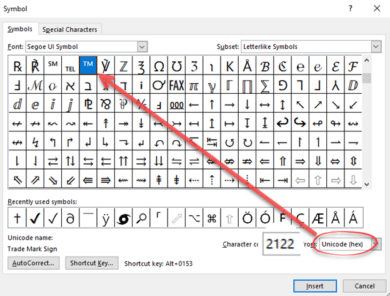
One of the eternal questions to Office Watch is about adding characters to an Office document. Symbols and characters not on the keyboard. The most common requests are for adding currency symbols like Pound £ Euro € or Yen/Renminbi ¥ but can also include the @ symbol which can, even these days, be missing from […]
Inside the new Designer for Microsoft Word
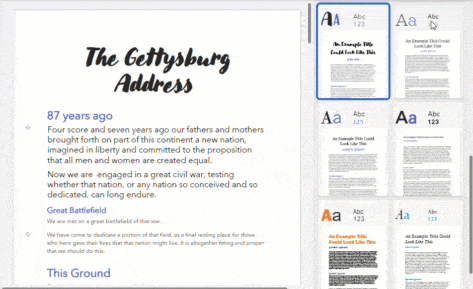
Designer, a quick formatting feature in PowerPoint is now available in Microsoft Word. Here’s how to find and use the new feature. Word’s Designer works a little differently to the PowerPoint Designer but the basics are the same. A side-pane offers some templates that will reformat the entire document. Some Microsoft clever coding (they call […]









