
Konami Code in PowerPoint and other Office documents
The Konami Code symbols can be used together or separately in PowerPoint slides, Word documents or elsewhere. They serve to demonstrate some tricks and failings in Office and it’s SVG support. The Konami Code graphics caught our eye because they are a useful set of icons or graphics either complete or separately. There’s nothing like […]
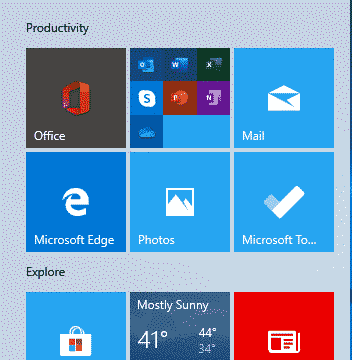
Fixing Office confusion and other hassles on Windows Start menu
The Start Menu on a new Windows 10 has Microsoft Office icons which are badly labelled, misleading and setup to promote Microsoft’s corporate agenda. We’ll explain what Microsoft has done and how regular Office users can make the Start Menu better. Make a Start Menu that suits you, not Microsoft. A new or reset Windows […]
Office all-in-one app for Apple iPhone and iPad
Last week we said it would not be long before Microsoft released their Office app for Apple devices and, sure enough, within a few days Office ‘all in one’ for iPhone and iPad is out. The app is a combination of Word, Excel and PowerPoint plus other tools into a single app. Individual Office apps […]

Oblique RAT documents try to infect computers
A new type of infected Word document is doing the rounds with the name ObliqueRAT with a few new tricks. ObliqueRAT is similar to an earlier nasty CrimsonRAT but has a range of infection capabilities and is encrypted. Password Protected The infected Word documents usually arrive via email and are password protected. Presumably the password […]

Office ‘All in One’ Mobile app – the video!
Microsoft has released a video to promote the Office Mobile ‘all in one’ app for Apple and Android. It’s big on fancy graphics but almost no useful information. There are lots of fancy colors, bouncing bubbles and even Office logos turning into balloons then exploding … all for no good reason. There’s more info in […]

Vale two pioneers of word-processing, Lawrence Tesler and Gary Starkweather
Farewell to Lawrence Tesler and Gary Starkweather. One gave us the clipboard with cut, copy and paste as well as the ridding computers of modes. Mr Starkweather invented the laser printer, a major innovation for the time. Back in the 70’s, word-processing programs had two modes – editing and viewing. Edit mode had rough text […]

Pete Buttigieg – a Microsoft Word guy
Apparently nothing can escape the touch of US politics*. Even Microsoft Word and PowerPoint got dragged into the latest Democratic Primary debate. It all started with Elizabeth Warren describing Pete Buttigieg’s health plan as ‘just a PowerPoint’. Buttigieg responded with the ad-lib that “I’m more of a Microsoft Word guy.” Which isn’t bad as an […]
Office ‘all in one’ app now on Android
The ‘all in one’ Office app combining Word, Excel, PowerPoint with Office Lens and PDF support is now available for all comers with Android phones. Office Watch did a comprehensive look at the Office app back in November when it was available to insiders. Now it’s available to all at the Google Play Store. No […]
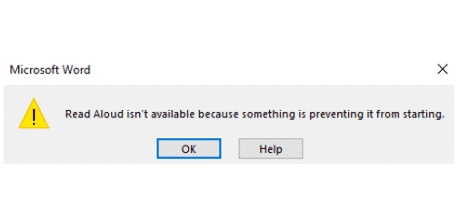
Unhelpful Office error message for Read Aloud
Our award for ‘Unhelpful Office error message of the week’ goes to this remarkable effort in Word 365’s Read Aloud feature which is just the start of Microsoft’s uselessness. We were trying to demonstrate Read Aloud in Word 365 when this singularly useless dialog appeared! “Read Aloud isn’t available because something is preventing it from […]

Inside the Office ‘all in one’ app for Apple and Android
A new Office app for Android a single ‘all in one’ app for Microsoft Office. We’ve done our own look at the new app, not relying on Microsoft’s hype to check out the Home panel, Actions, Word, Excel and PowerPoint features, PDF viewing and options, ‘image to text’ features and how to bypass a major […]

Difference between ‘Pickup where you left off’ and GoBack ‘Shift + F5’.
Microsoft Word’s ‘Pickup where you left off’ or ‘Welcome back’ message is different from the Shift+F5 shortcut. All the recent talk about the ‘Pickup where you left off’ feature in Word had a few Office-Watch.com readers asking how it’s different from the long-standing GoBack shortcut in Word – Shift + F5. GoBack Shift + F5 […]

Line Ends on Dashed Picture Borders in Word and PowerPoint
One of the more obscure settings when putting a frame around a picture in Word or PowerPoint is the Cap Type or line ends. This setting only applies when you are using one of the dashed borders with the choices Square, Flat and Round. To put a dashed border on your picture, click on the […]

Picture Frame Corner Types in Word and PowerPoint
Join Type is what Microsoft calls the corners of the picture frames – the place where the horizontal and vertical lines join. There are three options: Round. Bevel and Mitre. We’ll show you where those choices are and what they look like. We’ve previously looked at ways to put frames around pictures in Word and […]

Coronavirus, Buttigieg and other topical words in Word & Office
One of the quiet improvements in Office is the regular updates to the Office dictionary used mostly in Word and Outlook but also other Office programs. They even handle new terms like Coronavirus or names such as Buttigieg. In olden days the main dictionary was only updated with major revisions of Office. Now the dictionary […]
Multi-Line Picture Borders in Word or PowerPoint
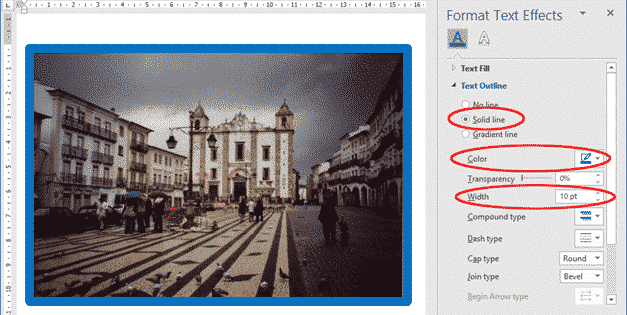
Word and PowerPoint have some great ways to add a border or frame around an image, graphic or logo. We covered these broadly in a Framing Pictures in Office and now we will look in detail at the Compound Type, or multi-line borders. Compound Type is Microsoft’s name for the options of two-line borders with […]

Which version of Office for iPhone, iPad do you have?
Here’s how to find the version number of your Word, Excel, PowerPoint or Outlook apps for iPhone or iPad. Sometimes it’s important to know which exact app version you’re running. Normally, the apps are updated automatically but occasionally it’s important info. Maybe you need to check the version to ensure that a new feature is […]









