Even today, despite the public outcry, a document saved to docs.com will automatically be available to everyone. The privacy choices aren’t obvious and the ‘public’ default isn’t clear either. Here’s what you see when uploading to docs.com You have to click the ‘three dots’ menu button then scroll down a
If you’ve ever used http://docs.com it’s a good idea to check what’s saved there and what public access is set. Login with your Microsoft account (or other login) and check the list of saved documents (click on your name at top right. Depending on your wishes you can: Leave as
The debate about the Oxford Comma continues with news that a Maine company has lost a court case for the lack of a vital extra comma. Oxford Comma is one of the lesser known grammar checks in Microsoft Word. Sadly, Word would not have warned of the problem and saved
Redmond has released more Office training videos to help newbie users. Get started with Office Intro to Office Basics Sign in to Office Get help and support Change your Office for Home password Change your Office 365 for Business password What is Office 365? What is Office 365? Get the
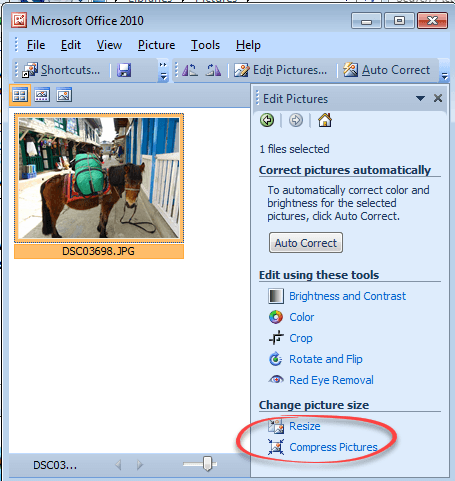
Office Picture Manager, the much loved and simple image editor was dropped by Microsoft, but it’s still available. Picture Manager has some features that aren’t in Windows 10 to this day. Here’s how to get it for free. There are two ways to get Office Picture Manager (OPM). Both involve
The Google Docs apps have a useful option for making new documents, worksheets and presentations that are Microsoft Office compatible. JR Raphael at ComputerWorld pointed out the option in the Google Docs app for Android, we poked around to find the equivlalents in Google Sheets and Google Slides Under Settings there’s
CyberX Labs has identified Operation BugDrop, which uses Word document to attack targeted businesses and steal corporate information. They send emails to the business they want to raid that trick people into enabling macros. Opening the hacked document displays the Security Warning and ‘Enable Content’ button are real; created by
You’ve chosen an image, now you have to get it into your Office document. You’d hope there was a single way to do that but, as usual, there’s plenty of options. Outlook has its own special needs, different from Word, Excel and PowerPoint. There’s also privacy and image size issues
Here’s the complete list of non-security updates for Office 2016 for Windows and Office 2013 plus our notes on some bug fixes that caught our eye. As usual, these updates will be pushed to most Office computers automatically. No action is necessary. Unexpected Issues Microsoft is always using different words
It was only a matter of time, the first attack targeting Word for Mac has been released. It’s a simple, almost primitive hack, but it’s out there so beware. There even a ‘silver lining’ of sorts. The document is named U.S. Allies and Rivals Digest Trump's Victory - Carnegie Endowment
The Metropolitan Museum of Art in New York is the latest gallery to put many of their images into the public domain. Now you can, legally, use them to decorate your PowerPoint presentations or Word documents. The Met has released about 375,000 images under Creative Commons Zero CC0 licence. That
Microsoft announced Touch Bar support with much fanfare back in October 2016. Over 3 months later and paying customers are still waiting. There’s been lot of talk about this feature including web sites with ‘tips’ on using Office with the Touch Bar without noting that it’s not got into ‘insider’
To many people the Oxford Comma is an obscure grammar issue but, boy!, can it get people excited. We’ve had lots of messages, pro and con, from readers. This all started because Microsoft dropped one of the options available for the Oxford Comma check. In Office 2016 (Windows or Mac)
A few years ago we had a close look at the Oxford Comma (‘Comma required before last item’, serial comma, Harvard Comma etc) in Word 2013. We’ll now repeat those tests with the new “Microsoft’s own” grammar system to see if there’s any improvement. Office-Watch.com has already noted that the
Microsoft has restored an important missing part of Word 2016 for Windows; the Grammar and Style checking! It’s available for all Word 2016 for Windows users including the ‘perpetual licence’ users who normally don’t get ‘new’ features. This important improvement hasn’t had the usual Redmond hype, presumably because it’s more
The saga of the Comic Sans font never ends. Like the font itself, stories about the font won’t die. Now we have “Comic Sans: The Man Behind the World’s Most Contentious Font” the video. Contentious is a polite word. Hated, Loathed, Despised, Reviled, Detested might be more accurate. It’s not
Office Lens, a way to convert pictures of documents or whiteboards into text is finally available for Apple iPads. Back in 2015 Office-Watch.com demonstrated some of the clever crop and rotation tricks in Office Lens, plus the ‘convert to text’ option shameless stolen from OneNote. Source: Microsoft Images can be
There’s a new type of infected Office document that can bypass some protections and trick people into installing a keylogger on their computer. A keylogger is software that records each keypress and send it to a hacker. They can use that info to get your login details for many sites
“Why doesn’t Word for Mac have a reading view like Word for Windows?” Clare C. Nottingham, UK? Word 2016 for Mac does have a variation on reading view. It’s similar to Word for Windows, but it’s renamed. Look for Focus on the View tab. Word for Windows has Read mode.
Microsoft has released a new version of Office 2016 for Windows to the ‘Slow’ insiders. This means Office 365 customers have more goodies to look forward to in coming months. You’ll need Office 2016 Version 1612 (Build 7628.2048) or above. The new features, as described by Microsoft are: View and
There’s very few security patches this month but the major fix is for Word 2016 for Windows. Alas, as usual, Microsoft tries to overwhelm with a lot of standard phrases leaving key questions unanswered. This months security flaw is similar to many others over the years. A hacked document can
A style is a collection of formatting choices combined under a single name. Any word or even a single letter has a collection of formatting settings as well. Font: size, color, bold/italic/underline/strikethrough/subscript/superscript, highlighting and more. Position: Left, Center, Right, Justified. List: bullet, numbering. Line Spacing, Borders, Background color and a
We’ll start 2017 with a look at some commonly used characters used in Office but are missing from the standard keyboard. How to insert symbols on a ‘one-off’ basis or insert quickly for more commonly used characters. Degree mark for temperature. Has no special shortcut but you can make one
Another festive season (marketing) tradition is the Pantone ‘Color of the Year’ which gets a lot of media coverage. It gives us an excuse to explain how to convert (as best you can) a Pantone color into something to use in Microsoft Office. Pantone colors don’t have a direct match