Make stacked or vertical fractions in Microsoft Office
Creating clean, professional-looking stacked fractions in Microsoft Office is easier than many users realize, if you know where to look. The built-in Equation feature lets you insert vertical (stacked) and other fractions quickly, without hacks or manual formatting. Here’s the fastest and most reliable way to add proper mathematical fractions in Word, Excel or PowerPoint.
We’ve already explained how to type fractions in different ways. Simple fractions with AutoFormat as you type, AutoCorrect to add other fractions as symbols or DIY fractions with sub/super script.
Typing common fractions in Word and Outlook
Make your own fractions in Word and Outlook
Diagonal / skewed or Stacked/vertical
All those options are great but they present fractions in the same format with a diagonal or skewed separator (in blue). The article explains how to make a ‘stacked’ or vertical fraction with a horizontal line (green)
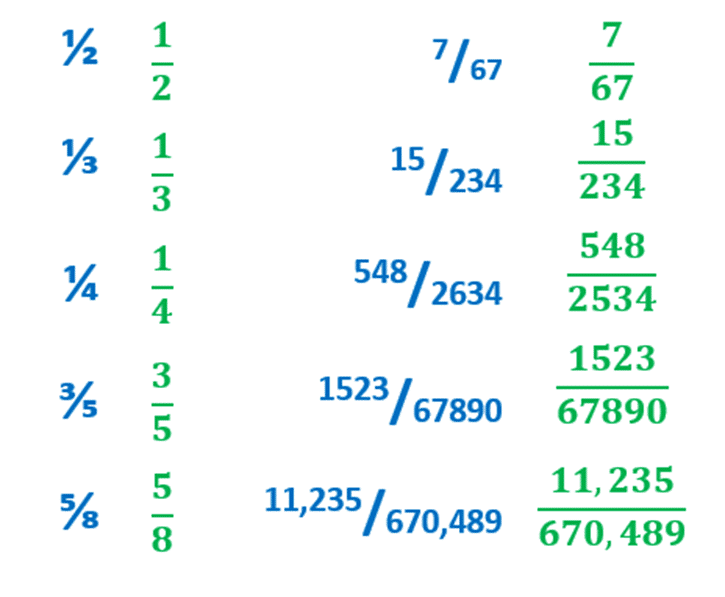
You can display fractions with the numerator directly above the denominator by using an Equation Field (aka Office Math).
Select on your page where would like to insert the fraction, then go to Insert | Equation or the shortcut Alt + Equals sign (=) does the same thing.

From there it will add an Equation box into your document.

From there it’s too simple. Just type your fraction as normal, for example 2/10. The equation box will automatically stack the numerator above the denominator.

Even more fraction display choices
Select the Fraction tab on the Equation tab to choose a different format for your fraction:

Stacked is the default, takes up more vertical space than Skewed or Linear.
Skewed looks almost the same as the super/sub script option.
Linear is the same as normal typing with a diagonal line between.
Small – also stacked but takes up less room.

Yes, you could make a stacked fraction with a small table but truly, the equation option is a lot easier.
Typing common fractions in Word and Outlook
Make your own fractions in Word and Outlook
Typing some simple fractions automatically in Word and Outlook