There are a series of keyboard shortcuts for quickly switching between Outlook views: Mail Ctrl + 1 Calendar Ctrl + 2 Contacts Ctrl + 3 Tasks Ctrl + 4 Notes Ctrl + 5 Folder List Ctrl + 6 Shortcuts Ctrl + 7 Either the
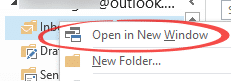
Outlook has a lot of different aspects; email, calendar, contacts etc and we see many people switching between them, waiting for different views to load …. and they don’t have to. If you click on a folder or navigation icon the window will switch to that view, often with a
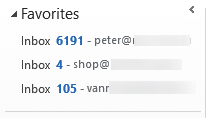
The default Outlook Navigation pane isn’t meant for you, it’s intended for absolute beginners to the program and to reduce the number of support calls. Once you’ve started to use Outlook, it’s time to change the way it looks to suit you, not some corporate agenda from Microsoft. Take off
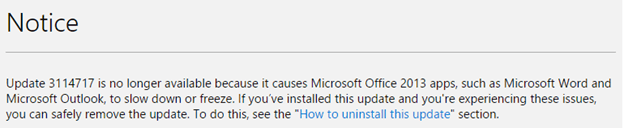
This is now beyond a joke. Yet another month with a broken patch for Microsoft Office. The February 2016 broken patch is known as KB3114717, after the Knowledge Base article. It applies only to Office 2013 installed via MSI (ie DVD or direct download). It also applies to Office RT for
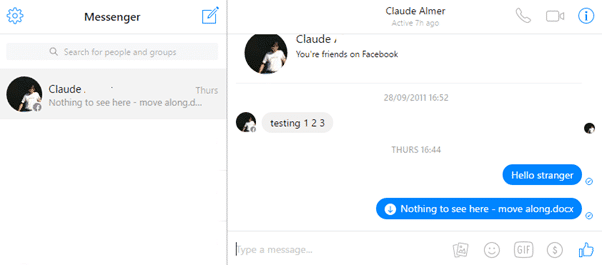
Facebook has an instant messaging/chat feature that can be used to transfer Office documents. It’s worth keeping in mind if you want to share a document with a Facebook friend. Messenger is different from Facebook’s WhatsApp which only has limited file transfer options. Rather than use the cluttered Facebook.com pages,
Effective Outlook Calendars 2nd edition has been updated for Outlook 2016, Outlook 2013 and Outlook 2010 in the one book. Greatly expanded and revised version from the popular 1st edition. An extensive guide to Outlook Calendar, appointments, events and reminders. How to sync a one or more calendars on many computers,
Apple is getting a lot of good publicity for their resistance to a US court order to unlock an iPhone. The US government could have chosen another example of an iPhone they want unlocked. The choice of a terrorism related case is no accident. It’s possible that the iPhone 5c
Among the many Table of Contents questions we’ve received were very good ones about making a ‘Quick Reference’ guide to a Microsoft Word long document. Usually this is the main headings plus some text that summarizes that chapter/section. It’s possible to make a special summary in Word that updates automatically.
Many useful changes in Excel 2016 for Windows in the January 2016 update. We have extensive coverage of the overall changes that apply to Word, Excel and PowerPoint. Check out separate articles on the specific new features in Excel, PowerPoint and Outlook. Like to know more? Office 2016: the real
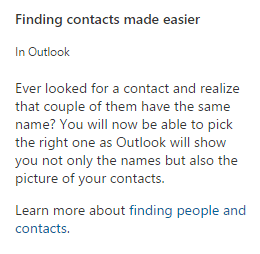
There’s really just one specific change in Outlook 2016 for Windows that we can find – not the three boasted by Microsoft. One ‘improvement’ is just fixing a feature that was crippled with the first releases of Outlook 2016. Another is vaguely described and we can’t find it in Outlook.
There’s just one January 2016 change in PowerPoint 2016 for Windows but it’s big and very useful. We have extensive coverage of the overall changes that apply to Word, Excel and PowerPoint. Check out separate articles on the specific new features in Excel, PowerPoint and Outlook. Like to know more?
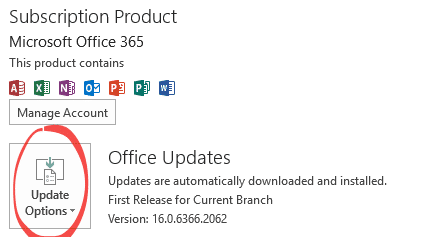
Continuing the new policy of regularly updating Office for Windows, there’s now a new set of features being pushed out to Office 365 subscribers. This page looks at the overall changes that apply to Word, Excel and PowerPoint. Check out separate articles on the specific new features in Excel, PowerPoint
Several readers have emailed to complain about yet another Office bug caused by an update pushed out by Microsoft. The company has managed to break one of their own VBA controls, used by third-party Office developers. The control mscomctl.ocx (version 6.01.9846) can cause the error “Object doesn’t support this property
Microsoft’s push of Office 365 annual payments over ‘one time’ purchases continues with the announcement that they have over 20 million consumer customers for Office 265. It’s one number from their results for the last quarter of 2015. Office 365 overall had a whopping 70% increase in revenue. But the
Microsoft Office now has significant and welcome expansion of the links to non-Microsoft cloud storage. In particular, it’s now possible to do real-time document collaboration with files shared on Box, Dropbox, Egnyte and Citrix ShareFile. Until now, you could save documents to some ‘outside’ cloud storage but not open the same
As promised, Microsoft has now opened their Office Insider program to our friends with Office for Mac. Office Insider is Microsoft’s new ‘preview’ program. Members get advance access to new releases of Office for Windows/Mac Access to Office for Mac insider is through Microsoft AutoUpdate. Open one of the Office
My Little Pony, those toys for little girls, are in a legal dispute over a font. TorrentFreak is reporting that Hasbro, owners of My Little Pony are being sued over the unauthorized use of a font. We all use fonts in our documents and presentations, but managers need to consider
Cindy M tells us about a curious oversight in Outlook … ‘Outlook will not allow me to choose a Contact Group on which to perform a mail merge. I got an error message stating “Contact groups cannot be merged. You must select a Contact.” ‘ It’s something we’d never thought
Exchange Server/Office 365 users of Outlook might see ‘Bing Maps’ links above messages, like this They appear when Outlook detects a physical address in this message body (which it does with mixed success). Click on the ‘Bing Maps’ link to open up a web page. You might not like this
When to use TO, CC, BCC in an email or Mail Merge instead. Those three email fields not only act differently but, these days, which one you use can make a difference to whether the message will be delivered. There are many different mail filtering and prioritizing systems that check
Office 2016: the real startup guide isn’t a single release, anyone who buys the ebook gets the free updates too. It’s a bit like the rolling updates to Office 2016 itself, but NO annual fee <g>. Microsoft has added some features to Office 2016 for Windows, so Office 2016: the
Microsoft’s Click to Run install may accumulate a lot of temporary files that stick around on your hard drive. They can amount to many gigabytes of wasted disk space. Amazingly, there doesn’t seem to be any official tidy up option available to reclaim all that disk space. We found 19GB
More and more, there are differences between Microsoft Office two variants the ‘Click to Run’ install and the older ‘MSI’ install (download a single large install package then install). Originally, Microsoft promoted both install options as giving the same final software but that’s changing. ‘Click to Run’ installations are now
The January 2016 updates to Office 2016 for Windows weren’t just security patches, there were also bug fixes and updates that Microsoft is doing their best to keep secret. We know of at least two bug fixes in Office 2016 that haven’t been properly documented by Microsoft. (Thanks to Office