Microsoft 365 – the subscription / annual fee plan for Microsoft Office on Windows, Mac, iPhone, iPad and Android.
Includes Word 365, Excel 365, PowerPoint 365, Outlook 365 and many other ‘365’ programs, apps and services.
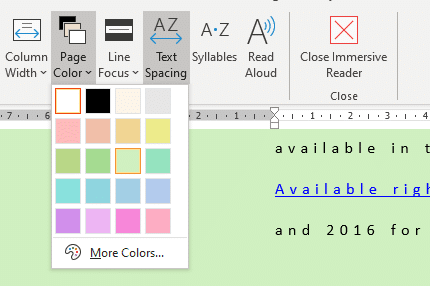
Word 365 new feature mystery
Additions and changes to Microsoft 365 (Word, Excel etc) are often not explained properly beyond a short paragraph. Then there are cases where even that explanation is a mystery. We’re obliged to Hannah J. from Munich for asking about this item on the Microsoft site from April 2019 which we overlooked. From What’s new in […]
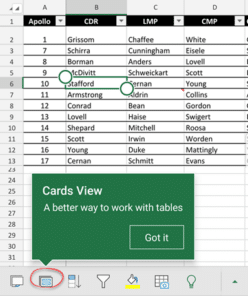
Excel Table Cards for smartphones
Excel for iPhone and Android smartphones have a useful extension of Excel Tables called Cards. It’s a better way to view tables on a smaller screen with larger text and easier editing. Instead of scrolling right/left on the small screen, all the info for a single table row can be seen and edited as a […]

Repeating or recurring Outlook Appointments
Outlook can record appointments in the Calendar but it can also record ‘recurring’ appointments for things that happen on a regular schedule. We’ll show you how to make a repeating appointment and suggest some ways it can be used that might not be immediately obvious. Repeating Appointments 101 To make a recurring appointment: Create a […]

Nekofont – the cat font
Headline your next document with cats! Looking for something really different to headline your next document or presentation – why not use ‘Neko Font’ the font made out of cats. Strictly this isn’t a font you can download, instead you type text into a web page, choose the size (Large, Medium, Small or Tiny) and […]

Surface Earbuds with Office
Microsoft’s Surface Earbuds are out now and have some extras for Word, Outlook and PowerPoint users. When we look past the hype there’s more than a few special conditions to keep in mind. Surface Earbuds have been some time coming, we first mentioned them about nine months ago. Now they are here, reviews have been […]
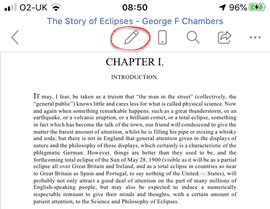
Word for iPhone gets reading mode
Word for iPhone now has a reading mode … at long last there’s a way to look through a document without the keyboard and other editing tools getting in the way. When a document is opened, it’s in read mode. No pesky keyboard or menus. The top line has Edit, Mobile View, Search, Share and […]

ICE – In Case of Emergency card in Word
Word can be used to fill in and make an ICE or In Case of Emergency card. Our newsletter subscribers can download the Word document, ready to fill in and use. ICE cards are known to paramedics and emergency rooms the world over. An unconscious or uncommunicative patient is searched for identification and other information. […]
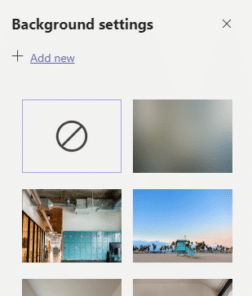
Add your own background image to a Teams call
Microsoft now lets you add your own virtual background image for Teams video calls. Before this change, there was a simple hack to add your own image as a virtual background. Microsoft rushed to add virtual backgrounds to Teams video in response to the popularity of Zoom. A major problem remains, you can’t change the […]

Tricks inside Money in Excel
Microsoft’s Money in Excel is worth looking at even if you don’t want to use it. There are some useful features and formula tricks you can use in your own workbooks. Group Columns Grouping columns or rows is normally for bringing together lists rows or columns. Grouping days into a week or weeks into a […]

Apple Silicon and what it means for Microsoft Office
Apple is switching their Mac computers from Intel to their own in-house chipsets known as ‘Apple Silicon’. A change in CPU is a big deal and raises questions about compatibility with Microsoft Office. The change from Intel to Apple CPU’s has been expected for some time and will take years to roll out to the […]

Animated GIF’s coming to Word, Excel and PowerPoint
Animated GIF support is coming (finally!) to Microsoft Word, Excel and PowerPoint. We discovered the new feature in a new Insiders build, Microsoft hasn’t announced anything. Here’s an animated GIF playing in Word 365. Paste or Insert an animated GIF now has play/pause buttons included (bottom left corner). The animation starts playing automatically when inserted. […]

Teams gets personal for families and groups
Microsoft has expanded Teams to allow personal groups like families, clubs and groups to use the service. Within Teams it’s possible to text chat, save and edit documents, share calendars and lists. A family could have a grocery list to which anyone can add items before the next supermarket run. A photo gallery of images […]
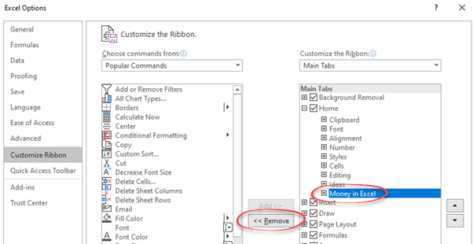
Getting rid of Money in Excel
Money in Excel shows up on the Home tab once you’ve opened the Microsoft template. Here’s how to remove its button from the ribbon or completely remove the add-in from Excel. As soon as you open and use Money in Excel, it adds itself to the Home tab on the extreme right. Microsoft probably thinks […]

Money in Excel goes public
Microsoft has gone public with their Money Excel template to import and manage financial transactions from bank accounts. There are some undocumented tricks available and an important security recommendation that Microsoft overlooks. Money in Excel can import transaction details (US bank accounts only) and show current balances. And convert that into snapshot views to see […]

More Office 2019, Microsoft 365 ‘latest version’ confusion
It’s hard enough for people to keep straight what is the latest version of Microsoft Office without some web sites getting it horribly wrong. The current Microsoft Office products are confusing, no doubt about it. Microsoft keeps changing their product names, policies and features. Microsoft’s ‘fixed’ support policy is written in a light pencil that […]

Numbered List with Only Odd or Even Numbers in Word
If you want a list of numbered items using only odd or even numbers; how do you do that? Are you thinking of Word’s automatic numbering feature? The answer is “Yes” if you add little Word trickery. What exactly you need to do is use the Numbering features but leave the even (or Odd) numbers […]