Microsoft 365 – the subscription / annual fee plan for Microsoft Office on Windows, Mac, iPhone, iPad and Android.
Includes Word 365, Excel 365, PowerPoint 365, Outlook 365 and many other ‘365’ programs, apps and services.

Make a transparent shape to mask a photo in Word, PowerPoint and more
Here’s how to mask a photo with any Microsoft Office shape or icon and do it with full control over what appears from the original image. We’ve already explained two simple ways to crop a photo to a shape or fill a shape with some options to move and resize each element. This method has […]
Beware OneNote .one files as virus carriers
Recent investigations have revealed some worrying truths about the risks in opening OneNote notebooks, a surprising fact about .one files, some bad news and good news. Criminals are increasingly sending out nasty OneNote .one files in emails, taking advantage of another Microsoft security ‘blind spot’. OneNote Embedded File Abuse from Nicholas Dhaeyer at NVISO Labs […]

Microsoft blocks Excel XLL add-ins – at last!
XLL addins for Excel coming from the Internet will be blocked by default as a security measure. Here’s how it works and how to enable XLL files and bypass the new block. You can implement a similar block now in other Excel versions without waiting for Microsoft’s late change. Excel can use .XLL files to […]

Dictate ‘speech to text’ on OneNote for Mac
The ‘speech to text’ Dictation feature is now in OneNote for Mac. Look on the far-right of the Home tab for the Dictate button. Click on it to make the little Dictation toolbar appear. Our book Dictation and Read Aloud in Office explains Dictation and other Office speech features from the beginning and in detail […]

Check out the new look Microsoft Office on an iPhone
There are new look menus and toolbars coming to the iPhone Microsoft Office apps, Word, Excel, PowerPoint and the all-in-one Microsoft 365 app. We’re not sure when you’ll see these changes because they are three months late! Microsoft started talking about this ‘fast and fluent’ change in November 2022. Three months later and there’s still […]

Ctrl + Enter shortcut in Outlook for Windows
What does Ctrl + Enter do in Outlook for Windows and why doesn’t it always work? What’s the equivalent in Outlook for Mac? Ctrl + Enter can be a shortcut in Outlook to send a message after you’ve finished typing. However Ctrl + Enter isn’t always available — in Outlook it can be turned off. […]
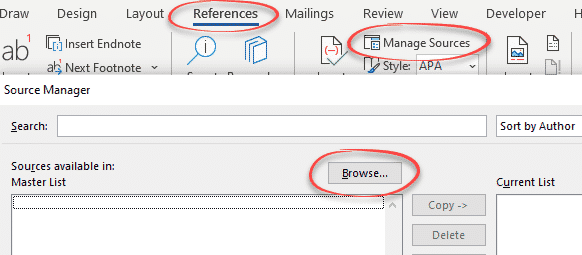
Citation and Bibliography tools beyond Word
Word’s Citation and Bibliography support is enough for some people, but not for everyone so here are tools available to go beyond what Microsoft provides. See Add a Bibliography to Word documents Custom Bibliography formats or styles in Word Citations for everyone in Word Source Manager for citations in Word JabRef JabRef is the commonly used, […]

A simple check for Plus addressing with your email address
There’s a simple way to tell if your mailbox has the useful plus + address feature. Plus email addressing (aka disposable or sub-address) is sometimes available automatically (Gmail or Outlook.com) or has to be switched on (Microsoft 365 hosting). Some other mail hosts might have an option to allow plus + addresses for your mailbox. […]
Indexing ‘bug’ in Microsoft Word tables
A peculiarity of indexes when you use big table cells to format your Microsoft Word document — and a suggested solution. Karen from New Mexico wrote to us describing a strange behavior in her Word document indexes. The documents are class handouts with each topic as a new row in a two column table. This means […]

How to add a Drop Down List in Word
A Word Drop-down list lets you quickly choose one of several options. It’s a fast way to make new documents with a standardized pattern. Don’t be scared, it’s easy to create even though the word ‘Developer’ is involved. We’ll show you how to make drop-down lists, change the bland ‘Choose an item.’ default text and […]

Add different symbols for each bullet in Word or PowerPoint list
How to make a bullet list that has different bullet symbol or emoji for each Word or PowerPoint line. With the wide range of symbols and emoji in Word and PowerPoint there’s scope for creative lists that use symbols that relate to each line. It’s not possible to do that as a normal bullet list. […]

Type double circled digits in Word, Excel and more
Insert digits with double circles from ⓵ to ⓽ in Microsoft Office, Word, Excel, Outlook etc. Use them as an alternative way to number a list like this … Double Circled digits in different fonts Only two common Office fonts have double circled digits Segoe UI Symbol and Calibri. Here’s how the symbols look in both […]
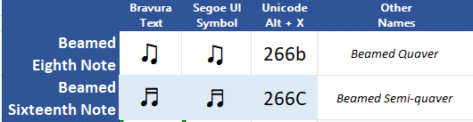
Beamed ♬ Musical Notes ♫ in Word, PowerPoint and More
Type beamed ♫ or joined ♬ musical notes into Word documents, Excel worksheets, PowerPoint slides or emails. It’s possible to type musical notes and other notation in Word documents. Full musical scoring isn’t practical (there’s other software). Unicode only has two ‘beamed’ or joined musical notes, the Eighth or Quaver and the Sixteenth of Semi-quaver. Beamed musical notes different in each font […]

Musical 𝅘𝅥𝅮 notes 𝅘𝅥𝅰 in Word, Excel and more
Type musical notes from breve 𝅜 (double whole note) to the semihemidemisemiquaver 𝅘𝅥𝅲 (128th note) in Microsoft Office, Word, Excel, Outlook etc. It’s possible to type musical notes and other notation in Word documents. Full musical scoring isn’t practical (there’s other software). How musical notes look in different fonts. Most fonts don’t include musical notes. The only common Office font that […]

Jeopardy! clue cards, make your own in PowerPoint and Word
How to make clue cards like the Jeopardy! TV show to use in PowerPoint or Word. Clue … it’s not as straightforward as you might think but we’ll take you through the steps and tricks. Use the well-known format to pose questions for your PowerPoint audience or as a section/chapter heading. Let’s go through the […]

Is “data” singular or plural – let Microsoft Word decide
Is the word ‘data’ singular or plural? It’s one of those changing usages of the English language that reasonable people disagree on. What does Microsoft Word’s grammar and style say … “Data is ..” or “Data are …”? The UK Financial Times has just changed its style guide to say that ‘data’ is always singular. […]









