Microsoft 365 – the subscription / annual fee plan for Microsoft Office on Windows, Mac, iPhone, iPad and Android.
Includes Word 365, Excel 365, PowerPoint 365, Outlook 365 and many other ‘365’ programs, apps and services.
Blank spaces in Word navigation pane
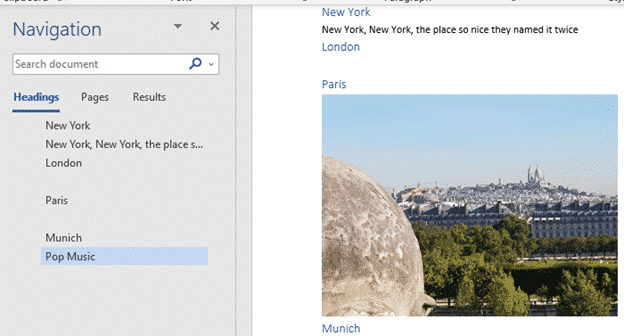
What causes blank spaces in the Word navigation pane and how to fix them. The Navigation Pane in Word shows the Headings in a document but sometimes has the unexpected. Blank lines or text not in a heading. But sometimes blank spaces appear, like between London and Paris above. Why is that happening? The Navigation […]

Dictate voice commands in Office – the full, searchable list
Here’s the full and searchable list of Word 365 Dictation special phrases, in English. Saying any of these phrases converts the words spoken into the symbol or does a Word command. For example, say “Full Stop” and . appears in the document. Say “Dollar sign” and get $ . Say ‘Align Center’ and the current […]

Money template – end of support
Microsoft will be removing Excel’s Money template from Microsoft 365 Personal and Family subscriptions on June 30, 2023. Here’s details on what’s happening to your data and an alternative with a free trial. Ending the Money template is just one of three features being dropped from Microsoft 365 in mid-2023. You’ll no longer receive updates […]

Checkered Flag 🏁 symbol in Word, Excel, PowerPoint and Outlook
Insert the Checkered Flag 🏁 into Microsoft Word, Excel, PowerPoint or Outlook. Plus other alternatives available in modern Microsoft Office like icons or stock images. As its name suggests, the Checkered Flag emoji 🏁 shows a flag with a black-and-white checkerboard pattern. It’s often used to represent vehicle racing, challenges, or accomplishments. How Checkered Flag […]
Simple start with Microsoft 365 and PowerShell
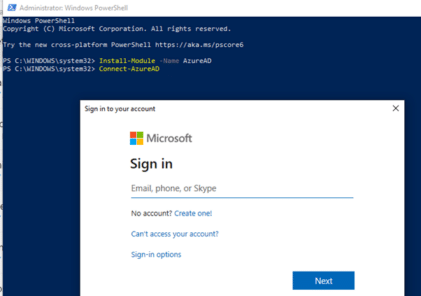
How to run administration commands via PowerShell for Microsoft 365 hosting and especially Microsoft 365 Exchange Server or mailbox hosting. Microsoft 365 customers will often see instructions like this to configure their Exchange Server mailboxes using PowerShell. Set-OrganizationConfig -AllowPlusAddressInRecipients $true Looks simple, but that command alone won’t work in PowerShell because there are add-ins to […]
Quick Excel list sorting and filter buttons
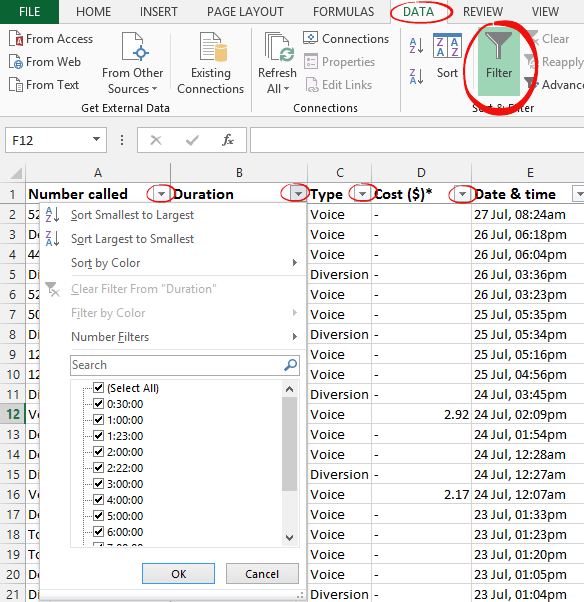
Any Excel worksheet that has lists with headings on the top row can quickly get pull-down menus to filter or sort the data. For a regular Excel worksheet, go to the Data tab and click the Filter button. This adds extra pull-down menus to each of the headings. For an Excel Table, the filter buttons […]

Use Pantone Colors in Office documents
You can translate a Pantone PMS code or name into something Microsoft Office; Word, Excel or PowerPoint understands? Sometimes you’re given a specific color using the Pantone color scheme. Most commonly this happens for a corporate logo. The Ford car company specifies ‘PMS 294C’ for their blue logo. McDonald’s uses PMS 123C and PMS 485C […]
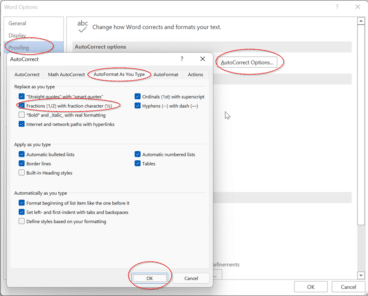
Typing some simple fractions automatically in Word and Outlook
As part of Word’s Autocorrect settings, some simple fractions will show as a symbol when you. For example, if you type in 1/4 and then space straight afterwards it’ll show as ¼. It’s done automatically from File | Options | Proofing | AutoCorrect Options | AutoFormat as you type | Fractions (1/2) with fraction character […]

Typing common fractions in Word and Outlook
Fractions like 1/2 1/4 3/4 can look better in Word and Outlook as ½ ¼ ¾ that can be done for other common fractions too ⅘ ⅚ ⅐ ⅛ among many. Either type directly with a shortcut or using AutoCorrect. We have a full table of the fractions available as symbols. As you may know, […]

Make your own fractions in Word and Outlook
There’s an easy way to make a good looking symbol for any fraction, no matter how unusual it might be. There are symbols and shortcuts for common fractions but beyond that you need a little Word trickery. But not very tricky because all you need is on the Home tab. Superscript then Subscript Use a […]

Thumbs Down👎emoji in Word, Excel, PowerPoint, and Outlook
Thumbs Down or Dislike 👎 can be typed into Microsoft Word, Excel, PowerPoint or Outlook. Both in Office for Windows and Office for Mac. Thumbs Down symbol 👎 or emoji is used to suggest disapproval or dislike. Partnered against Thumbs Up / Like 👍 symbol. How Thumbs Down Sign 👎 looks in different fonts. Here’s […]

Zero-day Windows security bug spreads to Europe and USA
The serious Windows and Office security bug is now used to target organizations in Europe and USA. Despite plenty of warnings, Microsoft still doesn’t have a fix, just ‘mitigations’. Last week Office-Watch.com told you about “Follina, or CVE-2022–30190” a relatively simple hack that exploits a security bug in Microsoft’s own Microsoft Support Diagnostic Tool (msdt). It’s […]
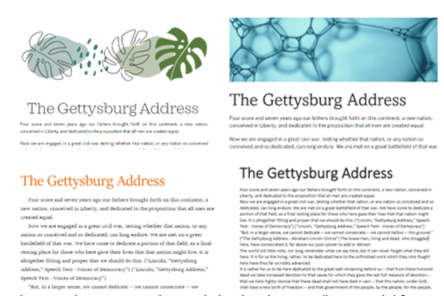
Word Designer: the quick way to better looking documents
Word in a web browser has a Designer feature, like Designer in PowerPoint, to quickly make great looking documents. Designer uses Microsoft’s templates collection to suggest formatting and design change for the document. One problem with Designer, like similar Office features, is that they can be overused and too many documents or slides end up […]

Calculate age and other interesting facts using Excel and DateDif()
All you need is a birth date or starting date and Excel can figure out the age, next birthday, days to next birthday or when you reach a milestone like 10,000 or 15,000 days. That’s just some clever tricks with DateDif(). How old is someone or something? To calculate the age, we will need to […]

Inside the Schengen Visa Calculation workbook
Here’s a quick look at some of the modest Excel tricks we used to make the Schengen Visa Calculation worksheet. Table Making the itinerary list an Excel Table lets us make use of some features. Formatting It’s a lot easier to format as a table with banded rows. We’ve turned off the Table | Filter […]
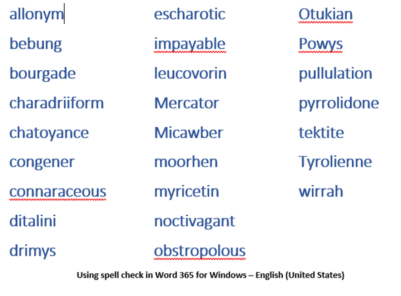
Microsoft Word is beaten (again) by a 14 year-old spelling champ
Our annual Microsoft Word vs the Spelling Bee Champions contest is on again for 2022. Word has done better than in the past but was still beaten by another extraordinary 14 year-old. 2022’s Spelling Bee Champ is Harini Logan, 14, from San Antonio TX who narrowly beat Vikram Raju a mere 12-year-old from Denver, CO. […]