
Many Ordinal RANK() options in Excel with joint, equal rankings, words and more
Here’s some more ordinal rank (First, 2nd etc.) options for Excel including with joint or equal results plus special fun wording. In a previous article we looked at options for showing ordinal numbers in Excel, now we’ll go a step further to cope with joint or equal results plus special wording. On the left are […]
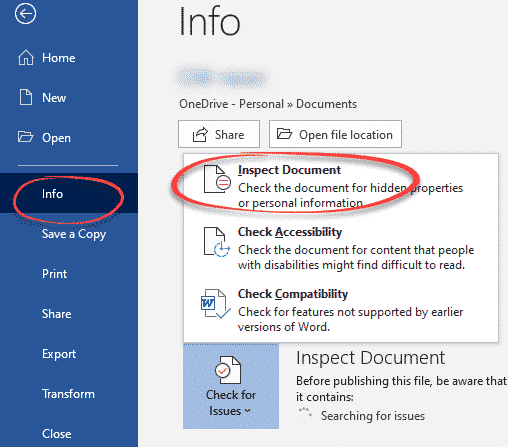
How a file name can reveal your secrets
A US government department has accidentally revealed a secret by overlooking the obvious in Office document security, the file name. Microsoft Office helps you scrub documents of private or secret information before sending. It’s easy to overlook the obvious data leaks that ‘Inspect Document’ doesn’t cover. ‘Inspect Document’ checks for hidden information in the document […]
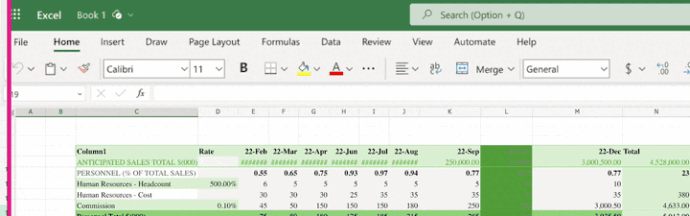
Nice new features in Excel on the web
Excel on the web has a new look and some nifty extra features like better ways to arrange rows/columns – move, resize, insert. A clever Freeze Pane option too. Some of these we’d love to see in desktop Excel. Overall, the web version of the Office apps now look more like the modern desktop apps […]

Two better ways to Remove Background from images
Microsoft Office has a Remove Background tool for images but there are two better, faster and free ways to do the same job. Background removal lets you get an image with a transparent surround which can be merged/overlaid into any other slide or document more seamlessly (left) than a separate box with non-matching background (right). […]

More free Copilot tricks for Microsoft Office users
You don’t need to pay for Microsoft’s AI service, Copilot, to get some of its benefits in Microsoft Office, especially Word, Outlook and Excel. Try converting text to a table or vice versa. The trick to grabbing text from an image. Along the way you’ll also discover some of the limits and problems with the […]
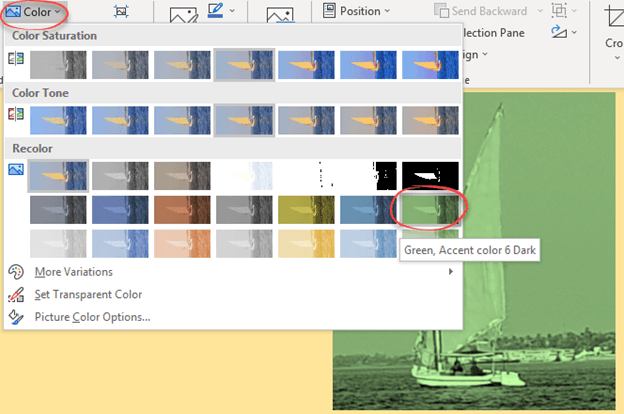
Change a picture to a custom color in Office
Don’t miss this often overlooked Office trick, changing the color of an image or graphic in Word, Excel, PowerPoint, or Outlook. We did this in our article about inserting Prince’s ‘Love Symbol Number 2’ in Office documents. The image is available in various formats but always black, not purple. As usual, there’s more to color […]

Excel’s data from picture!
The nifty Excel ‘Data from Picture’ feature is in all Excel 365. It’ll convert a picture of text & numbers into a worksheet … almost. And there’s alternatives if you don’t have Microsoft 365. Data from Picture is already all versions of Excel 365 for Windows and Mac and Excel Mobile apps for iPhone, iPad […]

All about “Please check your network connection and try again” errors
Many of us have seen the error message “Please check your network connection and try again” when the Internet is definitely available. What does this Office or OneDrive error message really mean and what can you do to fix it? This error message appears in Microsoft Office help and other places like OneDrive. “Sorry, something […]

Starting off with Regular Expressions in Excel
Now that Excel is getting proper Regular Expressions (Regex) here’s some resources to get you started. The upcoming Excel functions RegexTest(), RegexExtract() and RegexReplace() use a common type of regex (PCRE2) rather than some special Microsoft version. That’s important because each regex version has its own options and peculiarities. Using a common type of Regular […]

Using OpenDocument in Microsoft Office
OpenDocument is another set of file formats for word-processing, spreadsheets and presentations. It’s an international standard that’s supported by Microsoft 365 and Microsoft Office. OpenDocument vs Microsoft Office docs While most people use the modern Microsoft Office document formats (.docx .xlsx .pptx etc) there’s a competitive set of Office file formats to consider. The OpenDocument […]

Microsoft 365 gets better Open Document compatibility
Microsoft 365 is updating their OpenDocument format support to v1.4 which will improve compatibility with other software like LibreOffice. OpenDocument Format (ODF) is the International Standard for saving documents (ISO 26300 if you’re keeping score). It’s similar to the Microsoft Office formats in their basics of being XML based with ZIP compression. After initially joining […]
Python in Excel gets closer to public release
Python power in Excel 365 is getting closer to full public release. It’s now available for Microsoft 365 Current Channel (Preview), the last step before going out to all users. Python in Excel is possibly the most important improvement to Excel for a long time. All the power of Python libraries and code samples can […]

See the world’s top companies in Excel
In Excel 365 you can list the world’s top companies and their market capitalizations including the shortlived leader, NVIDIA. NVIDIA have a lock on the supply of AI related hardware and so their stock price has dramatically risen. ‘Dramatic’ is an understatement because NVIDIA briefly jumped over Microsoft and Apple to become the world’s largest […]

Join Tables with Excel Power Query
Excel’s PowerQuery has many clever tricks, one of them is merging and matching data from multiple tables into a single table. Combine, clean, and transform data from multiple sources into the single format you need; a table, PivotTable or PivotChart It’s a simple relational database with relations set to match up the rows in each […]

How to select more than one Office document to open
How to choose more than one Microsoft Office file or document to open at the same time. One of the frustrations about the ‘pane’ interface in Office for Windows is the failure to include all the features that customers were accustomed to from the standard File dialog boxes. Microsoft added new and useful features like […]
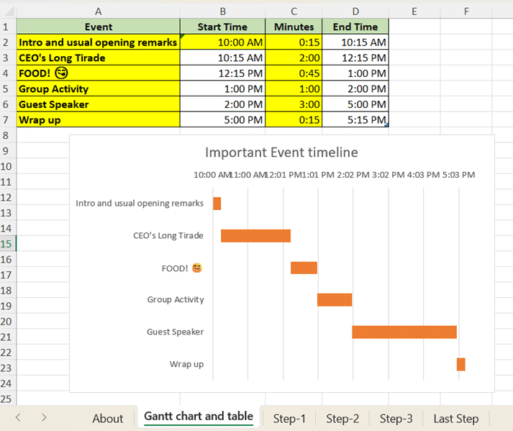
How to make a Gantt Chart in Excel
Gantt chart for project management or event scheduling are possible in Excel. Here’s the step-by-step help plus a complete sample worksheet for our subscribers. Gantt chart can be widely used in project management for visualizing project schedules. They break down a project or event into tasks or activities as horizontal bars on a timeline. Each […]









