
Highlight tricks for Word, PowerPoint, Excel and Outlook
Here’s another example of a seemingly simple Office feature that has hidden depths – Highlighting. For a long time, there’s been a highlight option in Office: Word, Excel, Outlook and even PowerPoint (albeit in a different form). They vary a little in each program so this article will go through them all, mentioning alternatives and […]
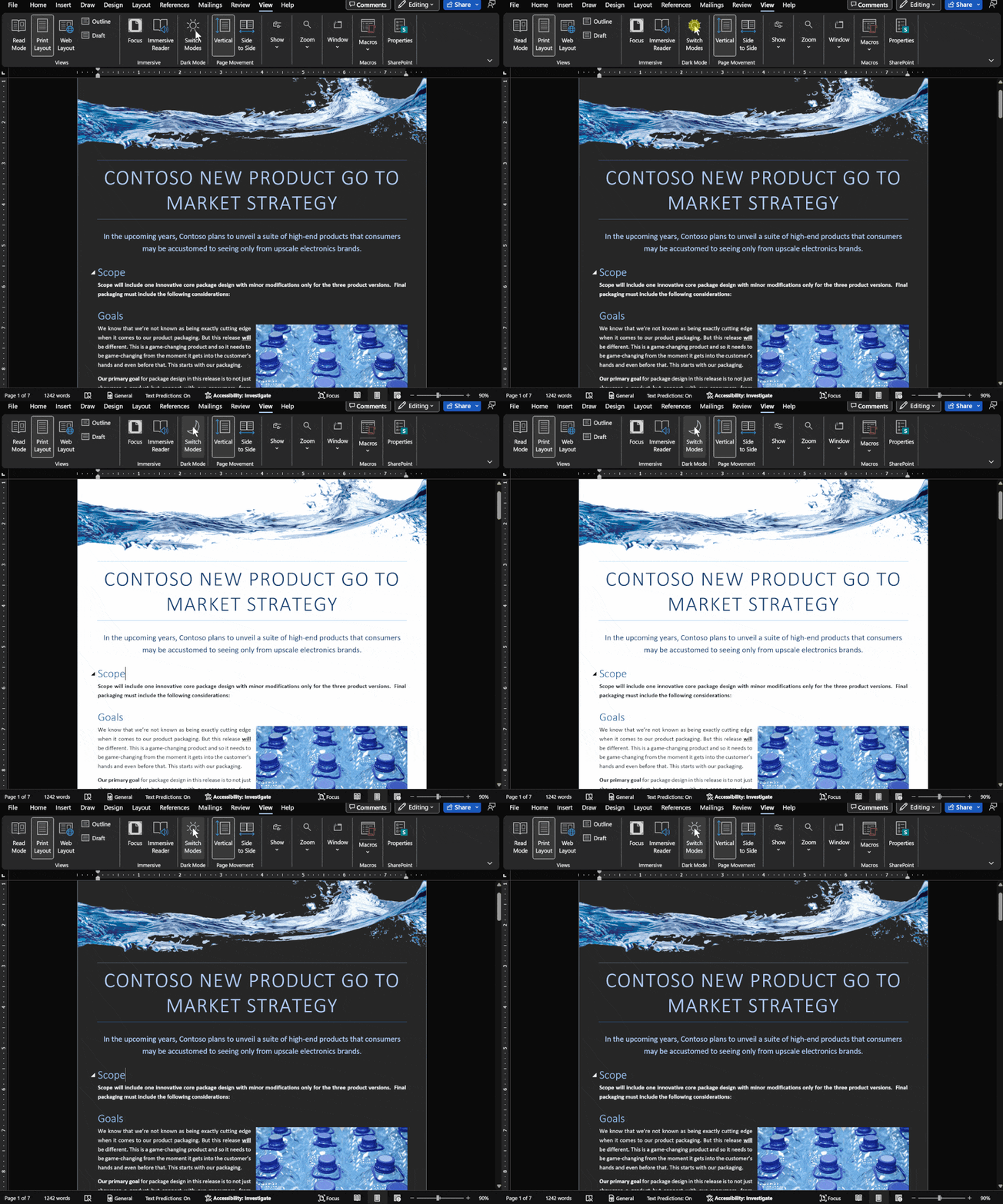
Dark Mode has gradual progress in Microsoft Office
Let’s take a moment to see where customers stand with Dark Mode options in Microsoft Office in Windows, Mac, iPhone, iPad, Android and web. It’s easy to get confused about Microsoft 365 and Office 2021 dark mode or theme options. Microsoft has announced ‘dark’ developments so many times it’s hard to keep up with what’s […]
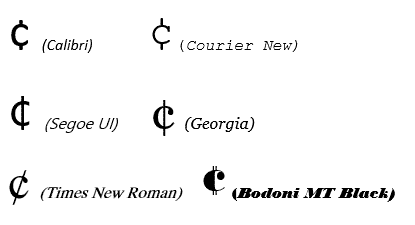
Cent ¢ symbol in Word, Excel, PowerPoint or Outlook
How to type the Cent symbol ¢ into Microsoft Word, Excel, PowerPoint or Outlook plus any Windows program. Cent ¢ shortcut Word and Outlook The Cent ¢ symbol has an inbuilt shortcut in Word and Outlook: Ctrl + /, C Hold down the Ctrl key while pressing / then type C (upper or lower case). […]

Get the most persuasive font in Microsoft Office
Baskerville has been decreed the most persuasive font after an experiment by Errol Morris and the New York Times. Happily, a very similar font is available to all Microsoft Office for Windows users. In an interview in Fast Company, Errol Morris talks about the experiment where people were asked to rate the same text, but […]
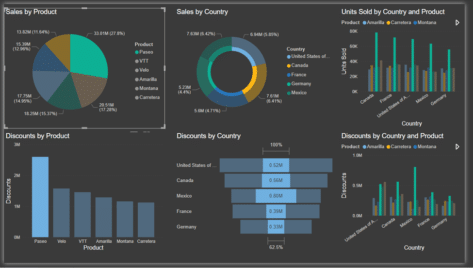
Getting into PowerBI with the free desktop app
Get started and understand Microsoft’s Power BI using the free desktop app. Here’s how to setup Power BI and some of its nifty tricks to delve into and make sense of data. All without the hassle of a ‘free’ trial. With plenty of buzzwords such as data-driven culture, business intelligence, analytics, metrics, KPI and our […]

The big weakness in Excel’s Data from Picture
Excel Mobile’s Data from Picture has one big problem, it can’t figure out what’s intended to be in one cell and puts text in many cells. Cell discernment is Data from Picture’s biggest weakness and the Review process makes it hard to fix those problems. For example, text using Excel’s own Accounting format which puts […]

Money template – end of support
Microsoft will be removing Excel’s Money template from Microsoft 365 Personal and Family subscriptions on June 30, 2023. Here’s details on what’s happening to your data and an alternative with a free trial. Ending the Money template is just one of three features being dropped from Microsoft 365 in mid-2023. You’ll no longer receive updates […]
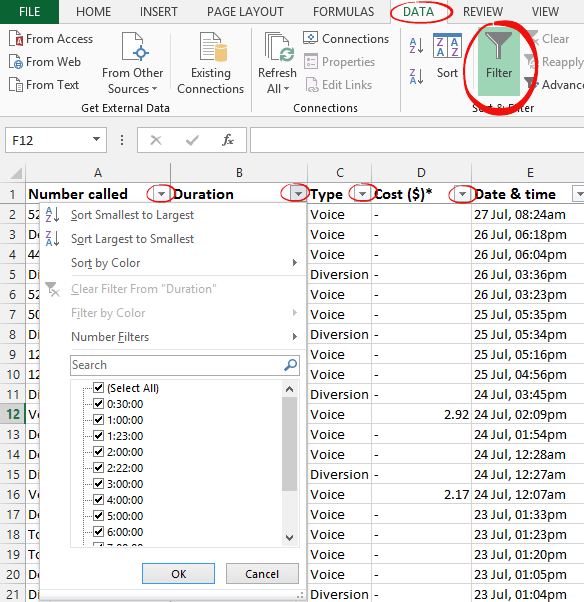
Quick Excel list sorting and filter buttons
Any Excel worksheet that has lists with headings on the top row can quickly get pull-down menus to filter or sort the data. For a regular Excel worksheet, go to the Data tab and click the Filter button. This adds extra pull-down menus to each of the headings. For an Excel Table, the filter buttons […]

Use Pantone Colors in Office documents
You can translate a Pantone PMS code or name into something Microsoft Office; Word, Excel or PowerPoint understands? Sometimes you’re given a specific color using the Pantone color scheme. Most commonly this happens for a corporate logo. The Ford car company specifies ‘PMS 294C’ for their blue logo. McDonald’s uses PMS 123C and PMS 485C […]

Thumbs Down👎emoji in Word, Excel, PowerPoint, and Outlook
Thumbs Down or Dislike 👎 can be typed into Microsoft Word, Excel, PowerPoint or Outlook. Both in Office for Windows and Office for Mac. Thumbs Down symbol 👎 or emoji is used to suggest disapproval or dislike. Partnered against Thumbs Up / Like 👍 symbol. How Thumbs Down Sign 👎 looks in different fonts. Here’s […]

Calculate age and other interesting facts using Excel and DateDif()
All you need is a birth date or starting date and Excel can figure out the age, next birthday, days to next birthday or when you reach a milestone like 10,000 or 15,000 days. That’s just some clever tricks with DateDif(). How old is someone or something? To calculate the age, we will need to […]

Inside the Schengen Visa Calculation workbook
Here’s a quick look at some of the modest Excel tricks we used to make the Schengen Visa Calculation worksheet. Table Making the itinerary list an Excel Table lets us make use of some features. Formatting It’s a lot easier to format as a table with banded rows. We’ve turned off the Table | Filter […]

Five ways to turn text into Excel dates
Sometimes you need to convert a date from the Excel cell saved format to a particular format. There are at least five ways to do that. DateValue(), Date() or converting Unix dates to Excel. Simply typing dates into a cell also works but there are traps for the unwary. Excel’s trap when typing in dates […]

Text to Excel Date conversion by adding Zero with Paste Special
Another way to convert text to dates is by adding zero to the text. This is a trick which forces Excel to convert the text into an Excel value so it can then add the zero. Since adding zero doesn’t change the value, you end up with text converted to an Excel value. It’s a […]
Excel Conditional Formatting, beyond the presets
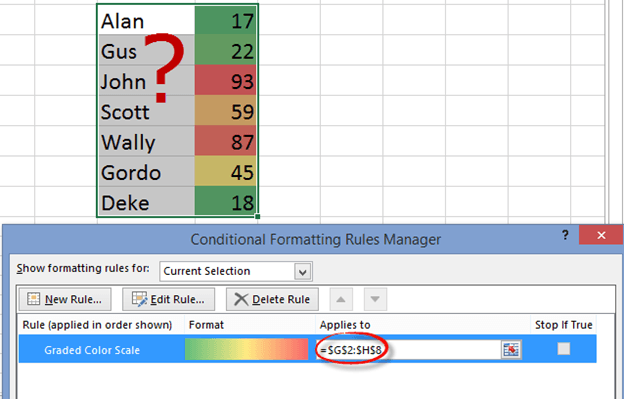
Excel has some nifty and simple options for color highlights the extremes in a list of values. It’s called Conditional Formatting and you can do all sorts of clever things with it. First let’s look at the simple presets that Microsoft has given us, some of the obvious choices they’ve left out and how to […]

IF and Nested IF Statements in Excel
An IF statement might sound like a complicated thing that programmers do, but it’s actually fairly easy to do in Excel. An IF statement basically puts something into a cell depending on certain conditions – if A is true, put X in this cell. You can even use what’s called a nested IF statement if you have […]









