Unpacking a big day for Office 365 / Microsoft 365
Microsoft has dumped a lot of news in a single day. As a result there’s a lot of misunderstanding and, sorry to say, misreporting. Journos not accustomed to Microsoft’s PR tricks have fallen for them. We’ll try to ‘unpack’ what’s been announced into what’s happening now, in the known future or just sometime in the […]

Excel’s EOMONTH() to find the last day of the month
The Excel function EOMONTH() returns the date of last day in a month. With a little extra, it’ll tell you the number of days in any month. EOMONTH() is the Excel equivalent of the little rhyme ‘30 Days has September, April, June and November …’ plus it handles leap years with 29th February. Applies To Excel for […]

Download a Warning Triangle in Word and PowerPoint
Here’s a download of the standard but blank Warning Triangle graphic and image ready for Word and PowerPoint. We’ll look at the official warning sign specification as a starting point, then we’ll look at variations based on that. In other words, symbols that look a bit like a warning sign, but different. The official ISO […]

Get ready to Zoom ….
Zoom online meeting software has become very popular with many people joining it for the first time. Here’s how to fully get ready for a Zoom meeting, there’s more to it than the official advice. Two Office Watch readers found themselves asked to join a Zoom meeting at short notice. Neither had heard of Zoom […]

Microsoft cloud servers slow down
Microsoft has quietly announced some minor but important slow down in some of their cloud services including the way real-time edits of Office documents are handled. It’s a wise move given the increased demand for cloud services. Microsoft had an outage on their much-hyped Teams services earlier this week. Like other cloud companies, Microsoft has […]

Using Skype with Microsoft Office
Skype can be integrated into collaborating on Word, Excel or PowerPoint documents. It’s not officially part of Microsoft Office collaboration but is easily done. It lets you work on a document while talking to other collaborators at the same time. Like this … This works with any modern version of Office or really any program […]

Remote Access options to control a distant computer
There are several free options to access one computer from another. You can see the screen, type and mouse from a remote location, just as if you were in front of the real computer. Access work computer from home computer Use desktop computer from a laptop or tablet Interact with laptop machine from a desktop […]
Collaborate remotely on documents, spreadsheets and presentations
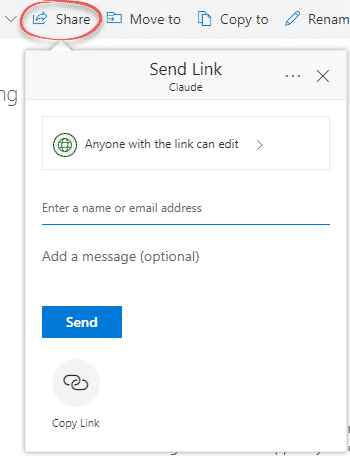
Working on an Office document can easily be done between many people no matter how far away they are. Most organizations will have some way to share documents remotely If not, there are clever options available. Instead of exchanging documents (we’ll get to that in a moment), save the document in a cloud location that […]

Prepare your computer for isolation or quarantine
There are many free tools available to make work and life continue if your movements are limited. Things you should do to prepare for a possible ‘work from home’, ‘no school’ or at worst ‘quarantine’ or ‘social isolation’ of some type. We know what we’re talking about because Office Watch has been working remotely for […]

Ignore Microsoft’s opportunistic marketing, Teams is not for everyone
Microsoft is cunningly pushing Teams as part of its COVID-19 preparedness recommendations. But Teams isn’t the best option for everyone, far from it. Promoting Teams is good for Microsoft and their sales partners but not necessarily their customers. At Microsoft.com there are now special banner ads promoting Teams as the solution for ‘working remotely’, clearly […]

Starting with Document Collaboration in Word, Excel or PowerPoint
Microsoft has been talking about document collaboration for a long time but now it’s available to everyone with a recent version of Office and OneDrive. So here’s a simple guide to opening the same document at the same time on multiple computers. You don’t need two people to try out document collaboration. You can try […]

Share a cloud stored document from Microsoft Office
Here’s how to share a Microsoft Office document that’s saved on a compatible cloud service like OneDrive or Dropbox. All you need is Office 365/2019 or 2016 for Windows or Mac. Document collaboration works in Word, Excel and PowerPoint. Sharing a single file via cloud storage is a lot faster and less trouble than exchanging […]

A better Side-by-Side document view for Windows and Mac
We highlighted Word 365’s Side to Side view but there’s another side-by-side viewing trick that works for any two windows on either Windows or Mac. Side by Side or Split View is great for many situations. No fussing about switching between windows or getting lost with all the open application. For example, Word on one […]
Complete Excel NetworkDays() solution with holidays & vacations
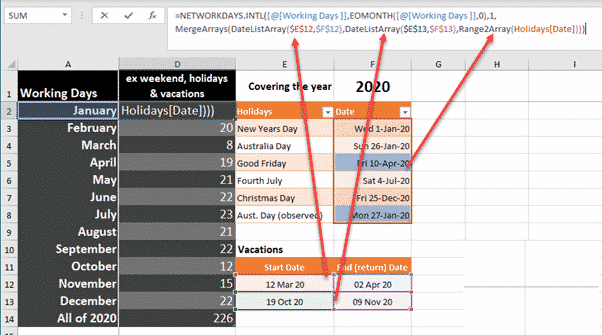
Excel’s NetworkDays() and NetworkDays.Intl() need more help to cope with realistic situations with public holidays and more than one vacation. Annabelle Almer started looking at NetworkDays() & NetworkDays.Intl() and we ended up deep down a geeky rabbit hole trying to get the functions working in realistic situations. The functions work, as advertised, but trying to […]

Excel making list of days between two dates
Making a list of all the days between two Excel dates is possible in various ways, manually, an Excel 365 formula or some VBA code. We need a way to make a list of all the dates between a start and end date. Use this to make a list of all vacation days for a […]
Enter Numbers Starting with Zero in Excel
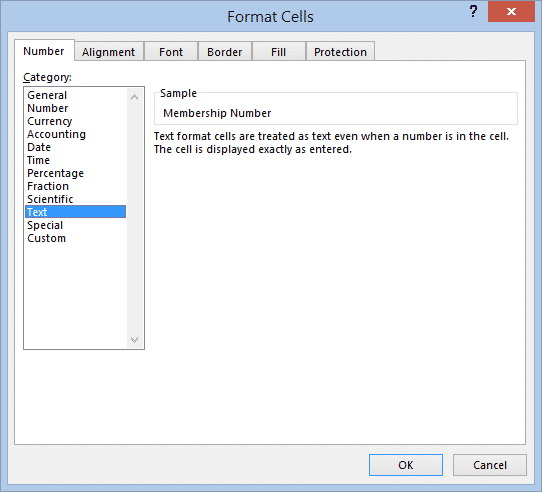
If you’ve ever tried to enter a number starting with zero into an Excel spreadsheet, you will have had the frustrating experience of finding that as soon as you exit the cell, the zero disappears from the front of the number. Here’s how to stop Excel from ‘helping’ you when it’s not wanted. Because zero […]









