
More Excel alternatives to nested IF statements
Nested IF statements can be hard to understand and manage but there are alternatives which can be easier to handle, fix and change. We’ll start with the relatively simple example we used for demonstrating IF and nested IF. =IF(C2>89,”HIGH DISTINCTION”,IF(C2>79,”DISTINCTION”,IF(C2>69,”CREDIT”,IF(C2>49,”PASS”,”FAIL”)))) This example has only five levels of nesting, we’ve seen nested IF’s with many, many […]

Dynamic Arrays now in Excel for iPhone and iPad
Microsoft has added Dynamic Array functions to Excel for iOS (iPhone and iPad) and done it in an uncharacteristically low-key way. Dynamic Arrays are now available across all Office 365 platforms; Excel 365 for Windows and Mac, Excel for Android, Excel Online (web) and now Excel for Apple devices. That’s an important milestone that Microsoft […]

Office apps for Windows 10 Mobile end support now and in 2021
The Office apps on Windows 10 Mobile devices have now ended main support and will end security updates, hotfixes and support in 2021. It’s an unsurprising announcement and another death notice for the failed Windows 10 Mobile platform and phones. Source: Microsoft, from happier days when Win10 phones were ready to take over the world […]
Office apps and the Fluid framework
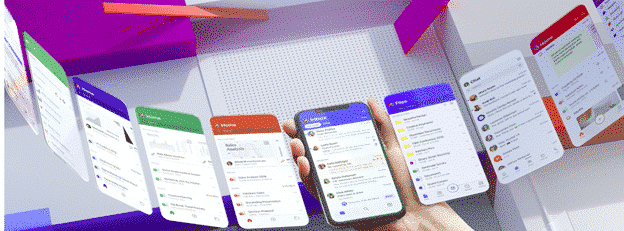
In a recent blog post Microsoft explained some of their thinking behind the redesigned Office mobile apps like the new ‘all in one’ Office app. The company has done a lot of research into the way people use their mobile devices, including the many people who only use a smartphone with no laptop or desktop […]

Pantone 2020 color of the year in Word, Excel and PowerPoint
Pantone has announced its Color of the Year for 2020 here’s how to get it in Microsoft Office – Word, Excel, PowerPoint, Outlook etc. The color of 2020 is … Classic Blue Source: Pantone As usual what’s more amazing than the color is the description from the ‘Pantone Institute’. Classic Blue is: reassuring thought-provoking dependable […]

New Excel and Outlook for Android features
The Office apps for Android are getting some interesting new features. Excel for Android has better sort and filtering. Galaxy Watch can now link to the Outlook app. At first for preview ‘Insiders’ and later to the publicly available Word, Excel, PowerPoint and Outlook apps. Here’s Microsoft announcement of the new features with their images: […]
Excel ‘system delay’ phishing trick
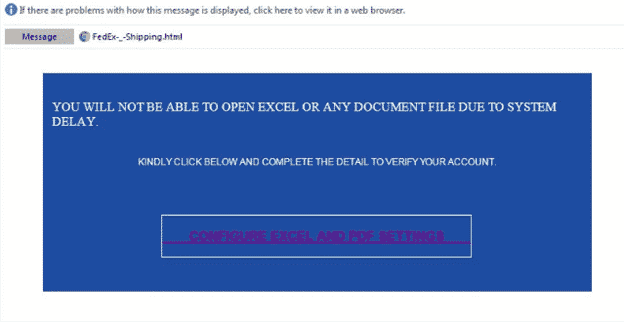
Just one of the many tricks to get people to giveaway their password is a bogus ‘system delay’ email, supposedly from your network administrators. The fake login page is given extra credibility being hosted on a Microsoft server! It starts with a fake message from the ‘Excel Team’ saying you can’t ‘Open Excel or any […]

Faster PivotTables with the new Ideas or Insights feature in Excel
Excel is getting a clever new way to quickly analyse your worksheets and pull out useful ideas or insights to quickly make PivotTables, PivotCharts and Charts. It’s now available in Excel 365 for Windows and Mac, Insiders and will eventually make it to public releases. It’s now called ‘Ideas’, previously known as ‘Insights’ (a more […]
What is Application Guard and what it means for Office 365
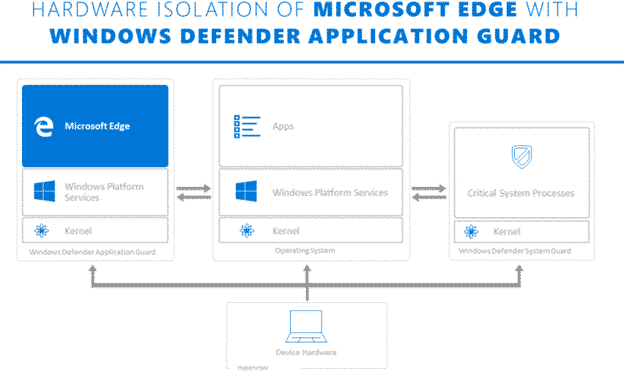
Microsoft is touting Application Guard as a defence against Office 365 macro viruses. What is it and will it truly prevent viruses in Word, Excel or PowerPoint documents? Application Guard is already in the Edge browser and Microsoft has announced that it will be extended into Office 365 sometime in early 2020. They’ve not said […]
Protect against the latest ransomware attack via Excel
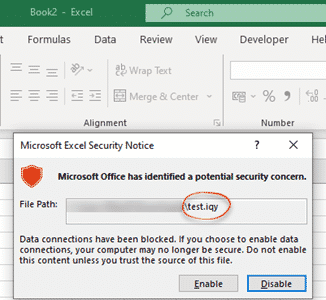
Here’s how to block .IQY web queries in Excel that are being used to infect machines with Buran ransomware. Yet again, a mostly forgotten part of Office is being used by hackers to get inside computers and networks. Suspicious Link (great name) found this nasty in an email. It pretends to be a forwarded message […]
Office for Mac long-standing security bug revealed
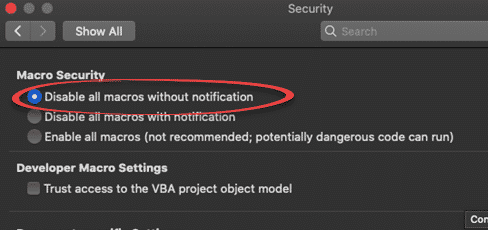
A security vulnerability has been discovered in Excel for Mac. It’s been there for many years and affects Office 365, Office 2019, Office 2016 and Office 2011 for Mac. We have details and suggest a protection you can do yourself. It’s another problem with legacy support for an older Microsoft Office feature. In this case […]

Microsoft Bluetooth keyboard – with Office and Emoji keys
The Microsoft Bluetooth Keyboard is one of two new models with dedicated Office key and Emoji key. What’s this new keyboard like … aside from those innovations? We bought a Microsoft Bluetooth Keyboard with our own money and gave it a long hard look. Source: Microsoft Note: this is the Microsoft Bluetooth Keyboard released in […]

Hiding Columns and Rows in Excel
Make your worksheets look more compact and focused by hiding unwanted columns or rows. Hidden rows/columns still work in calculations, they can be referenced in formulas etc. It’s pretty straightforward. Select the columns or rows, right-click and choose Hide. Keyboard shortcuts Type Control + 9 to hide a row. Control + 0 to hide a […]

Office Key, all about Microsoft’s new keys
Two new Microsoft keyboards have a dedicated Office key. Office-Watch.com has tested one of these keyboards to see how the new Office key really works. We have a full list of Office key shortcuts plus how it works inside Word, Excel and PowerPoint and geeky hardware info. Hard information about the new key has been […]
Using 3D Formulas to range across Excel worksheets
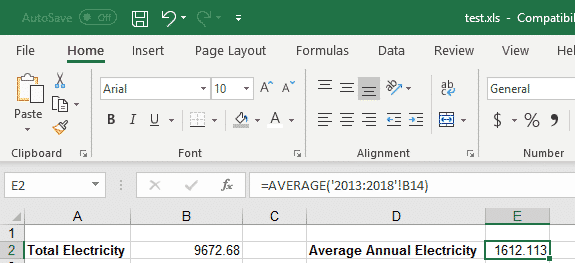
3D Formulas in Excel allow you to make calculations using data from many different worksheets, including ones that don’t exist yet. This can be incredibly useful, when you have similar figures for different periods across worksheets and want to use data from all of those periods. For our example, we have a file with expenses for a number of years, a different worksheet for […]
Accessibility Checker and document conversion in Office 365
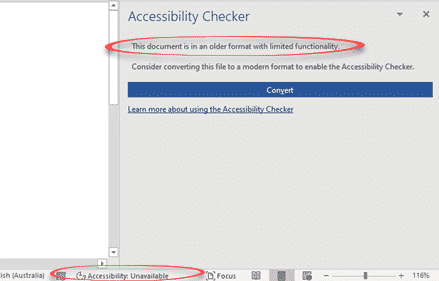
Soon, Office 365 will warn you when the document, worksheet or presentation uses a document format that doesn’t support modern accessibility features. Accessibility features like alt text in images, color contrast, heading consistency, table structures are only available with the modern Office document formats ( .docx .xlsx .pptx etc). Office 365 for Windows from Insider […]









