
Special Office and Emoji keys coming to a keyboard near you
Microsoft is releasing two new keyboards with new keys; an Office key and a dedicated Emoji key. Back in June we talked about the plans for an Office key to go alongside the existing Windows key. Here it is … Source: Microsoft The Office and Emoji keys are on the right of the spacebar. Source: […]

Saving an Excel Chart as a Template
Excel has a huge range of charts available and endless ways to customize them, but after working to get it just right, you don’t want to have to go through the whole process again next time you want to make a similar chart. Fortunately, you don’t have to because Excel allows you to save your […]

The price trap for Office users in the new iPad
The new iPad has a great price tag and good features but a hidden price trap for Microsoft Office users. It has a 10.2” screen with support for important accessories like an external keyboard and Apple Pencil. Source: Apple. The trap is in the screen size, at 10.2” it’s 0.1 inches more than Microsoft allows […]

October 2019 security updates for Microsoft Office
It’s time again for the monthly drop of security updates for Windows and Office. Here’s what caught our eye; two Excel security bugs and a Windows update which kills VMWare Workstation. Commentators are calling this a ‘light’ month for security patches because there are a mere 59 patches instead of the usual 80 or more. […]
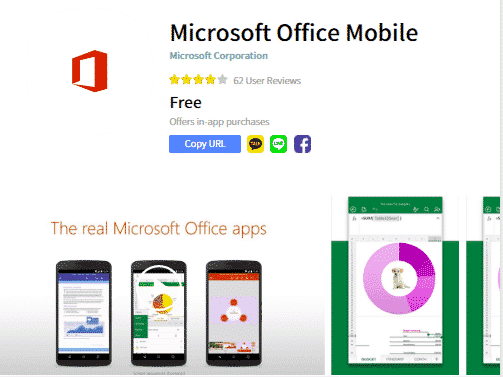
Combined Office Mobile app coming to smartphones
Microsoft is pushing out a new Office app for iPhone and Android devices however most Office users won’t need to bother with it. Paid Office 365 subscribers already have better choices as part of their annual plan. The new app is called ‘Microsoft Office Mobile’ and it’s a single app with the basic features of […]
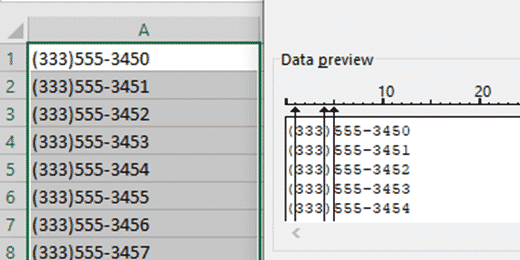
Excel Text to Columns
There are many situations where you need to split up text into separate columns. Names, phone numbers, dates, addresses and lot’s more can be managed with Excel’s Text to Columns, Text to Columns allows you take data from one column, and split it out into multiple columns. This can be used to split full names […]
Outlook blocks more attachments, but not the most dangerous one
Outlook on the web is now blocking another 38 email attachments because they can be carriers of viruses. But Microsoft doesn’t block the most commonly used files for infecting computers. Far and away the most common infected email attachment is old-style Word documents, with .doc extensions. Excel .xls worksheets and PowerPoint .ppt presentations are similarly […]

How the US government accesses your OneDrive and Outlook info with NSL
A recent forced disclosure by the US government demonstrates the use of NSL’s which access your personal data from Microsoft OneDrive and Outlook without a warrant or regular oversight, let alone notice to you. Microsoft, Google, Facebook and many other tech companies (including gaming services) have received National Security Letters which demand information about a […]

Files Needing Attention to replace the Upload Center in Office
The Upload Center, that annoying little extra in modern Office is being closed down. It’s being replaced with ‘Files Needing Attention’ alerts within Word, Excel, PowerPoint, Publisher and Visio. The Upload Center controls documents being uploaded from Office to online storage like OneDrive and SharePoint. If you haven’t noticed Upload Center, it appears as a […]

More secrets left in Office documents
As we suspected, there are more holes in the Office Document Inspector. Our clever readers came up with some possibilities for revealing secrets in documents, worksheets and presentations. Document Inspector is good but could be better. As you’ll see, there really should be a warning about objects with multiple layers. The biggest problem with Document […]

Surface Pens turn on Office drawing automatically
Surface pens will now turn on the Draw tab in Word, Excel and PowerPoint automatically. When you pick up a Microsoft Surface Pen, the Draw tab in Office 365 will automatically appear to choose color, thickness of the digital ink. There are a few requirements, but they are pretty obvious: The Surface Pen has to […]
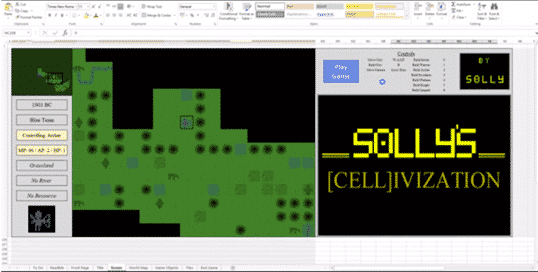
Civilization comes to Excel … as a game
The famous game, Civilization, has been impressively recreated in Excel as Solly’s Cellivization. Civilization was an early computer game that started in 1991 for MS-DOS and has undergone many reincarnations for Windows, Mac and gaming devices now almost forgotten. Here it is in Microsoft Excel … Even with the power of modern computers and Excel, […]
Revealed! Office install/update errors and fixes
Here’s a list of the known Office install/update error codes with possible fixes. All thanks to a diligent and long-suffering Office Watch reader. Ron S has compiled these lists from web sites and forums based on experiences of other people. Doesn’t Microsoft have all this? Yes, they probably do but not for public consumption. Microsoft […]
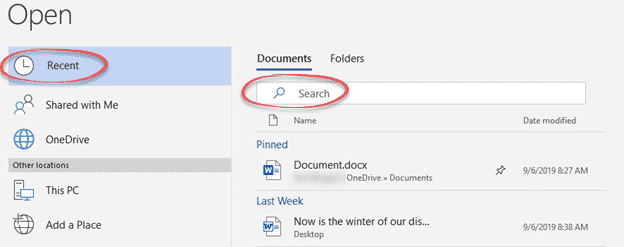
Expand your Recent Documents list in Word, Excel and PowerPoint
The newer File | Open panes include a Search option to quickly find Recent Documents by name. That means it’s practical to expand the Recent Docs list to a higher or maximum value in Word, Excel or PowerPoint. In any of the three programs go to File | Options | Advanced | Display. Over time, […]
September bug fixes to Office 2016 and Office 2013
Here’s this months non-security bug fix updates.for Office 2016 and Office 2013. They are only for .msi installs, not ‘Click to Run’ modern installations. For most systems, they’ll be applied automatically. This is the full list with extra notes on a few fixes which caught our eye. Office 2016 updates Excel 2016 KB4011629 “PowerPivot formulas […]

The realistic guide to fixing Office 365/Office 2019 update problems
The error messages on Office 365/2019 setup and update are notoriously unhelpful, so here’s a guide to fixing Office install or update problems that work out here in the real world. Error messages like the infamous ‘Something went wrong” should be taken with a large pinch of salt. The error message is often misleading and […]









