What is a Style in Word, Excel or Outlook?
A style is a collection of formatting choices combined under a single name. Any word or even a single letter has a collection of formatting settings as well. Font: size, color, bold/italic/underline/strikethrough/subscript/superscript, highlighting and more. Position: Left, Center, Right, Justified. List: bullet, numbering. Line Spacing, Borders, Background color and a lot more details. Instead of […]
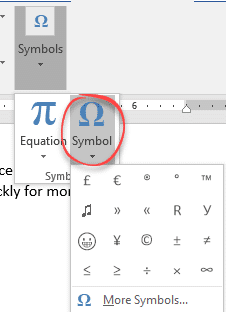
Degrees, Money and other symbols in Office
a look at some commonly used characters used in Office but are missing from the standard keyboard. How to insert symbols on a ‘one-off’ basis or insert quickly for more commonly used characters. Degree mark for temperature. Has no special shortcut but you can make one (see below). Currency symbols. We have a quick way […]
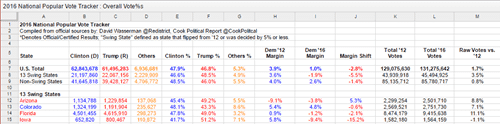
US Election results in Excel
If you’re interested in the hard numbers about the 2016 US election, David Wasserman @redistrict has done the work for you. Channel your inner ‘Nate Silver’ <g>. Go to https://docs.google.com/spreadsheets/d/133Eb4qQmOxNvtesw2hdVns073R68EZx4SfCnP4IGQf8/htmlview?sle=true#gid=19 to see a ‘read only’ Google Docs worksheet showing the state-by-state results. Not visible above are columns with the total number of votes cast in […]

SVG graphics coming to Office … at long last!
Office 2016 for Windows will soon support scalable vector graphics (SVGs). Preview/Insiders can try them now and it’ll be available to all Office 365 subscribers in 2017. That means you’ll be able to make your documents look even better with vector-based SVG files that won’t pixelate when increased in size. SVG support has been a […]

Excel: easily get the latest currency exchange rates
Here’s a ‘no fuss, no muss’ way to grab the latest exchange rates and use them in Excel. No need to lookup a rate and type it in, let Excel do all that work for you. You might expect Excel to do this out of the box. After all, Microsoft has been banging on about […]

Ink innovations coming to Office
Microsoft is gradually adding to Office some interesting new Ink related features; Replay and Math. Rewind and Replay Until now drawings or ‘ink’ in Office documents has been static and fixed, much like real ink. OneNote Mobile for Windows 10 is the first Office app to make ink additions animated. Office remembers how you’ve drawn […]
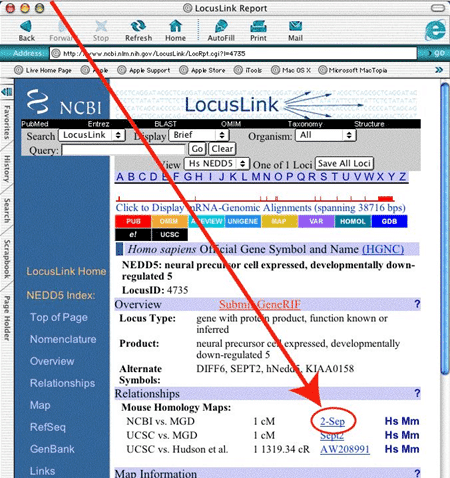
Why Excel causes errors in gene studies and how to fix
A new report shows that Excel is causing errors to creep into genetic studies because of data conversion problems. Excel tries to figure out the type of information you are typing or importing into a worksheet. Those rules work most of the time, but not always. If Excel converts a cell wrongly, it changes the […]
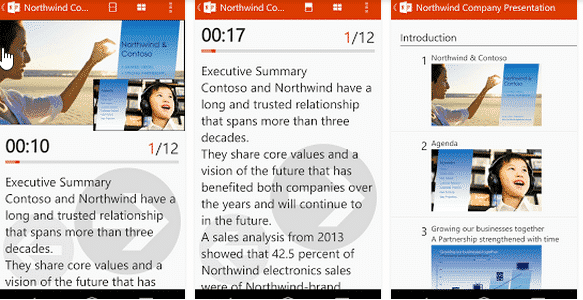
Office Remote for Android
The days of carrying a separate presentation ‘clicker’ may be over as Microsoft brings it’s Office remote app to Android. Office Remote turns a smartphone into a controller for a PowerPoint presentation, Excel worksheets (including Slicers and PivotTables) plus Word documents. Image supplied by Microsoft. The smartphone connects to your PC via Bluetooth. You need […]
Buy Android – get Office as well
Yet one more for the list of things you’d never thought you’d see from Microsoft. They now have a deal with major Android phone and tablet makers to include Office software in some of their products. That’s right, Microsoft is paying companies to put their software on non-Windows devices. At least we’re assuming Microsoft is […]

Delve goes public for businesses
After a preview period, Microsoft Delve has gone public for Office 365 Business users. More links into Delve have also been announced. Delve is a new form of search tool which bring in relevant data from a selection of sources. Some are private like a Sharepoint site, corporate address book , OneDrive for business etc. […]
January patches but no Excel fixes
Microsoft has released its monthly security patches for January 2015 but no fix for the broken patch from last month! All the talk has been about Google’s disclosure of a security flaw in Windows just before Microsoft released a fix for the problem. Lots of accusations flying both ways on that topic which distracted from […]
December patch for Office – Fail!
One of the automatically installed patches for Office causes a new bug! Ouch. The new bugs aren’t common but even so, they are embarrassing. You can find the details under the Knowledge Base article headed ““Cannot insert object” error in an ActiveX custom Office solution after you install the MS14-082 security update”. Most people won’t […]
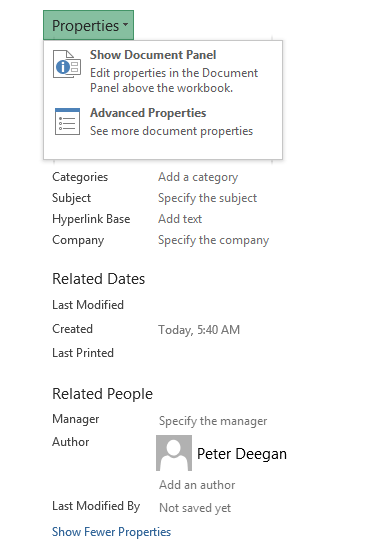
Adding Document Properties in Excel
We’ve already told you about document properties and how useful they are in Word. We also complained about the poor support for properties in Excel. You can add and edit document properties in worksheets much the same as in Word documents. Go to File | Info in Excel 2013 (Prepare | Properties in Excel 2007) […]

Document Properties in Word and Office
Document Properties is one of those long-standing parts of Office that is worth another look. It can be quite useful and not always in the ways that Microsoft intends. At first, document properties looks like a fixed and rigid feature with limited use. However it can be used in much wider and creative ways. Any […]
Excel 2010 patch mystery
One of the September 2014 updates has us scratching our heads because it doesn’t make a lot of sense. The download is a fix for a problem caused by a previous bug patch, but what else? Under the bland title “September 9, 2014 update for Excel 2010” you’ll discover that the download fixes, in Microsoft’s […]

Why PivotTables get confused and how to fix them
Why Excel PivotTables get messed up and how to stop it. Time and again we’ve heard from people who try PivotTables and only get nonsense tables. That’s understandable since Microsoft’s hype about PivotTable ignores the basics that we’ll cover in this article. You’ve probably seen a Microsoft demonstration of PivotTables where it looks sooooo easy. […]