All about Microsoft Office for Apple Mac. Word, Excel, PowerPoint, Outlook on macOS, Microsoft 365 for Mac, Office 2021 for Mac and earlier versions.

Make Word line spacing LESS than single
There’s a simple Microsoft Word trick that lets you shrink the vertical space between lines. Specifically reducing to below single line spacing. To set less than 1 line space go to Paragraph | Line Spacing and choose ‘Multiple‘ – yes ‘Multiple’. Sounds screwy but it works. Set the Multiple line spacing value to less than one eg […]

Speaking Head in Silhouette 🗣 emoji in Word, Excel, PowerPoint and Outlook
How to insert the Speaking Head in Silhouette 🗣 emoji into Microsoft Word, Excel, PowerPoint or Outlook. Both in Office for Windows and Office for Mac. Speaking Head in Silhouette 🗣 emoji can be used as a different way to draw attention to a special point or note. Or as an alternative icon for a speaker […]

Don’t wait – start using the new Microsoft Designer now
Get the new Microsoft Designer tool now. You can preview Microsoft’s new way to quickly make graphic designs with text and pictures including fancy, original AI generated (aka Dall-E) images. Now NO wait list, just login and start creating. Give Designer a try to add something interesting to a Word document, PowerPoint slide or social […]
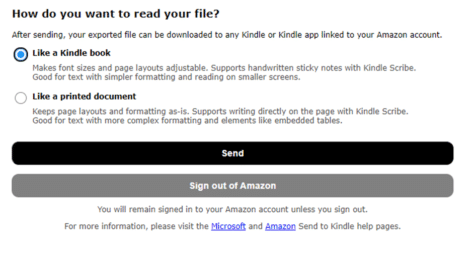
From Word doc to Kindle in one easy step
Now you can copy a document from Microsoft Word to the Kindle ebook reader in one step with the arrival of “Send to Kindle” inside Word 365 for Windows and Mac. We’ll also explain how to convert and transfer a Word document to Kindle without the latest Office innovation. It’s always been possible to send […]

Siren 🚨 emoji in Word, Excel, PowerPoint and Outlook
Insert the Siren or Police Car Light 🚨 symbol / emoji into Microsoft Word, Excel, PowerPoint or Outlook. Both in Office for Windows and Office for Mac. Police Car Light🚨 (aka Siren or Emergency Vehicle Light) symbol can be used any time you want to add warning or alert to a document, slide or sheet. […]
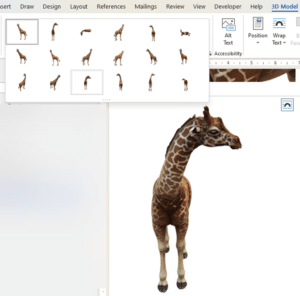
Starting out with 3D models in Microsoft Office
How to insert and use 3D models in Microsoft Office. 3D models let you rotate, pan and zoom all around an object to show it exactly the way you want. Microsoft Office’s 3D models feature has more uses than you might expect. From the Microsoft promotion, it looks like 3D models are only good for […]
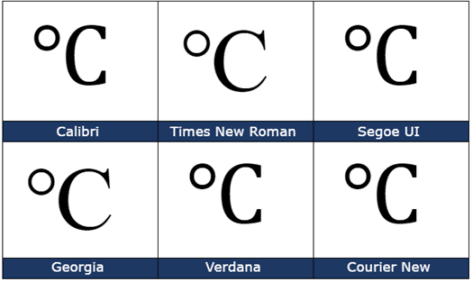
Degree Celsius ℃ symbol in Word, Excel, PowerPoint and Outlook
Insert the Degree Celsius / Centigrade ℃ into Microsoft Word, Excel, PowerPoint or Outlook. Both in Office for Windows and Office for Mac. Degree Celsius ℃ is a single character symbol is used to refer to a specific temperature on the Celsius or Centigrade scale. Centigrade was the original name for the temperature scale before 1948 […]
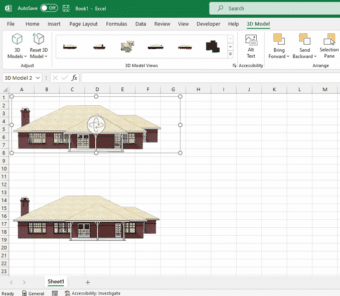
SketchUp 3D graphics in Office 365
Microsoft has added SketchUp 3D graphics (.skp files) to the models inserted into Word, Excel, PowerPoint, and Outlook. SketchUp is a 3D graphics program where you can create shareable designs such as architectural models and graphics used in industrial design, product design, and civil and mechanical engineering. SketchUp Free is available for everyone. Adding Sketchup’s […]

Use the Smithsonian for great photos and 3D models in PowerPoint and Word
The Smithsonian has millions of images and 3D models available online to add something great and different to Microsoft Office including PowerPoint slides and Word documents. The Smithsonian Institution has been a US cultural, scientific and historical resource for the last 170 years. No visit to Washington DC is complete without going to several of their […]

Illegal colors in Word, PowerPoint and Office
Amazingly, a simple color can be trademarked and using one in a Word, PowerPoint or Office document can be illegal. We’ll explain why and a list of some colors you might need to avoid. Companies can trademark a color that’s associated with their product or logo. If you’re designing a document or presentation, especially for […]

Use Microsoft’s AI magic now – don’t wait for Copilot
Microsoft’s AI is available to use now to search or summarize web pages, PDF or any Office document. Use Bing as a peek at the future CoPilot AI system might do for Microsoft Office. Bing Discover is available in the latest Edge browser (Windows or Mac). It opens up two panes of Microsoft AI ‘Chat’ […]

Start a Word list from any value, not just 1 or A
You can tell Microsoft Word to start an ordered or numbered list from any number or letter you like. Not just start an ordered list with 1 or A. Lists can also restart numbering after a break. Creating a numbered list There are different ways for creating a numbered list you can simply type 1 […]

OneNote is getting Microsoft CoPilot
Microsoft has confirmed that their AI helper tools, called CoPilot will be added to OneNote. Here’s some ideas of what the AI system will add to OneNote. CoPilot will be interesting and useful in many ways but the Microsoft Hype ™ is getting way ahead of reality. The OneNote with CoPilot announcement included the usual […]

Vertical Bar | symbol in Word, Excel, PowerPoint and Outlook
How to insert the Vertical Bar | into Microsoft Word, Excel, PowerPoint or Outlook. Both in Office for Windows and Office for Mac. Vertical Bar | symbol (technically a glyph) has many uses in computing, physics, maths and typography. In some programming languages | has a special meaning, for example in PowerShell | is called […]
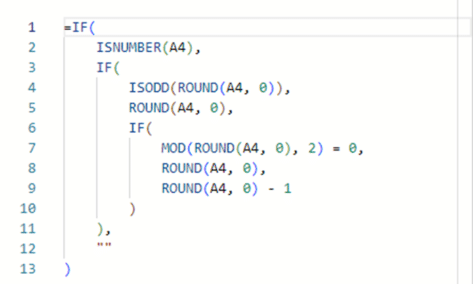
More accurate Excel rounding to the international specification
Here’s how to round numbers more accurately than Excel’s in-built Round() and other functions. This method uses the internationally recognized standard for rounding (yes, there is one), we’ll show the long formula, how it works plus the Let() and Lambda() versions that can make your worksheet easier to deal with. Rounding ‘Ties to Even’ The […]
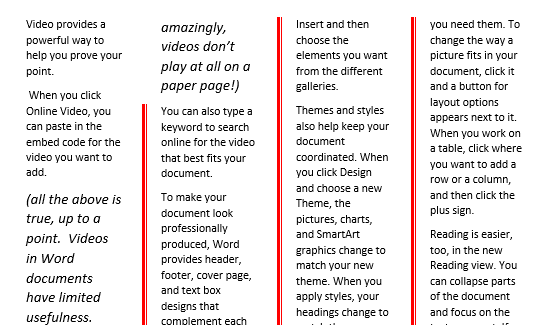
How to color the Column dividing line in Word
Microsoft Word’s ‘Line Between’ option for multiple columns can replaced and formatted to a different color or other types of line. Word’s standard ‘line between’ column setting has no formatting. All you can do is choose ‘Line Between’ and no more. There’s no known way to change the look of the vertical line between columns. […]