All about Microsoft Office for Apple Mac. Word, Excel, PowerPoint, Outlook on macOS, Microsoft 365 for Mac, Office 2021 for Mac and earlier versions.

Four more vertical formatting tricks in Word
In Adding Vertical Lines in Word we looked at the many common choices for lines down the page. Moving beyond that, let’s look at other, more interesting and creative vertical non-line choices to spice up a Microsoft Word document. Sidebars Sidebars are the starting point for many different design element options. You’re not limited to […]
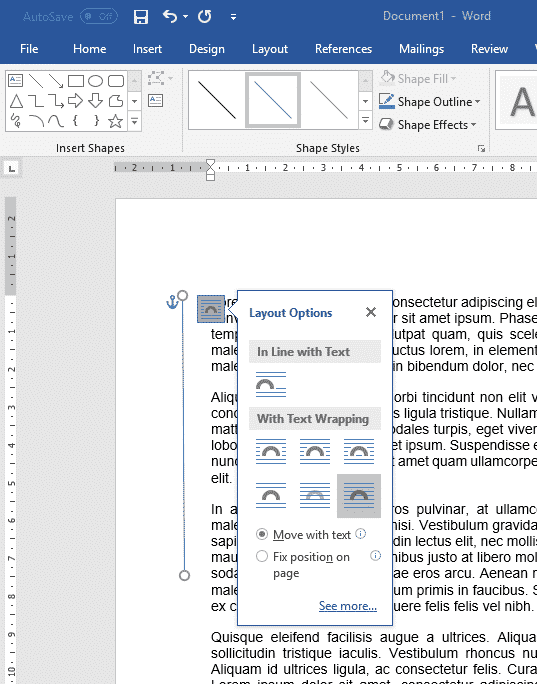
6 ways to add vertical lines in Word
There are at least six ways to add a vertical line in Microsoft Word. Vertical lines can help accentuate a piece of text in Word, but adding them is not as obvious as adding a horizontal line. These are most common options available. With all the features in Word there are other more complicated choices. […]

Word links – three ways to make internal clickable links
As well as links to web sites, Word lets you make ‘internal’ links to other parts of the same document in at least three different ways. Longer documents can benefit from internal links that let you and readers jump within the document. Insert Hyperlink – Place in this document The Insert Hyperlink box has an […]

Make a better PDF from Microsoft Word using the hidden options
Microsoft Word has vital but hidden options for making a better PDF file from your document. PDF’s made from Word can be smaller than usual for faster sending or to get under size limits that apply to email or messaging services. There are choices for including better navigation (like the navigation pane in Word), markup/comments, […]
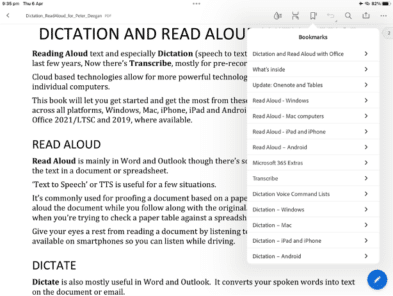
Two ways to read PDF files on an iPad
A quick guide to reading and searching PDF files on an iPad, either with the Books app or the Adobe PDF viewer. There are many apps that can view PDF files on portable devices. They all have the same basic features (more or less). View Table of Contents (Bookmarks in PDF-speak), Search for words/phrases plus […]

How to put Office Watch ebooks on an iPad or iPhone
Reading an Office Watch ebook on a portable device like an iPad or iPhone is quite easy. We’ll take you through the steps, which work for any PDF or other files, not just our ebooks. Many thousands of our Office Watch ebook readers use their iPad/tablet to read our books. The other day we received […]
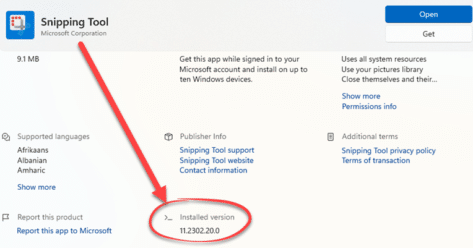
Update Windows to prevent the Acropalypse information leak
A bug in the Windows 11 Snipping Tool or Windows 10 Snip and Sketch could let people read info that had been cropped from an image. Microsoft has released an emergency update to fix the bug. Because it involves ‘cropping’ an image, the bug has been called ‘Acropalypse’. Taking screenshots, your guide for Windows, Mac, […]

Dates, time and duration, the truth in Excel
Date handling in Excel can be confusing and it’s not your fault. Microsoft could do a better job. Here’s a quick guide to how Excel handles dates and date arithmetic with the settings you should know. What you see isn’t what’s saved What Excel shows in a cell is only a version of what’s actually […]

Line And Paragraph Numbering In Word
How to number lines and paragraphs in Microsoft Word and format the numbers with a different font, size or color. Plus some ‘wish list’ features that are missing from Word. When you’re discussing a speech or other document ‘in progress’ you might want to number the lines or paragraphs for easy reference “Please change paragraphs […]
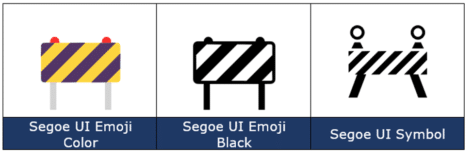
Construction Sign 🚧 emoji in Word, Excel, PowerPoint and Outlook
How to insert the Construction or Roadwork Sign 🚧 emoji into Microsoft Word, Excel, PowerPoint or Outlook. Both in Office for Windows and Office for Mac. Construction, Roadwork or Warning Sign 🚧 symbol can be used in PowerPoint slides and in other Office documents sometimes to mark WIP or “Work in Progress“. Need more than an […]

How to get better results with Bing Image Creation
Make better and faster images with Bing Image Creation, Dall-E and other AI tools using a few simple tricks. Here’s some ideas and comments with plenty of examples. If you’ve tried Microsoft Designer, Dall-E or other AI image makers, Bing Image Creation is nothing new and works the same way. See What is Dall-E and […]

Make your own pictures in a flash with Bing Image Creation
Microsoft has released their version of an AI image maker (like Dall-E) called, imaginatively, Bing Image Creation. We’ll explain how to access and use the preview with some examples of freshly made images and how the Content Warning/Block works. All these images are original, made by Bing Image Creation from a text description like ‘Woman […]
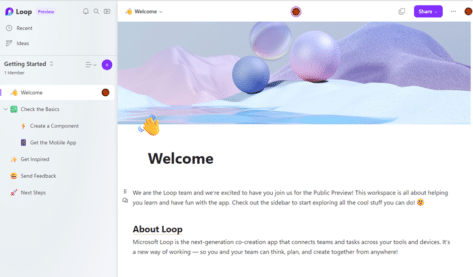
Try out Microsoft Loop, now available to the public
Microsoft Loop is coming for everyone and is now in a public preview of this new way to collaborate online. Here’s how to get into the Loop preview and how to get started exploring this new tech. Loop components are live mini-documents, worksheets or lists that people can collaborate on within other Office features like […]

Fixing Microsoft Office Unlicensed Product errors
Here’s what to do if you get the dreaded Microsoft 365 / Office 2021 or Office 2019 Unlicensed Product / View only error message. Assuming you have a current Office 2021/2019 or Microsoft 365 subscription (we’ll show you how to check that, below). The unlicenced product warning usually happens if you’ve started Office after a […]

Reversed Question Mark / Irony ⸮ symbol in Word, Excel, PowerPoint and Outlook
How to insert the Reversed Question Mark / Irony ⸮ into Microsoft Word, Excel, PowerPoint or Outlook. Both in Office for Windows and Office for Mac. Reversed Question Mark / Irony ⸮ symbol has been proposed to denote irony or sarcasm within text. Or for rhetorical questions. It’s never really caught on. The proper name […]

Add a special font for dyslexics to Word and Office
Dyslexie is a special font that’s easier for dyslexic people to read than standard type. It’s free for personal use and easy to include in Microsoft Word, Excel or PowerPoint for Windows or Mac. The font is specially designed, making it easier for the eye/brain to distinguish similar letters. For example, the slight incline reduces […]