All about Microsoft Office for Apple Mac. Word, Excel, PowerPoint, Outlook on macOS, Microsoft 365 for Mac, Office 2021 for Mac and earlier versions.
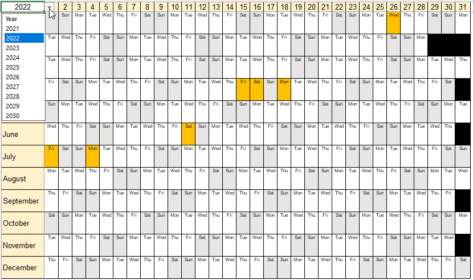
Yearly Planner / Calendar for Office Watch readers
Here’s a great Excel yearly planner that we’re delighted to share. It works for 2024 or any other year you like and highlights Public Holidays in a simple and elegant way. Office Watch friend David Peel from the UK made this workbook and let us share with our readers. He’s now added an extra so […]

What’s the deal with Excel’s Calendar Creator?
Excel has a Calendar Creator template which might work or might not. Why it doesn’t work is a little mystery but we have an alternative for our readers. The ‘Calendar Creator (any year’) template sounds great … a one-page year calendar. Find it from File | New then search for calendar creator. When the template […]

Lambda upper Λ or lower case λ in Word and Office
Type the Lambda upper case Λ, and Lambda lower case λ symbols (aka Lamda) in Microsoft Word, Excel, PowerPoint, or Outlook. Both in Office for Windows and Office for Mac. Lambda/Lamda (uppercase Λ / lowercase λ) is the 11th letter of the Greek alphabet. The uppercase symbol has various uses, it is used for the likelihood ratio […]
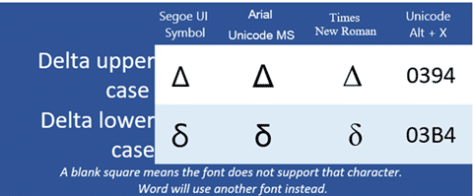
Delta upper Δ or lower δ symbols in Word, PowerPoint and more
The Delta upper case Δ or Delta lower case δ symbols in Microsoft Word, Excel, PowerPoint, or Outlook. Both in Office for Windows and Office for Mac. Delta (uppercase Δ / lowercase δ) is the fourth letter of the Greek alphabet. It’s the “d” sound in Modern and Ancient Greek. Delta uppercase Δ symbol is used […]
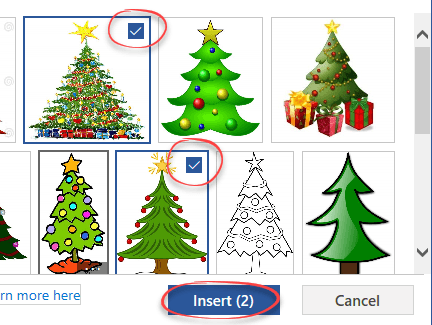
Great Christmas images and clipart in Microsoft Office
Looking for some Christmas images, pictures or graphics? Microsoft Office has some in-built Xmas options for the festive tide of Yule. Add these images into Word documents, Outlook emails, PowerPoint slides or even Excel worksheets. Unsubtle Hint: Christmas Cheer with Office has a collection of festive cards, letters, gift tags, emails ready to open, edit […]

Favorite Christmas font for Microsoft Word & Office
We take a look at a Christmas-themed font called Igloo, where to get it, and more, all compatible with Microsoft Office, Word etc for Windows or Mac One of my favorite fonts is the snow capped TrueType font usually called Igloo or Igloo Laser. A set of letters and numbers with ‘snow’ draped over the […]

Add Santa Hats to your Xmas photos and emails
There are many red and white Santa hats that you can quickly add to any photo using Word, Outlook, PowerPoint or any Microsoft Office app. I’ll explain where to get some Santa hats and how to add them to a picture. A Santa Hat can add a little festive fun to a photo, like this […]

Airplane ✈ symbol in Word, Excel, PowerPoint and Outlook
Type the Airplane ✈ symbol, icon, emoji into Microsoft Word, Excel, PowerPoint or Outlook. Both in Office for Windows and Office for Mac. Airplane ✈ symbol is often used for signs, directions or an itinerary, possibly in combination with symbols for other transport like train, car, walking. For more ‘airplane’ related graphics see Even more […]
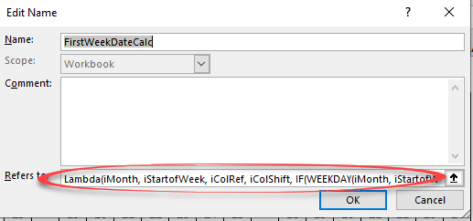
Lambda() downsides and their workarounds
The Lambda() feature in Excel 365 is great, when you try using it the downsides quickly become obvious. Happily there are workarounds. Lambda() itself is fine. It’s a welcome addition which more advanced users will make Excel do amazing things or simplify complex formulas. See Lambda – strange name for a really good extra in […]
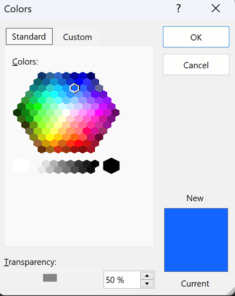
What is RGBA color and how to use in Microsoft Office
RGBA color codes are an extension of the RGB (Red, Green, Blue) color system which you can use in modern Microsoft Office with a little trickery. There’s an annoying difference (reversal) in settings on Office for Windows vs other Microsoft services and Office for Mac. RGB colors have been around for a long time to […]
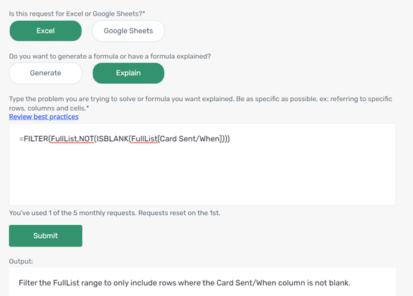
Add the Excel Formula Bot into Excel itself
The excellent Excel Formula Bot is now available as an Excel addin for subscribers to the Bot service and now can explain a formula in plain language. Excel Formula Bot is a wonderful service which converts human-speak into Excel formula-speak or vice-versa. Since we last reported, David Bressler has added an ‘Explain’ option which takes […]
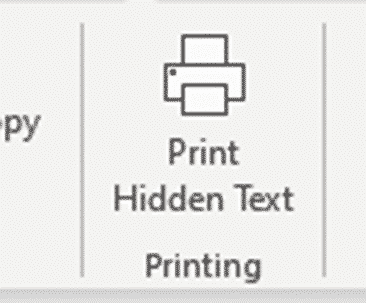
Hidden Text Printing options and workaround for Word
Hidden Text Printing in a Word document is possible but is more complex than it should be. Here’s how to change the setting quickly from the ribbon or change the print setting just for one print job. By default, the hidden text will not be printed, but you can choose to print it if you […]
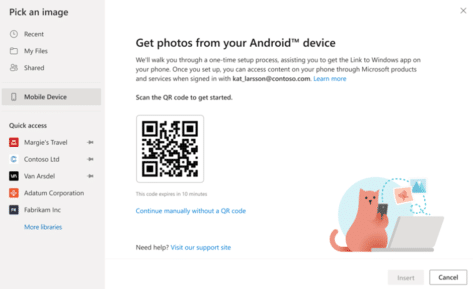
Grab photos from Android direct to Word or PowerPoint
A new way to insert a picture directly from an Android device into a Word document or PowerPoint slide on a Windows or Mac computer. Plus alternatives you can use now and might be more reliable. How it’s (supposed) to work In the online (browser) versions of Word and PowerPoint, Microsoft is gradually rolling out […]

How to fix #BLOCKED! errors in Excel
What to do if you see a #BLOCKED cell error message in Microsoft Excel. The fix is simple, if you can get past Microsoft’s unhelpful, er, ‘help’. Open uṗ a workbook and see #BLOCKED in some cells. The message ‘Check privacy settings’ is typical Microsoft message. It’s strictly correct but not very helpful. There are […]
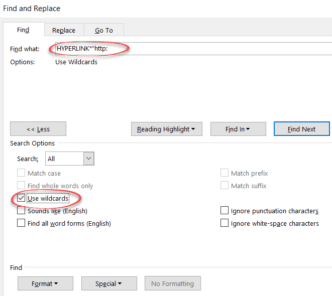
Two tricks to Find or Replace web links in Word
Find or change many web links in Word documents using the Replace command, here’s the two tricks – one is good and the other not so effective. For example, you might need to change the domain name due a corporate restructure or update links so they are secure (https) instead of regular (http) links. Reveal […]

Viva Magenta! Pantone’s 2023 color in Word, Excel and PowerPoint
Pantone has announced their “Color of the Year” for 2023 is “Viva Magenta” and, as usual, we’ll explain how to use that exact color in Word, Excel, PowerPoint and Outlook. And we’ll look at the purple prose that’s become a hallmark of Pantone’s annual promotion. The color of 2023 is … Viva Magenta As usual […]









