All about Microsoft Office for Apple Mac. Word, Excel, PowerPoint, Outlook on macOS, Microsoft 365 for Mac, Office 2021 for Mac and earlier versions.

Hidden picture info in your Office documents
The BBC has a ‘long read’ about hidden information inside almost all photos. Office Watch has talked about this problem many times before including how the extra image data hides in Microsoft Office documents, despite the ‘Document Inspector’. It’s too easy just to think of an image as just what you see on the screen […]

Quickly make Word Indexes with concordance or AutoMark
A more efficient way to mark index entries in Microsoft Word is with a concordance or AutoMark file. It’s a separate document with a table of words to be found in the document coupled with their index entries. See Simple Indexing in Microsoft Word for an intro to Word’s indexing features. Concordance or AutoMark? The […]

Simple Indexing in Microsoft Word
We’re going to talk about creating indexes in Microsoft Word. ‘Real’ books often have an index at the back which Word can create for you. An index is a list of terms or topics that can be found within the document. Microsoft Word has the ‘fixings’ to make an index and automatic options to take […]

A risk of spam filters – you might miss a real prize!
Aggressive spam filters can stop you getting messages you really want to get. One Australian author found that out the hard way when she almost missed out on a genuine $150,000 prize. The email notifying her of the valuable and prestigious prize ended up in her Junk Email folder. The problem of spam filters ‘false […]
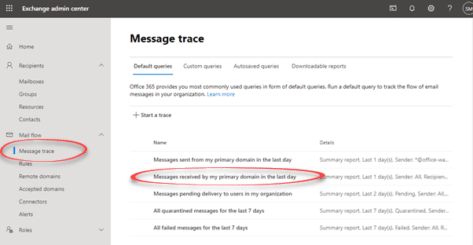
Message Trace – the way to find missing Microsoft 365 emails
Trying to find a missing message or why an email is in a particular folder? For Microsoft 365 hosted accounts the place to start is Message Trace Microsoft 365 / Exchange Server admin has a system for tracking all messages. Other Exchange Server systems have a similar feature for administrators. Maybe someone swears they sent […]

How we made the ‘Adjust your monitor’ sign
Re-creating the “Don’t be a Spock” sign in Word wasn’t hard especially since the original sign seen at the laboratory was probably made in Microsoft Word. Here are some comments on the design. The standard Arial font was used throughout. The two images and captions are in a 2 x 2 cell table with spacing […]

The case of the missing file extension
You’ve received a document, but when you try to open it, the file stubbornly won’t appear! We explain how to fix it. Our editor-in-chief saw that problem in an Internet cafe‚ in Ketchikan, Alaska and was surprised when neither the manager of the store nor the cruise computer ‘expert’ knew the answer. As you probably know, […]

Black Right Pointing index ☛ symbol in Office
How to insert the Black Right Pointing index ☛ into Microsoft Word, Excel, PowerPoint or Outlook. Both in Office for Windows and Office for Mac. Black Right Pointing index ☛ symbol can be used for pointing a direction on a sign or as a different bullet symbol. There’s also a similar, lesser known symbol Black […]
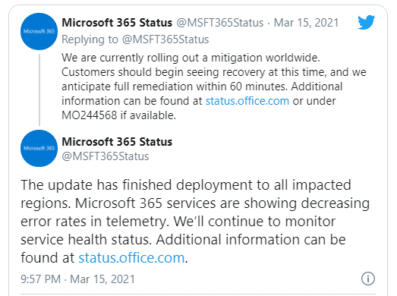
Microsoft 365 cloud outages, what happened and what you can do
Another bad week for Microsoft’s customers who rely on the Microsoft 365 hosting and other cloud technologies. There were global outages for more than half a day in Teams, Azure, Xbox Live and many other Microsoft Cloud services. All should be restored by the time you read this but there are still questions about what […]
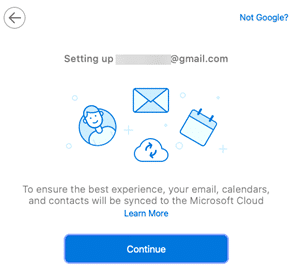
Outlook for Mac vital tips and traps with Gmail
Outlook 365 for Mac has a more complete connection to Gmail accounts which includes calendar and contacts. But it’s not a simple link and there are so many ‘gotchas’ we wonder if it’s worth the trouble. Microsoft is hyping an Outlook for Mac feature that synchronizes not just mail, but also calendar and contacts. But […]

Broken Vertical Bar ¦ symbol in Word, Excel, PowerPoint and Outlook
Type the Broken Vertical Bar ¦ in Microsoft Word, Excel, PowerPoint or Outlook. Both in Office for Windows and Office for Mac. Broken Vertical Bar ¦ symbol was sometimes used in computing. These days there’s no specific use for the broken vertical bar but it’s good to keep in mind as a design alternative to […]
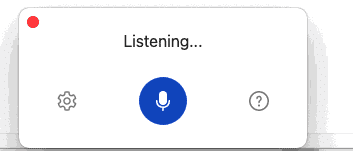
Dictation updates in Office 365 for Mac
Microsoft has added new features and interface to Dictation in Word for Mac. Voice commands, auto punctuation and even a !@$#$ profanity filter. It’s almost the same as Dictation in Word 365 for Windows. A different shortcut key ‘tis all. Clicking the Dictation button on the Home tab or pressing Option + F1 now opens […]
Office docs to avoid at all costs, the old formats
There are types of Office documents that you should NOT open, even if they come from someone you trust. Here’s the full list of file extensions for the older Office document formats which are much more likely to be ‘malicious’ docs from hackers and criminals. We’ve talked about the risks of receiving hacked documents using […]
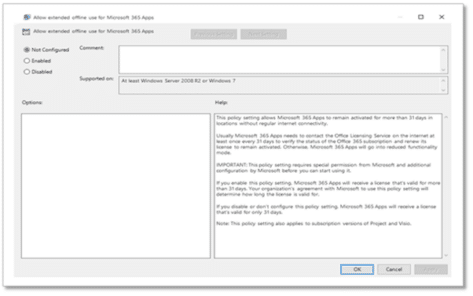
How to get Microsoft 365 extended offline time
Microsoft has finally agreed to help out customers who are offline for a long time and can’t keep their Microsoft 365 activated with a regular Internet connection. People on ships or other isolated places might use their computer offline for weeks or months. Ever since Microsoft changed to counting each login (not installs) that’s been […]
Complete price list for Office 2019
Microsoft’s prices for Office 2019 bundles make one thing clear, Microsoft really doesn’t want people buying Office 2019. The retail prices are high and there’s less chance for retail discounts. There’s less competition on the perpetual license products compared to Microsoft 365 Home ‘subscription’ which is usually available for less than the headline price. Not […]
‘Spy Pixels’ email epidemic, the good and the bad
‘Spy Pixels’ is the new name for a common tracking method used in commercial emails. We’ve written about them many times over the 20+ years of Office-Watch.com, the only new thing is the name. What are Spy Pixels? So called ‘Spy Pixels’ are tiny images (1 pixel only) linked in an email. They are invisible […]









