All about Microsoft Office for Apple Mac. Word, Excel, PowerPoint, Outlook on macOS, Microsoft 365 for Mac, Office 2021 for Mac and earlier versions.
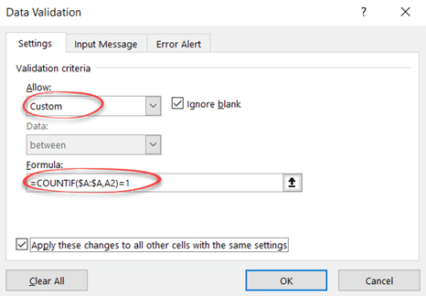
Stop accidental duplicates in your Excel lists or Tables
Stop duplicate names, email addresses or product SKU’s from being added to an Excel list or Table. Adding more rows to an Excel Tables can be done while preventing accidental duplicates creeping into the list. Excel Tables or lists can grow to hundreds or thousands of rows, there’s a risk of someone entering a duplicate […]
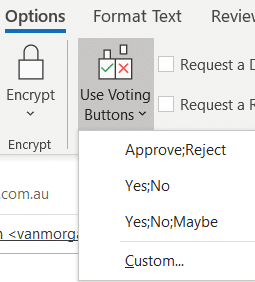
Easy Voting by email in Outlook
Microsoft is releasing a ‘Quick Poll’ option in Outlook ignoring the very similar, voting buttons, option that’s already in Outlook for Windows and Outlook for Mac. Use Voting Buttons to ask a question and Outlook will automatically collect responses. Office Watch also explains how recipient see the voting options and respond. Voting buttons have been […]

Format text with Dictate voice commands in Word
Dictate now has formatting commands with two ways to apply bold, italic, underline and other text formatting as you speak. Dictate with formatting is now available in Word Online (in a web browser) for Microsoft 365 customers. It’ll spread to other Word releases (for Windows, Mac etc) later. To use voice formatting, choose Home | […]
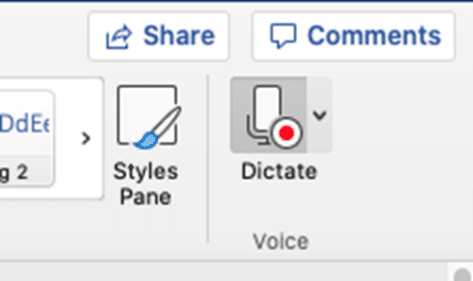
Dictate into documents with Word 365 for Mac
Mac Word 365 and Outlook 365 have the same powerful ‘Speech to Text’ option, Dictate, that’s in the Windows version of Word and Outlook. No compromises or differences except the setup is a LOT easier. Dictate is only available to Microsoft 365 subscribers with Office 365 software for Mac, Windows, iPhone, iPad and Android devices. […]

Everyone can make an Outlook Quick Poll now
Everyone with Microsoft 365 can get a ‘quick poll’ now with any email account or software. No need to wait for the Outlook Quick Poll option, now in preview for Microsoft 365 customers with Outlook for Windows. As we’ve already explained, Quick Poll is a simple and very limited way to add a Microsoft Forms […]

Left Right arrow ↔ in Outlook, Excel, PowerPoint and Word
Type the Left Right arrow ↔ into Microsoft Word, Excel, PowerPoint or Outlook. Both in Office for Windows and Office for Mac. How Left Right arrow ↔ looks in different fonts. Here’s some examples of how Left Right arrow ↔ looks in common Office fonts. Left Right arrow ↔ codes These are the important code […]
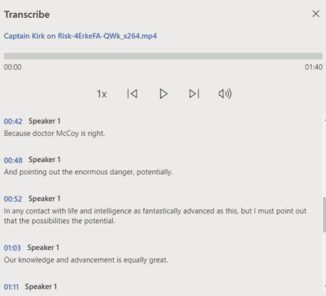
Three extra audio formats that work with Microsoft 365’s Transcribe
According to Microsoft, there’s only four audio formats accepted by their new Transcribe option to convert audio into a text transcription. That’s not true, there are more formats possible with no conversion necessary. The official list of audio formats for Transcribe is .MP4 .M4A .MP3 and .WAV. Strictly speaking that’s only three formats because .MP4 […]

Excel Subscriptions Manager
With all the subscription offerings available (Netflix, HBO, Disney, CBS, Apple, Google, Amazon, Office 365 etc), here’s a way to manage them all from Excel. Along the way we’ll show you some interesting Excel features. We were inspired by Brian X Chen in The New York Times, writing about how easy is it to sign […]

Tricks to formatting Word’s Footnotes and Endnotes
Change the look of Microsoft Word footnotes and endnotes. You can change the look of footnotes and endnotes using their linked styles: Footnote Reference Footnote Text Endnote Reference Endnote Text The two ‘… Reference’ styles create the look of the numbers, usually just superscript positioning of the default paragraph font. Changing the style could radically […]

Blood Type and Star Signs now in Outlook for Mac
One of the most curious feature additions is now in Outlook for Mac. Each Contact can have their Blood Type and Star Sign included along with phone numbers, address etc. These details and many more have always been possible in Outlook Contacts via custom fields. In the latest Outlook for Mac preview the list of […]

Get 11 Indian languages translated by Microsoft 365
Microsoft 365 Translator now has the language Odia (or Oriya), taking the list of Indian languages supported to 11. in Odia, according to Microsoft …. Microsoft 365 ଅନୁବାଦକ ବର୍ତ୍ତମାନ ଓଡ଼ିଆ ଭାଷା (କିମ୍ବା ଓଡ଼ିଆ) ଅଛି, ଯାହା ଦ୍ୱାରା 11ଟି ଭାରତୀୟ ଭାଷାର ତାଲିକା ଗ୍ରହଣ କରାଯାଇଛି । Microsoft Translator is a cloud-service so Odia is now on the list […]

Alumni and Student discount for Microsoft Office
Microsoft has a Microsoft 365 offer for students and recent graduates that’s worth a look but watch out for the fine print. The offer is Microsoft 365 Personal for $12 instead of $69.99 which is a good deal if you qualify. It’s available to students and recent graduates of colleges/universities that have a Microsoft 365 […]

Get money back after billing bugs with Microsoft 365
There are strange and worrying reports of double billing, disconnection of service and other anomalies that leave some Microsoft 365/Office 365 paying more or getting less than what they paid for. Here’s what to do if your Microsoft 365 account and billing has gone wrong, Just some of the troubles being reported: Double charging. The […]

Office 2010, 2013 and 2016 troubles coming in October
There are changes coming for Office 2010 and Office 2013 for Windows plus Office 2016 for Mac on 13 October as Microsoft makes their online services incompatible with older versions of Office. We’ll explain what’s happening, to whom and the effects. What’s happening? Some older, less secure connection methods will be dropped from Microsoft hosted […]

Gene names changed to stop confusing Excel
The names of genes are being changed just to stop Excel confusing them with dates during the import process. We’ll explain two ways Excel already works to avoid the geneticist’s problem. Genes named like MARCH1 and SEPT1 which Excel converts into dates when imported the wrong way, usually directly via a CSV text file. Office […]
Excel’s General problem that messes up what you type
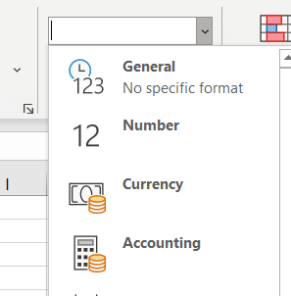
Why does Excel change what people type or import, sometimes in ways they don’t want? It’s the General cell format that messes with what you type or import. It’s the default cell format ‘General’. It’s top of the Formats list and most of us haven’t given it a second thought. Microsoft short explanation is ‘No […]









