All about Microsoft Office for Apple Mac. Word, Excel, PowerPoint, Outlook on macOS, Microsoft 365 for Mac, Office 2021 for Mac and earlier versions.
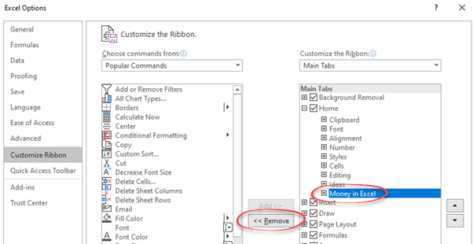
Getting rid of Money in Excel
Money in Excel shows up on the Home tab once you’ve opened the Microsoft template. Here’s how to remove its button from the ribbon or completely remove the add-in from Excel. As soon as you open and use Money in Excel, it adds itself to the Home tab on the extreme right. Microsoft probably thinks […]

Money in Excel goes public
Microsoft has gone public with their Money Excel template to import and manage financial transactions from bank accounts. There are some undocumented tricks available and an important security recommendation that Microsoft overlooks. Money in Excel can import transaction details (US bank accounts only) and show current balances. And convert that into snapshot views to see […]

Numbered List with Only Odd or Even Numbers in Word
If you want a list of numbered items using only odd or even numbers; how do you do that? Are you thinking of Word’s automatic numbering feature? The answer is “Yes” if you add little Word trickery. What exactly you need to do is use the Numbering features but leave the even (or Odd) numbers […]
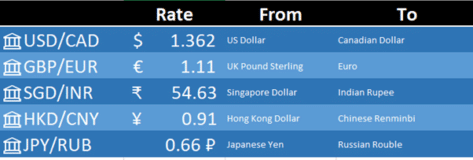
Exchange Rate support in Excel 365
The latest global exchange rates can go directly into Excel 365 for Windows and Mac. No plugins or extras are necessary because it’s in Excel 365 though it’s hiding away. Foreign exchange rates are part of the Stock data type. They weren’t part of the original Stocks data feed but have been added very quietly. […]

Recovering lost Word for Mac documents
If you’ve lost or accidently deleted a Word for Mac document (or Excel or PowerPoint) there are various places to look for it some might not occur to you. This article is also helpful if you’re trying to find and delete any files or documents that must be removed for privacy reasons. Time Machine MacOS […]

More Rounded Corner tricks for Office
Some more tricks for improving or fixing rounded corner boxes in Office. Change the corner angle or roundness even to a stadium shape. Alter the border line a little or a lot. Make a Word text box with rounded corners explains the basics of making the rectangular box into something with ‘soft’ corners. This article […]

‘Tell me’ help now in Mac Office 365 with the same limitations
‘Tell me’ help box is now in Microsoft/Office 365 for Mac as a way to find features on the ribbon. However it continues to have the same limitations that are in the Windows version. Look for the lightbulb and ‘Tell me’ box beside the ribbon tabs. Type in a phrase and Office will show relevant […]
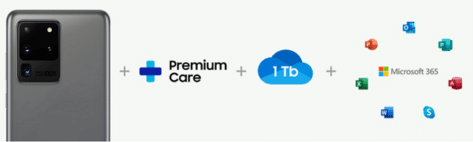
Samsung phone subscription includes Microsoft 365
Samsung’s new Access plan lets you pay a set price each month, get a replacement phone every nine months plus a Microsoft 365 ‘subscription’ plan as well. Is the Microsoft 365 element optional or even make sense (especially if you already have ‘Office 365’ as was)? It’s an interesting way to sell phones now that […]
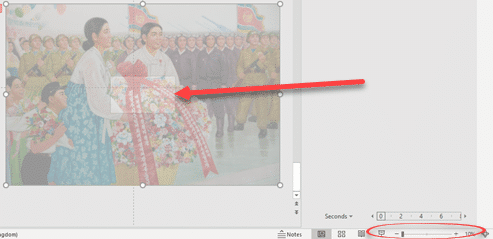
PowerPoint’s ‘Zoom out’ animation option
PowerPoint has an option to ‘zoom out’ on a still image from a close-up view to a wider look at the same picture. It’s not a great option and Microsoft could make it a lot easier. Here’s how to do a ‘Zoom out’ on an image This is an endnote on our series about adding […]

Stop embarrassing template or stock phrases in Outlook emails
A UK politician got caught sending an email with optional stock phrases and guides still in the message. Is there a simple way to stop that happening? Most organizations have standard wording and stock phrases which is understandable but there’s a risk those helpers are left in an email or document that goes out to […]
Fantasy Football ranking and analysis in Excel
Microsoft Excel is the perfect tool to analyze and rank your fantasy football ranking. This article explains how to import players, other rankings and add your own opinion. How to Build Your Own Fantasy Football Rankings “There is no reason to re-invent the wheel by typing out all of the players, positions, teams, and analyst […]

PowerPoint Ken Burns Effect complete – part 3
We continue our look at the options for the ‘Ken Burns Effect’ in PowerPoint by combining the pan and zoom animation features into a complete effect. It adds interest and movement to a still image with two separate animation effects available, in part, in PowerPoint. Ken Burns Effect in PowerPointThe zoom in or zoom in/out […]
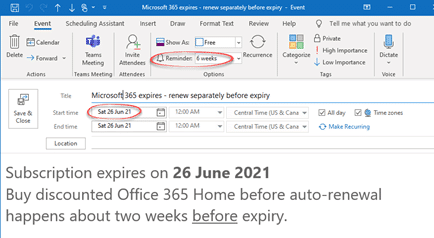
Simple way to save money on Microsoft 365 renewal – use Outlook!
One of our readers just saved over 20% on her Microsoft 365 renewal using one of Microsoft’s own products – Outlook! Julia A. a long-time Office-Watch.com reader took our advice about early renewal of Microsoft 365 (formerly Office 365). She just bought another year of Microsoft 365 from a retailer for less than what Microsoft […]

What’s my Microsoft 365 expiry date?
Not sure when your Microsoft 365/Office 365 plan expires? Go to https://www.office.com/ login with the Microsoft account linked to your Office 365/Microsoft 365 plan. Look for the icon at top right, it looks different for each person and might be your initials. Choose ‘My Account’. Then ‘Services & Subscriptions’ on the top row. Look for […]

Did Chris Pratt’s 51,000 emails really delete?
Chris Pratt released a video showing 51,000 emails being deleted from his computer. Are they really completely lost? We doubt it. On Instagram we see his shock as the Trash folder gradually counts down the messages being removed from his computer. That’s supposedly the 51,000 Inbox messages that he’d promised to respond to during lockdown. […]

Outlook’s ‘Permanent’ delete but doesn’t – how we tested it.
When Outlook displays a ‘This will be permanently deleted’ it’s not really deleted. For anyone interested in the gory details or testing themselves, here’s how we checked that out. It’s standard database procedure for a deleted record simply to be flagged ‘deleted’ rather than fully erased or overwritten. Tagging as ‘deleted’ and hiding from the […]









