All about Microsoft Office Word, Excel, PowerPoint and Outlook, Microsoft 365, Office 2021 and earlier versions.

Use Pantone Colors in Office documents
You can translate a Pantone PMS code or name into something Microsoft Office; Word, Excel or PowerPoint understands? Sometimes you’re given a specific color using the Pantone color scheme. Most commonly this happens for a corporate logo. The Ford car company specifies ‘PMS 294C’ for their blue logo. McDonald’s uses PMS 123C and PMS 485C […]
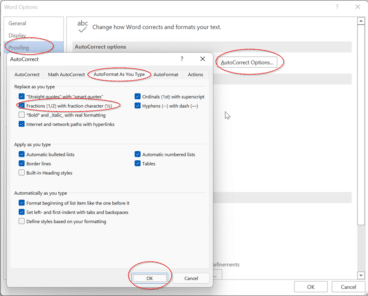
Typing some simple fractions automatically in Word and Outlook
As part of Word’s Autocorrect settings, some simple fractions will show as a symbol when you. For example, if you type in 1/4 and then space straight afterwards it’ll show as ¼. It’s done automatically from File | Options | Proofing | AutoCorrect Options | AutoFormat as you type | Fractions (1/2) with fraction character […]

Typing common fractions in Word and Outlook
Fractions like 1/2 1/4 3/4 can look better in Word and Outlook as ½ ¼ ¾ that can be done for other common fractions too ⅘ ⅚ ⅐ ⅛ among many. Either type directly with a shortcut or using AutoCorrect. We have a full table of the fractions available as symbols. As you may know, […]

Make your own fractions in Word and Outlook
There’s an easy way to make a good looking symbol for any fraction, no matter how unusual it might be. There are symbols and shortcuts for common fractions but beyond that you need a little Word trickery. But not very tricky because all you need is on the Home tab. Superscript then Subscript Use a […]

Thumbs Down👎emoji in Word, Excel, PowerPoint, and Outlook
Thumbs Down or Dislike 👎 can be typed into Microsoft Word, Excel, PowerPoint or Outlook. Both in Office for Windows and Office for Mac. Thumbs Down symbol 👎 or emoji is used to suggest disapproval or dislike. Partnered against Thumbs Up / Like 👍 symbol. How Thumbs Down Sign 👎 looks in different fonts. Here’s […]

Join the Office Watch team
Research Assistant / Technical Writer Office Watch is seeking a reliable and organised individual with excellent research and writing skills to join our team as soon as possible. About The Role All work is remote based. We offer flexible working hours based on your existing schedule, and you will have a great deal of autonomy […]

Zero-day Windows security bug spreads to Europe and USA
The serious Windows and Office security bug is now used to target organizations in Europe and USA. Despite plenty of warnings, Microsoft still doesn’t have a fix, just ‘mitigations’. Last week Office-Watch.com told you about “Follina, or CVE-2022–30190” a relatively simple hack that exploits a security bug in Microsoft’s own Microsoft Support Diagnostic Tool (msdt). It’s […]
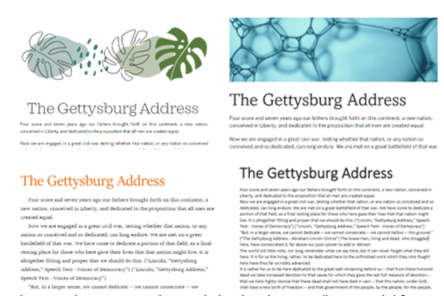
Word Designer: the quick way to better looking documents
Word in a web browser has a Designer feature, like Designer in PowerPoint, to quickly make great looking documents. Designer uses Microsoft’s templates collection to suggest formatting and design change for the document. One problem with Designer, like similar Office features, is that they can be overused and too many documents or slides end up […]
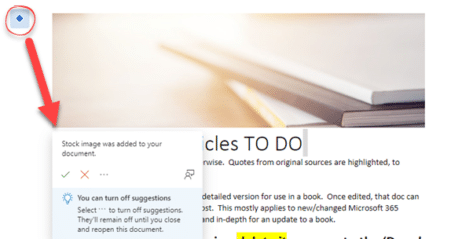
Suggested Images and Visual Emphasis in Word – a mystery new feature
Suggested Images and Add Visual Emphasis options have appeared in our Microsoft Word … looks like a new but not yet announced feature. We’ve been editing Word documents with Word in a browser, when a small blue diamond icon appears in the left margin: ◇ Clicking on it added a Stock Image to the top […]

Calculate age and other interesting facts using Excel and DateDif()
All you need is a birth date or starting date and Excel can figure out the age, next birthday, days to next birthday or when you reach a milestone like 10,000 or 15,000 days. That’s just some clever tricks with DateDif(). How old is someone or something? To calculate the age, we will need to […]
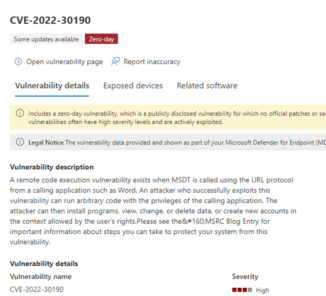
Zero-day security hole in Word, Microsoft very slow to act
A large security risk has appeared in Microsoft Word, a zero-day security problem which can infect even fully updated Word. Microsoft has taken at least 14 months and still hasn’t fixed the security hole. We’ll explain the problem and what you can do. It’s a relatively simple hack which takes advantage of gaps in Word, […]

IF and Nested IF Statements in Excel
An IF statement might sound like a complicated thing that programmers do, but it’s actually fairly easy to do in Excel. An IF statement basically puts something into a cell depending on certain conditions – if A is true, put X in this cell. You can even use what’s called a nested IF statement if you have […]

Microsoft Office license info coming to Windows
Windows 11 is getting a way to view your Microsoft 365, Office 2021 and Office 2019 licence details within the Windows Settings app. At Windows Settings | Accounts | Your Microsoft account … it shows a lot of the details from the Office.com account web pages. Windows 11 for Microsoft Office users is your independent […]

Elizabeth Line designs for Word, PowerPoint and Office
The Elizabeth Line (aka Crossrail) is now open in London, a major new tube line crossing the city. Here’s the roundel and color scheme for the new line in a format ready for Word, PowerPoint and Office. The same design elements can be used for any other London Tube line (real or imaginary) or totally […]
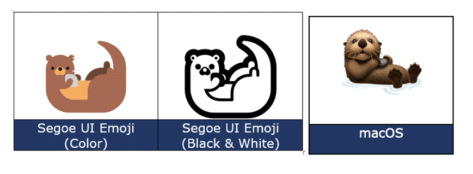
Otter 🦦 emoji in Word, Excel, PowerPoint and Outlook
Type the fun Otter 🦦 emoji into Microsoft Word, Excel, PowerPoint or Outlook. Both in Office for Windows and Office for Mac. Otter 🦦 emoji represents a light-brown otter (a member of the weasel family) on its back with its paws held together. But the emoji can just be used for a bit of fun. […]
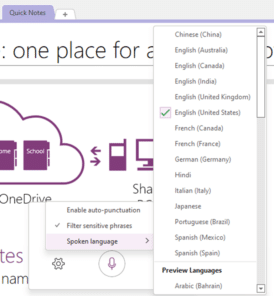
Dictation (speech to text) is now in OneNote
OneNote is finally getting the Office Dictation (speech to text) feature that’s already in other Office programs. That’s in addition to the long-standing Look for Dictation in OneNote for Windows Home tab, way off at the right-side. Also, in OneNote in a web browser … Dictation and Read Aloud in Office is our comprehensive guide […]