
Microsoft forces new Outlook on Microsoft 365 customers
The new Outlook for Windows (still in development) is being forced onto some Microsoft 365 customers from early next year unless users take action to stop the forced migration. From early January 2025, Microsoft 365 for Business Standard and Premium licenses users will be forced over to Outlook (new) unless they or their IT admins […]
Two Outlook bugs to watch out for
Here’s two Outlook for Windows bugs to watch out for. One is too easy to trigger and the other will affect people with a LOT of email to handle. Copy bug with Input Method Editor With Outlook 365 (classic) and using the Input Method Editor, Outlook might crash or hang when trying to copy text. […]
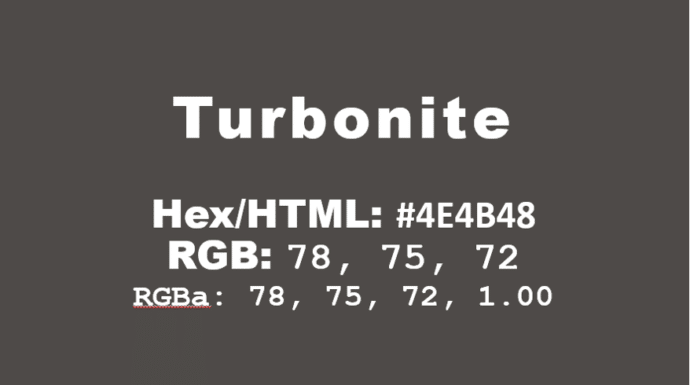
How to get the official Porsche color in Word and Office
How to get the official Porsche color “Turbonite” in Microsoft Office for Word documents, PowerPoint slides and more. The color has been announced by Pantone with the code PMS-2336-C. Porsche Turbonite is described in the usual flowery terms by Pantone: Turbonite color codes It’s easy to apply the Turbonite color to Office documents using these […]
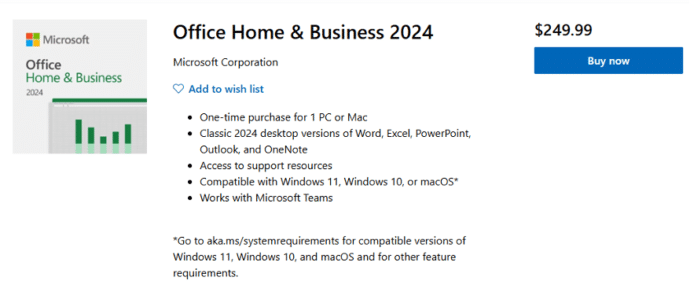
Office 2024 is now on sale
The new version of Microsoft Office 2024 is now on sale to the general public all around the world. This is the ‘perpetual licence’ or single purchase release with no subscription fee. Office 2024 is now available direct from Microsoft.com and some retailers at the same prices as Office 2021. See All about Office 2024 […]

How to correctly spell Brontë in Microsoft Word with the diaresis
An 85-year-old blunder has just been fixed at Westminster Abbey to change the spelling to Brontë with the important diaresis. Here’s how to type an ë in Word and other matters arising. Here’s how the memorial to the Brontë sisters looked in Poets Corner until a few days ago. For 85 years this memorial, seen […]
Microsoft Office and the “Dialog from Hell”
A short video which brings up some interesting points in the early development history of Microsoft Office, some might surprise you. Microsoft Office started as separately sold products (Word, Excel, PowerPoint and Outlook) and only gradually did they become an integrated package with shared components, consistent interface and some interconnections. See the whole video on […]

Great macOS Sequoia features for Office users
The latest version of the macOS for Apple Mac computers, Sequoia v15, is out now. Here’s a few features and settings that might interest Microsoft Office users plus a few tips from real use of macOS Sequoia. macOS Sequioa is available now and works quite well for us. More cautious people might want to wait […]

Strange spam that Microsoft isn’t stopping
No spam/junk email filter is perfect but it’s hard to understand how some recent messages have been missed by Microsoft’s inhouse security systems. Here’s two peculiar examples to watch out for. A prank email or a failed scam? An email is sent out to many people that seems to have hidden CC list with this […]

Copilot Wave 2 – watch out for the fine-print
A new collection of Copilot features have been released under the banner “Wave 2” with inclusions for Excel, PowerPoint, Outlook, Word and Teams. Don’t get too excited because there’s ‘fine print’ that limits who can catch this wave. Before we explain a little of what’s in the new set of Copilot features, let’s look at […]

Does Outlook (new) really have offline support?
Microsoft’s promise of offline support in Outlook (new) is a lot LESS than it appears as the company continues to over-promise and under-deliver their Outlook replacement. We’ve said it before … Maybe someday new Outlook will really be ready for the public but it’s not there yet. See Outlook (new) is NOT ready, ignore what […]
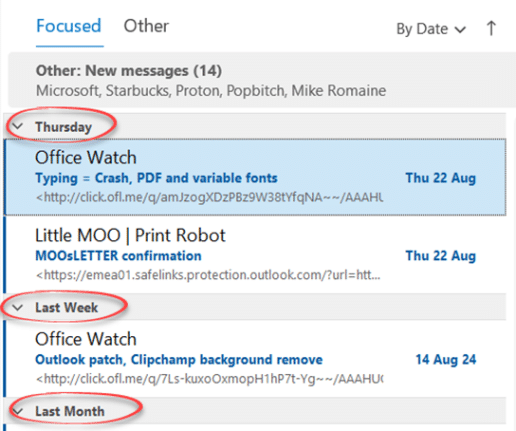
Easy fix for unwanted message grouping in Outlook
How to stop Outlook grouping Inbox messages, most commonly by date. “Today”, “Yesterday” etc. which might suit some people but is a right nuisance to others. This is an option in Outlook (classic) for Windows which can appear, seemingly for no good reason. It’s not in Outlook (new). Some people might like it, but most […]

The ultimate way to change Microsoft Word defaults.
Having trouble changing Microsoft Word defaults? The ultimate way to change defaults is sure to work. It’s has been around since the very early days of Word and works for Outlook too! We often hear from people having trouble changing Word’s opening (default) settings for a new document. Various places in Word have ‘Set as […]

Koalas galore in Microsoft Office
We went hunting for koalas in Microsoft Office. Found more than 18 of the cuddly marsupials for Word, PowerPoint or Outlook. There are emoji, Office icons, SVG, online images and more making a colony or cling of koala (either can be the collective noun for koala). None of the endangered species where harmed in the […]
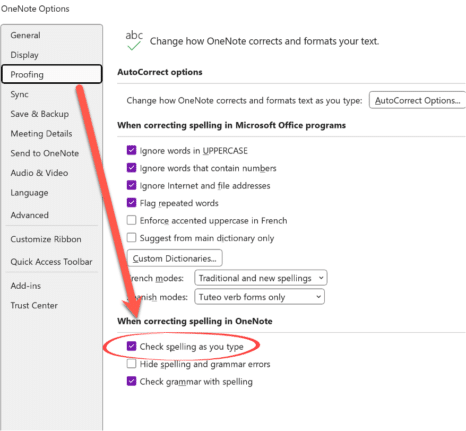
Office crashes while typing – the problem and workaround
Microsoft 365 for Windows might crash while someone is just typing (you read that right). All the Office apps, Word, Excel, PowerPoint, Outlook or OneNote can be affected according to Microsoft, which knows about the problem and offers some workarounds. The problem is caused by an out-of-date language pack which has all the spelling and […]
Are your old email accounts secure? Microsoft report
A new security report from Microsoft shows how much is done to mislead and disrupt the upcoming US election plus a warning to everyone about the danger of leaving old email accounts unprotected. The report is titled “Iran steps into US election 2024 with cyber-enabled influence operations” though it’s clear that both Russia and China […]

Outlook security hole needs quick patching
The latest Outlook security hole is quite easy to exploit so it’s a good idea to quickly update Microsoft 365/Office for Windows. The security bug is easy to exploit. Infection occurs simply by downloading a small file from any web site or source and running it. Hackers know plenty of ways of tricking people into […]









