
How to fix an imported appointment in Outlook
Some imported Outlook calendar items can’t be changed, here’s why and how to make the imported appointment editable. Understanding issues with an Outlook imported appointment can help you manage calendar inconsistencies. Usually an imported appointment (via a downloaded .ics file) can be edited just like most Outlook calendar items. Often that’s necessary to add more […]

Outlook (new) is NOT ready, ignore what Microsoft says
Microsoft says that the new Outlook for Windows is now generally available, but everyone should ignore that. Outlook (new) isn’t truly ready. It lacks vital features and has serious security shortcomings which are likely to frustrate anyone who relies on it. On 1 August 2024, Microsoft declared that Outlook (new) for Windows is now ‘generally […]

Beware the privacy trap in the Outlook (new)
Microsoft’s eventual replacement Outlook (new) for Windows supports Gmail, Yahoo and other accounts but there’s a privacy trap that Microsoft does its best to hide. Outlook for Windows privacy is a major concern. According to Microsoft, it’s easy to add Gmail, Yahoo and other accounts to the new Outlook, all they show is entering an […]

Dictation leaves Outlook mobile apps
The Dictation feature in Outlook for iPhone, iPad and Android will leave the apps in September for no reason Microsoft will share. The announcement was made discreetly so that only Microsoft 365 non-consumer accounts with Admin access are notified. Message MC841218 “We will be retiring the Dictation feature from Microsoft Outlook for iOS and Android […]
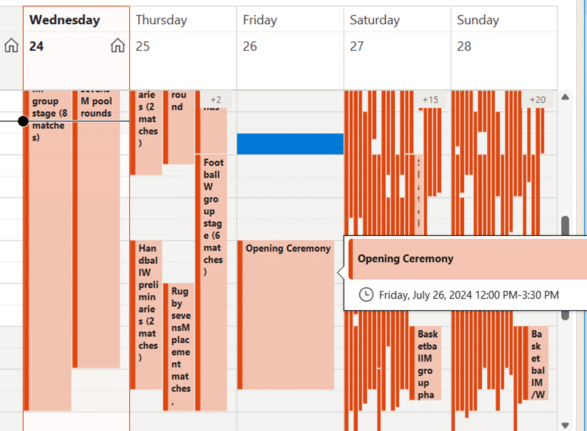
Paris 2024 Olympics complete calendar in Outlook
Add to your Outlook a special Paris 2024 Olympics calendar shows all the events plus opening/closing ceremonies with times in your location and search for favorite events. A special Olympics calendar shows all the events plus opening/closing ceremonies with times in your location. This calendar shows the Olympic calendar in US Central time with the […]
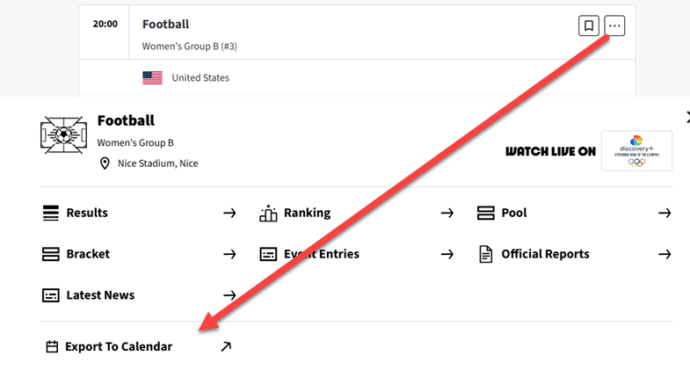
Get a Paris 2024 Olympics event times into Outlook calendar
Here’s how to quickly add events from the Paris 2024 Olympics into your Outlook calendars, showing times in your location. The Paris Olympic organizers have provided an online calendar with .ics calendar files for individual events from their website. Those calendar files can be imported into Outlook for Windows or Mac. They’ve been well made […]

Why Crowdstrike might still strike you
There are two ways the fallout from the Crowdstrike troubles might affect people even if their computers didn’t ‘die’. First, some organizations are still recovering or are dependent on businesses that are recovering. Keep that in mind if there are problems with a company. (On the other hand, some organizations might use Crowdstrike as an […]
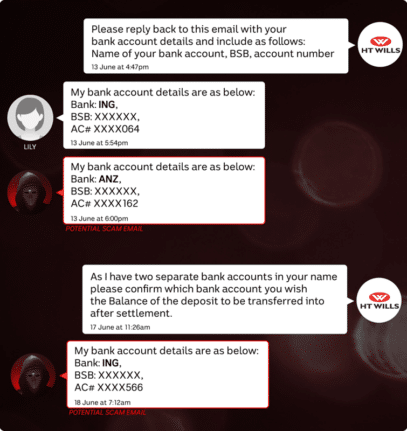
One thing you must do to your email account today
Securing your email account is vital. It’s the one thing that everyone must do unless they want hackers to invade your privacy and possible steal your money. A news story from Australia is yet another lesson in why everyone should properly secure their email account with two-factor authentication. A lady lost $26,000 Aussie dollars (US$17,500) […]

Two better ways to Remove Background from images
Microsoft Office has a Remove Background tool for images but there are two better, faster and free ways to do the same job. Background removal lets you get an image with a transparent surround which can be merged/overlaid into any other slide or document more seamlessly (left) than a separate box with non-matching background (right). […]
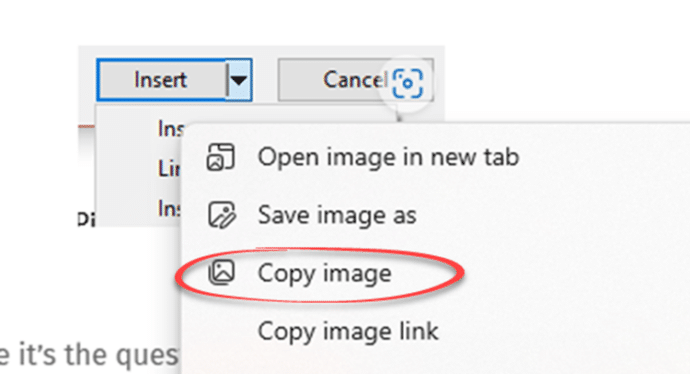
Two faster ways to insert an image from the web into Microsoft Office
There are two quicker ways to insert an image or graphic from the Internet or web page into a Word document, Excel sheet, PowerPoint slide or Outlook email. The method most people are taught is to save an image to their computer then Insert | Picture | from this device to select that file. That […]

More free Copilot tricks for Microsoft Office users
You don’t need to pay for Microsoft’s AI service, Copilot, to get some of its benefits in Microsoft Office, especially Word, Outlook and Excel. Try converting text to a table or vice versa. The trick to grabbing text from an image. Along the way you’ll also discover some of the limits and problems with the […]
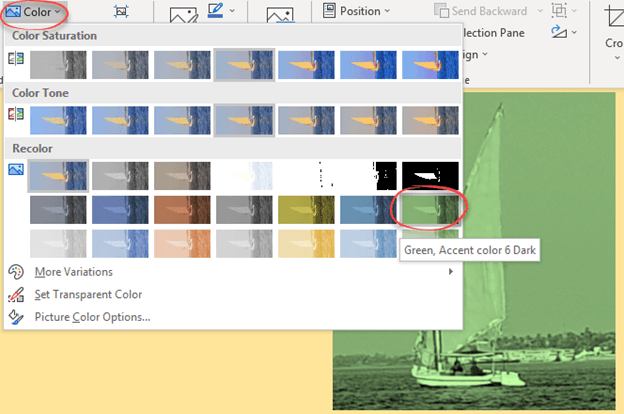
Change a picture to a custom color in Office
Don’t miss this often overlooked Office trick, changing the color of an image or graphic in Word, Excel, PowerPoint, or Outlook. We did this in our article about inserting Prince’s ‘Love Symbol Number 2’ in Office documents. The image is available in various formats but always black, not purple. As usual, there’s more to color […]

All about “Please check your network connection and try again” errors
Many of us have seen the error message “Please check your network connection and try again” when the Internet is definitely available. What does this Office or OneDrive error message really mean and what can you do to fix it? This error message appears in Microsoft Office help and other places like OneDrive. “Sorry, something […]

Bald Eagles aplenty in Microsoft Office
There are ten different bald eagles in Microsoft Office alone, as icons, stock images or even a 3D model, plus many other sources for photos and graphics online. We’re focusing here on the bald eagle (Haliaeetus leucocephalus) which is native to North America and a US National Symbol. There are many collective nouns for eagles …. […]
Outlook for Windows gets a name change, at last
Outlook for Windows is about to become Outlook (classic). We’ll explain why the change is necessary and should have happened last year. The current Outlook for Windows is being renamed “Outlook (classic)” or more properly “Outlook (classic) for Windows”. That will properly distinguish it from the new, still in development, Outlook (new). Despite being a […]
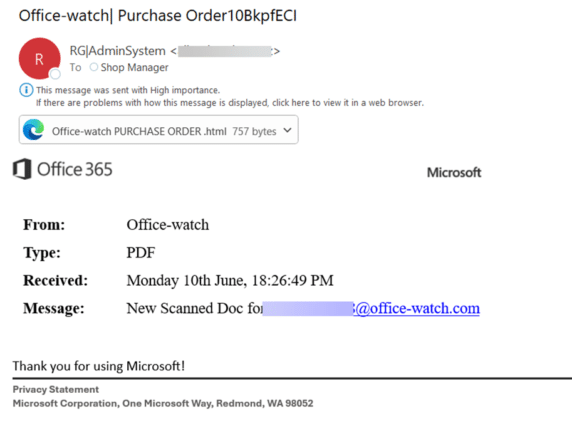
Don’t Fall for This Fake Microsoft Email Scam
Here’s the latest example of a fake Microsoft email that slips past their anti-virus and security checks to end up in a Microsoft 365 mailbox. It might look like a real email at first glance but it’s not. The big clue to us was “Office 365” which is a name Microsoft rarely uses these days […]









