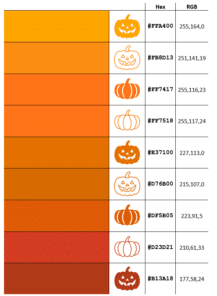
14 perfect pumpkin colors and more in Microsoft Office
Our exclusive Pumpkin Color Charts have the perfect ‘pumpkin’ colors you can use in Halloween documents, slides and graphics with their Microsoft Office compatible color codes including the five Pantone colors called ‘Pumpkin’. There are many Halloween ‘pumpkin’ colors to choose from depending on the variety and ripeness of virtual vegetable you want. See more […]
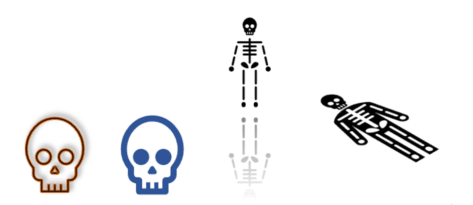
Add Skeleton and Skull to Word, PowerPoint and Office
Office has various options for graphics or images of skeletons or skulls – perfect for Halloween or other gory, scary uses in Word docs, PowerPoint slides or Outlook emails. We can’t offer a 12-foot skeleton, complete with creepy glowing eyes. For this 3.56 meter monster you have to hunt through Home Depot stores in the […]

New Outlook is getting VERY limited offline support
Microsoft is boasting about the coming ‘offline support’ for the new Outlook but a look at the detail shows its very limited offline access. The current Outlook desktop apps for Windows and Mac have excellent offline support, meaning you can work on your mail, calendar, contacts even when there’s slow or no Internet access. The […]
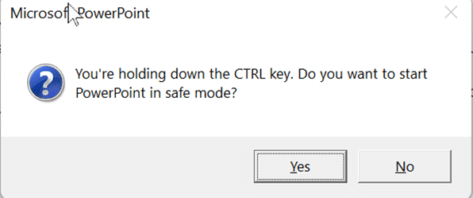
All about Safe mode in Microsoft Office
Safe Mode is a special way for Office apps to run when things aren’t working properly. Here’s how to use Safe Mode, if Office doesn’t offer it automatically, and what Safe Mode does differently. Safe Mode is useful in situations where you cannot open files in normal mode because the app is crashing, or you […]
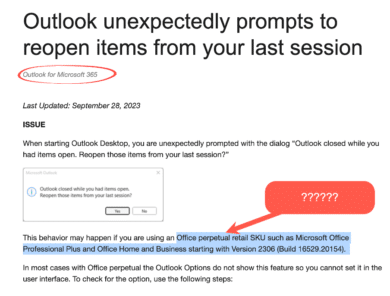
Fixed: Outlook bug showing restore items dialog
Microsoft has fixed a bug in Outlook for Windows which wrongly popped up the notice “Outlook closed while you had items open. Reopen those items from your last session?” When Outlook closes with items open (email, appointment etc.), it should offer to reopen those items when Outlook next starts. The message looks like this: Outlook […]

Use a Hidden Registry Hack to Improve Your Privacy with Microsoft Office
Use a hidden registry hack to protect your privacy by reducing the amount of private info Microsoft Office apps send to Microsoft. Dr Aleksandar Milenkoski, working for the German Federal Office for Information Security, has produced a report on what information Microsoft Office software sends back to the company. That’s information about when and how Office […]

Stethoscope 🩺 emoji in Word, Excel, PowerPoint and Outlook
How to insert the Stethoscope 🩺 symbol/emoji into Microsoft Word, Excel, PowerPoint or Outlook. Both in Office for Windows and Office for Mac. Trivia: the stethoscope was invented by a Frenchman who was embarrassed putting his ear upon a lady’s chest to hear her heartbeats. His original was a simple tube, not the dual-ear device we […]

Microsoft’s font substitution for Aptos really sucks
Microsoft’s alternatives for the new Aptos fonts range are very poor. In some cases, the substitutions make no sense at all. We’ve looked at what happens if a document with Aptos fonts is opened Office 2016 and earlier versions of Word, Excel, PowerPoint and Outlook. Aptos fonts are the new default for Microsoft 365 and […]
Discover Office Keyboard Shortcuts in Windows 11 and 10
There are some keyboard shortcuts to open or switch to Office apps in Windows 11 and Windows 10, if you have enough fingers! They are all based around the Ctrl + Alt + Shift + Win combo plus a letter. That might seem like a keyboard shortcut for an octopus but it makes a little […]

Copying images from Designer to Office documents
Unfortunately, copying an image made in Designer isn’t as simple as it should be. Here’s how to grab images made with Designer to use in your own Office documents. Don’t wait, start using Microsoft Designer now It’s easy to paste an image into Designer. Just copy the image from your app (like Word or PowerPoint), […]

Gun 🔫 emoji in Word, Excel, PowerPoint and Outlook
Insert the Water Pistol or Gun emoji 🔫 into Microsoft Word, Excel, PowerPoint or Outlook. Both in Office for Windows and Office for Mac. AND how to make the ‘gun’ point to the right. Water Pistol 🔫 symbol is the only ‘gun’ style symbol in the emoji collection. It’s officially called ‘Water Pistol’ but searching […]

Ten ways to Reverse, Mirror or Flip Text in Microsoft Word
There are at least ten ways to ‘reverse’ ‘mirror’ or ‘flip’ text or images in a Word document. Horizontal, vertical, reversed, combined or any angle you like. When people say those terms they can mean different things so we’ll look at many options and how to do them. Also along a curve, but that’s a […]

Was Microsoft 365 email down or not?
Microsoft 365’s mail service had troubles on Monday 4th for almost 24 hours. Or did it? Microsoft’s reporting of the incident has been inconsistent and had more than the usual self-serving blather. The Microsoft 365 email outage started on Monday 4th September about noon UTC (early morning in the US) and was described by Microsoft […]

Surprise! Office 2021 & Office 2019 has the all Aptos fonts
An undocumented surprise for Office 2021 and Office 2019 customers. The new Aptos fonts are automatically installed in Office 2021/Office 2019 even though Microsoft insists they are for Microsoft 365 only. However, there’s a crucial difference and strange anomaly between how Aptos fonts work in Office 2021/2019 vs Microsoft 365. According to Microsoft the Aptos […]
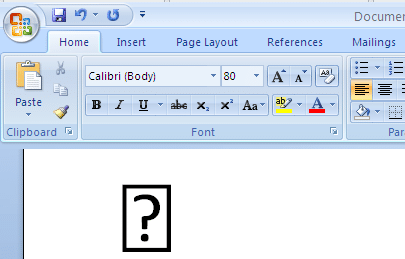
Word’s symbol substitution, the good and the bad
A few years ago, Microsoft quietly added a little Word trickery to make it easier to Insert Symbols and not get the dreaded blank box or box with question mark. Here’s what Word does and how to workaround the, sometimes unhelpful, fix. Back in the olden days of Word 2007 and before, it was possible […]
Outlook meeting organizers now appear in Google Calendar
Google unveiled a little update designed to streamline the experience for Outlook enthusiasts. Outlook meeting organizers will now appear as that in Google Calendars. According to the Google Workspace blog, Google introduced a subtle yet notable modification in the integration between Calendar and Outlook. The update clarified: Previously, if a Microsoft Outlook user invited a […]









