
Stop Word’s grammar ‘help’ once or always
Despite appearances, Microsoft Word’s Grammar and Style checks are not compulsory. There are simple but somewhat hidden controls to turn off the blue underline or dots for selected tests. This article explains how to selectively turn of Microsoft Word’s “Grammar and Refinements” checks either once only or for all your documents. Over time you can […]

Why does a document look different on other devices
Reasons why a Word document or email can look different on one computer than another device and what you can do get ‘fidelity’ or the same look across many machines. In short – you can’t assume that what you see is the same as someone else. You get a document sent to you or maybe […]

Highlight tricks for Word, PowerPoint, Excel and Outlook
Here’s another example of a seemingly simple Office feature that has hidden depths – Highlighting. For a long time, there’s been a highlight option in Office: Word, Excel, Outlook and even PowerPoint (albeit in a different form). They vary a little in each program so this article will go through them all, mentioning alternatives and […]
Dark Mode has gradual progress in Microsoft Office
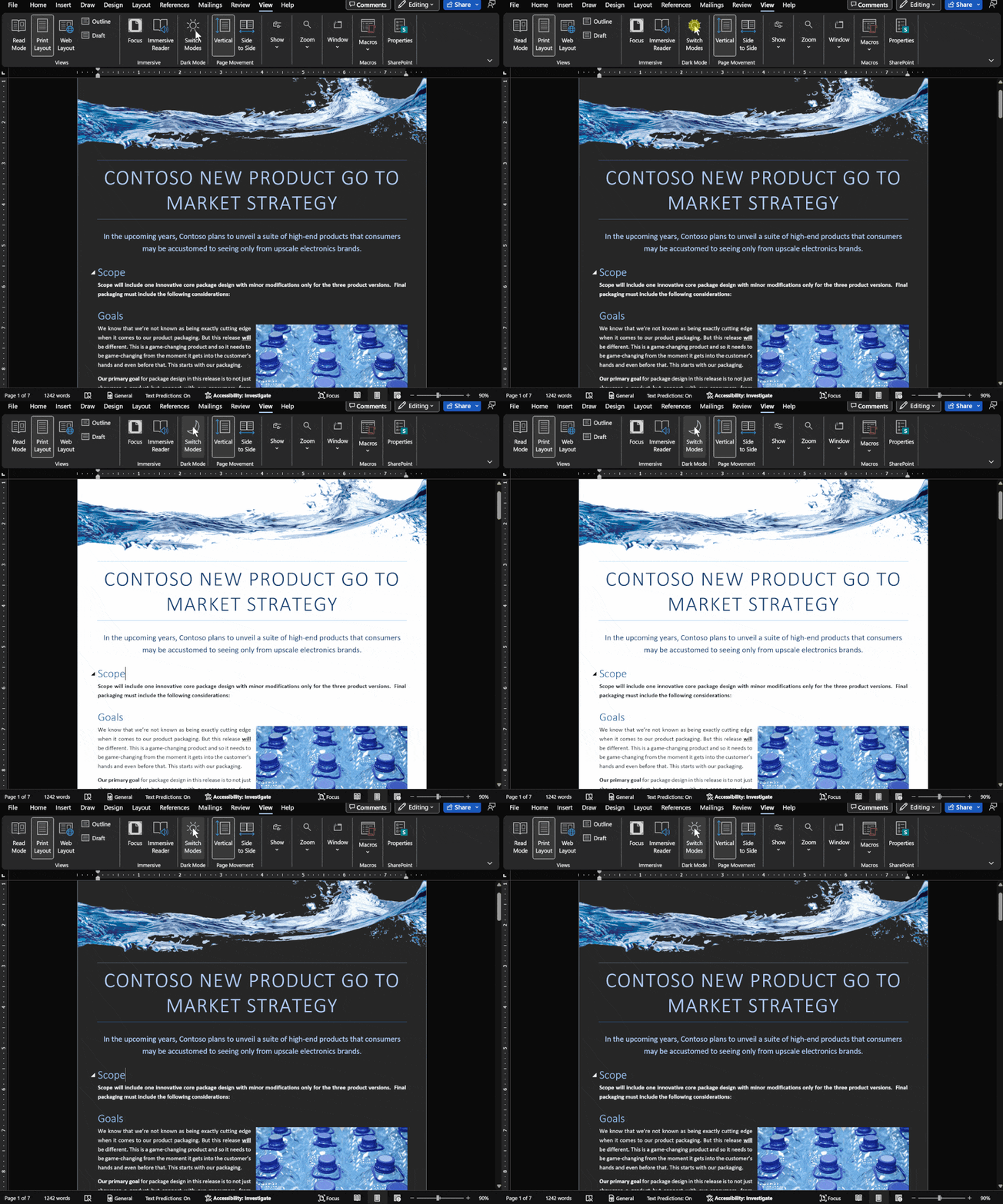
Let’s take a moment to see where customers stand with Dark Mode options in Microsoft Office in Windows, Mac, iPhone, iPad, Android and web. It’s easy to get confused about Microsoft 365 and Office 2021 dark mode or theme options. Microsoft has announced ‘dark’ developments so many times it’s hard to keep up with what’s […]

Images in Office – Inserted or Linked?
More details on the image insert or linked options in Office, Word documents and Outlook emails. We’ve already talked about the three options available for documents; Insert, ‘Link to File’ and ‘Insert and Link’. Insert adds a copy of the image into the document Link displays the current external picture within the document. Insert and […]

Three choices to add images to Office and emails
There are three different ways to add an image into a Word document or Outlook email. Insert is the most common but there’s also Link or Insert and Link ” When I make a web page I can link to any image on the Internet. In Word, it’s different. You add an image to the […]

Make Contact Groups with CC and BCC in Outlook
Here’s how to make Outlook Contact Groups work with both CC and BCC’s as well. Outlook Contact Groups are a way to combine a list of contacts under a single name. They are often used in business but are also useful for individuals or families. For example groups like: ‘Regional Managers’, ‘Branch Staff’, ‘Neighbours’, ‘Club […]

8 ways to share calendars or events in Outlook
There are at least eight ways to share an entire calendar or individual appointment in Outlook software. Sharing can be ‘live’ and connected. Any changes or updates to the event or calendar are automatically sent to everyone sharing. Or it can be a ‘one-off’ item. A special attachment which is emailed or a little .ics […]
Cent ¢ symbol in Word, Excel, PowerPoint or Outlook
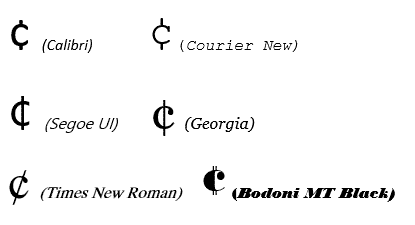
How to type the Cent symbol ¢ into Microsoft Word, Excel, PowerPoint or Outlook plus any Windows program. Cent ¢ shortcut Word and Outlook The Cent ¢ symbol has an inbuilt shortcut in Word and Outlook: Ctrl + /, C Hold down the Ctrl key while pressing / then type C (upper or lower case). […]

Get the most persuasive font in Microsoft Office
Baskerville has been decreed the most persuasive font after an experiment by Errol Morris and the New York Times. Happily, a very similar font is available to all Microsoft Office for Windows users. In an interview in Fast Company, Errol Morris talks about the experiment where people were asked to rate the same text, but […]
Checkered Flag 🏁 symbol in Word, Excel, PowerPoint and Outlook
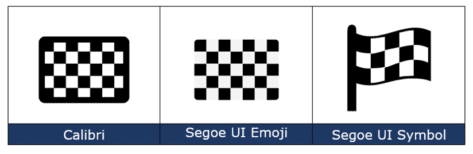
Insert the Checkered Flag 🏁 into Microsoft Word, Excel, PowerPoint or Outlook. Plus other alternatives available in modern Microsoft Office like icons or stock images. As its name suggests, the Checkered Flag emoji 🏁 shows a flag with a black-and-white checkerboard pattern. It’s often used to represent vehicle racing, challenges, or accomplishments. How Checkered Flag […]
Simple start with Microsoft 365 and PowerShell
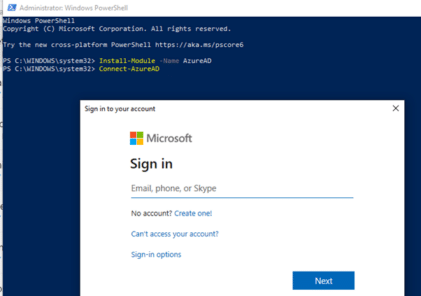
How to run administration commands via PowerShell for Microsoft 365 hosting and especially Microsoft 365 Exchange Server or mailbox hosting. Microsoft 365 customers will often see instructions like this to configure their Exchange Server mailboxes using PowerShell. Set-OrganizationConfig -AllowPlusAddressInRecipients $true Looks simple, but that command alone won’t work in PowerShell because there are add-ins to […]
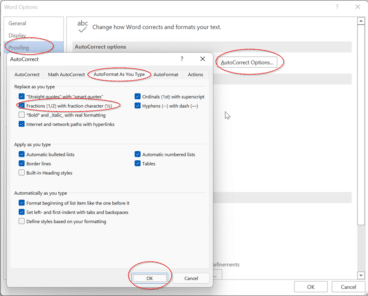
Typing some simple fractions automatically in Word and Outlook
As part of Word’s Autocorrect settings, some simple fractions will show as a symbol when you. For example, if you type in 1/4 and then space straight afterwards it’ll show as ¼. It’s done automatically from File | Options | Proofing | AutoCorrect Options | AutoFormat as you type | Fractions (1/2) with fraction character […]

Typing common fractions in Word and Outlook
Fractions like 1/2 1/4 3/4 can look better in Word and Outlook as ½ ¼ ¾ that can be done for other common fractions too ⅘ ⅚ ⅐ ⅛ among many. Either type directly with a shortcut or using AutoCorrect. We have a full table of the fractions available as symbols. As you may know, […]

Make your own fractions in Word and Outlook
There’s an easy way to make a good looking symbol for any fraction, no matter how unusual it might be. There are symbols and shortcuts for common fractions but beyond that you need a little Word trickery. But not very tricky because all you need is on the Home tab. Superscript then Subscript Use a […]

Thumbs Down👎emoji in Word, Excel, PowerPoint, and Outlook
Thumbs Down or Dislike 👎 can be typed into Microsoft Word, Excel, PowerPoint or Outlook. Both in Office for Windows and Office for Mac. Thumbs Down symbol 👎 or emoji is used to suggest disapproval or dislike. Partnered against Thumbs Up / Like 👍 symbol. How Thumbs Down Sign 👎 looks in different fonts. Here’s […]









