
Outlook’s ‘Permanent’ delete but doesn’t – how we tested it.
When Outlook displays a ‘This will be permanently deleted’ it’s not really deleted. For anyone interested in the gory details or testing themselves, here’s how we checked that out. It’s standard database procedure for a deleted record simply to be flagged ‘deleted’ rather than fully erased or overwritten. Tagging as ‘deleted’ and hiding from the […]

Add Outlook appointment in another time zone
Outlook for Windows and Mac can easily add appointments or events using times from another time zone. They’ll show up and remind you in your local time. That’s really handy for global meetings or live streams scheduled in other locations. Enter the Outlook appointment or event using the time and time zone given by the […]
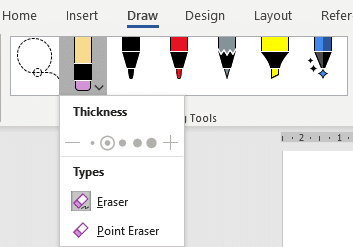
Combined Drawing Tools in Word 365 and other Office programs
The Drawing Tools in Word 365 is now larger with separate tools like Lasso and Eraser now in a single combined gallery. There are other changes and new limitations on the Drawing Tools gallery, some of them undocumented. Compare that to the old Draw tab where the Lasso, Eraser and Add Pen were separate from […]
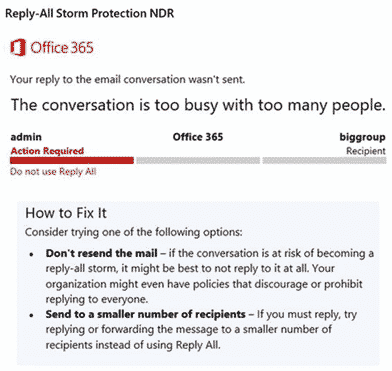
Reply All Storm Protection comes to Office 365 hosted
Office 365 hosted organizations will soon get protection from Reply All email storms. Reply All storms happen with large distributions lists (e.g. whole company or division). Too many people hit ‘Reply All’ sending thousands of messages to already cluttered mailboxes. Now, if there’s too much ‘Reply All’ activity in a list, Exchange Server will block […]
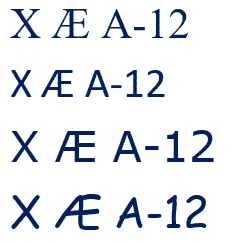
X Æ A-12 in Microsoft Word and Office
Elon Musk and partner have named their child X Æ A-12 (no kidding) how do you type Æ in Microsoft Word and Office generally. The child’s name doesn’t trigger any spelling or grammar errors in Word. No squiggly lines. What is Æ ? Æ or æ is a a-e ligature that was used in English […]

Looking back on Love – the Love Bug in Windows
Just like the Melissa virus, looking back to the Love Bug virus of May 2000 shows how much has changed and how much has remained the same. Much the same story as the Melissa virus that came out a few months before. Love Bug or I Love You was a VBScript virus sent mostly by […]

Format Painter with Shapes and gradients
Format Painter in Office will work to copy formatting between shapes which is very useful for complex Gradients. But they don’t always format copy in the way you’d expect. We’re obliged to Office-Watch.com reader, Lorelei, for pointing out that Format Painter can copy gradient fills in most but not all situations. To copy the formatting […]

Six shortcuts for horizontal lines in Word and stopping them!
Word has six shortcuts to make horizontal lines, here’s how they work, change them, color the lines and how to stop lines when they get out of control. All six line shortcuts There are six horizontal line shortcuts. For each one type the same character three times at the start of a new line then […]

Three-day Aussie breakdown of Outlook.com
Over Easter there was a three day serious breakdown in Outlook.com for Australian users among many. The problems were first acknowledged by Microsoft about 1pm Sydney time on Saturday 11 April and continued for around three days! Mostly Aussies were affected with pockets of trouble in Europe and USA. A three-day outage is bad at […]
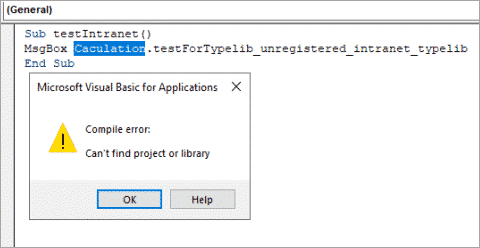
April 2020 updates for Office come with a warning
The April 2020 security fixes for Microsoft Office come with a warning that some VBA code will stop working. There are workarounds to let some references through. The KB4557055 security fix blocks VBA references that link to Internet or intranet sources or have been downloaded from the Internet. That will effect some Office/VBA code which […]

Add the Indian Flag into Word, Excel or PowerPoint
Find and add the Indian flag into Office documents, Word, Excel or PowerPoint, then use some Office picture tools to enhance the image. The same help applies for any other national flag, just look for a different source. Get the Indian Flag Image There are many, many copies of the Indian flag available. We’ve opted for the Wikipedia site because it […]

Microsoft 365 summary that’s readable!
Here’s a readable and searchable version of the Microsoft 365 summary table that came with Microsoft’s announcement of the rebranding from Office 365 to Microsoft 365. It shows the differences between ‘free’ Office (with a Microsoft account), Microsoft 365 Personal (formerly Office 365 Personal) and Microsoft 365 Family (formerly Office 365 Home). Important limitations on […]

Online call services ranked
Choose the best online call and conference service to keep in touch with the people in your life. We’ve looked at all the major online voice and video calling/conferencing options and ranked according to ease of use, access to all-comers and reliability across slow Internet connections. Leaving aside privacy considerations, our preference for online calls […]

Try Grandma’s Trivia Quiz by email and online
A simple and cheap way to keep kids amused and give them something to talk to grandparents and others during online calls. Grandma/pa starts with some trivia questions for the kids to research, sent by email. Later in the day there’s an online call when grandma/grandpa can catch up on the day and discuss the […]

Zoom ‘1 to 1’ calls – making and answering
Here’s how to call someone using Zoom or answer a call, then some of things you can do in a call. Zoom makes a blurry distinction between a call (between two people) and a meeting (more than two). It’s even possible to start/accept a Zoom call while in a Zoom meeting or vice-versa. However, there’s […]
Get an emergency, backup email account
Be prepared for the possibility that one mailhost/email address might not work. That’s a risk at any time, not just now. Setup an emergency, backup email account. One way to prepare is having TWO email addresses with different mail hosts. If one stops, you can keep sending messages with another, already setup. Setup the alternate […]









